How Much Data Does Viki Use per Hour? Per Episode, by Plan and Offline

Viki publishes no figures, but its quality caps suggest roughly 0.6–0.7 GB an hour at 480p (the free plan's maximum), around 1–1.8 GB an hour at 720p (Viki Pass Standard) and up to about 3 GB an hour at 1080p (Viki Pass Plus). One K-drama episode ranges from under 1 GB to more than 3 GB.
The episode ends on a cliffhanger, the next one is already counting down, and the only signal on the long train ride is your travel eSIM. Whether you press play depends on how much each episode costs, and that makes Viki one of the heavier apps on a travel data plan.
Below: the estimate for each Viki plan, data per episode and per series, the settings Viki actually offers to limit data (there are fewer than many guides claim), offline downloads, and how much data to buy if you want to keep watching on a trip.

Viki data usage by plan and quality
Viki adjusts video quality automatically based on your plan, your device and your connection. According to Viki's help centre (updated June 2026), the maximum quality depends on the plan:
| Viki plan | Maximum quality | Estimated data per hour | 1GB lasts about |
|---|---|---|---|
| Weak connection, any plan (auto drops to 240p–360p) | low | ~0.25–0.3 GB | 3–4 hours |
| Free (with ads) | SD 480p | ~0.6–0.7 GB | 1.5 hours |
| Viki Pass Standard | HD 720p | ~1–1.8 GB | 35–60 minutes |
| Viki Pass Plus | Full HD 1080p | up to ~3 GB | about 20 minutes |
| Rentals | 720p–1080p | ~1–3 GB | 20–60 minutes |
Because Viki gives no numbers, the data column uses standard streaming rates: Netflix's published figures (about 0.3 GB an hour at low quality, 0.7 GB at standard definition, 3 GB in HD) and carrier StarHub's estimates for video at 240p, 480p and 720p (about 225 MB, 560 MB and 1.8 GB an hour). The same rates sit behind our trip data calculator.
Do those rates hold up for Viki? Viki recommends a connection of at least 2 Mbps for streaming, and used continuously that speed works out to around 0.9 GB an hour, which fits the range above.
Data per episode and per series
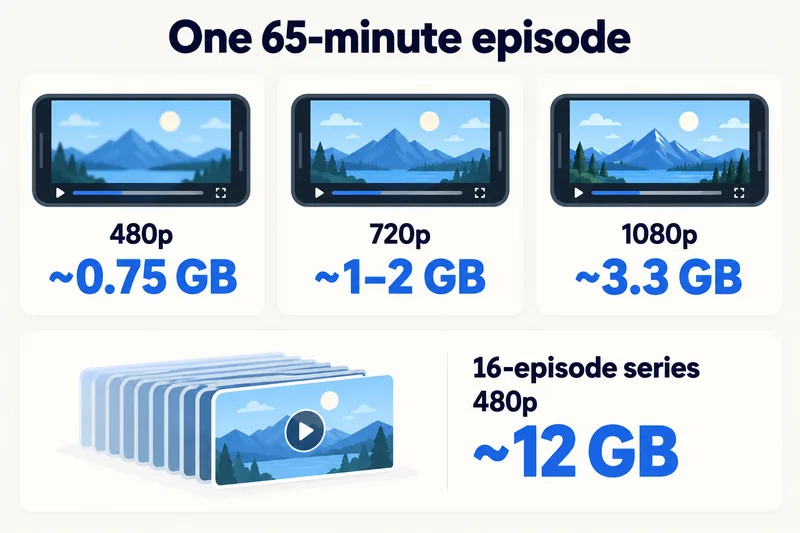
Most K-drama episodes run 60–70 minutes. Using the rates above:
| Quality | One 65-minute episode | 16-episode series |
|---|---|---|
| Low (weak signal) | ~0.3 GB | ~5 GB |
| 480p (free plan maximum) | ~0.7–0.8 GB | ~11–13 GB |
| 720p (Viki Pass Standard) | ~1–2 GB | ~17–31 GB |
| 1080p (Viki Pass Plus) | up to ~3.3 GB | up to ~52 GB |
So binge-watching a full series on mobile data is the territory of large or unlimited plans. One or two episodes a day on a train or in a café is manageable with a mid-size plan. Free users also see video ads, which add a little on top of each episode.
Need data for your trip? Compare eSIM plans by validity and data volume.
View eSIM plansHow Viki compares with other streaming apps
| App | Typical data per hour on a phone | Source |
|---|---|---|
| Viki, free (480p cap) | ~0.6–0.7 GB | estimate from Netflix, StarHub rates |
| Netflix, standard quality | ~0.7 GB | Netflix Help |
| YouTube 720p | ~1.8 GB | StarHub |
| TikTok, default | ~0.84 GB | StarHub |
| Spotify, High | ~0.07 GB | Spotify Support (bitrate) |
Viki on the free plan sits close to Netflix at standard quality. Viki Pass in HD is closer to YouTube at 720p or above. For more services side by side, see our guide to how much data streaming uses and YouTube's data use by quality.
How to make Viki use less data
1. Choose Standard in the Viki app (Viki Pass)
Can you lower Viki's quality on your phone? Only with Viki Pass: subscribers can cap quality in the mobile app (Android app 6.2.0 or later, iOS app 6.11.0 or later, according to Viki's help centre). While a video plays, tap the icon at the top right, then Video Quality, and choose Standard instead of High. These are the only two options; there is no separate "low" setting.
2. Turn on "Play HD only on WiFi" (Android, Viki Pass)
On Android, go to Me, then Settings at the top right, and in the Video section switch on Play HD only on WiFi. HD then waits for Wi-Fi and mobile data streams at lower quality. On iPhone, use the Video Quality setting above.
3. Download episodes on Wi-Fi (Viki Pass Plus or rentals)
Offline viewing is available to Viki Pass Plus subscribers and on rented titles, in an up-to-date Viki app on Android or iOS, on one device per account. Downloads include subtitles and expire after a while, and not every title can be downloaded. For a trip, download the next few episodes at the hotel each evening.
4. Know what the free plan and the website can do
Free users have no manual quality setting, but the free plan is already capped at 480p. On viki.com in a browser there is no quality control at all; quality follows your connection. If you tether a laptop to your phone to watch on the website, Viki will use as much quality as the connection allows.
5. Use your phone's own limits
Turn on Low Data Mode (iPhone) or Data Saver (Android) for background activity, and check the Viki entry in your phone's per-app data list after the first day.
How much data to buy if you watch Viki while travelling
Our calculator's "moderate" traveller (maps, messaging, an hour of social media, a short video call) uses about 1.3 GB a day including a 20% buffer. Add one 65-minute episode a day at 480p and that becomes about 2.2 GB a day, roughly 15 GB for a week. Watching in 720p or higher pushes it well past that. Here is a 7-day South Korea trip, with Zyesims prices checked on 1 October 2026:
| How you watch | Data for 7 days | Plan that fits | Price |
|---|---|---|---|
| Downloaded episodes on hotel Wi-Fi, little streaming | ~9 GB | South Korea 10GB, 30 days | ₱787 |
| One episode a day at 480p, roughly the same every day | ~15 GB (about 2.2 GB a day) | South Korea Unlimited Plus, 3GB a day at full speed | ₱820 |
| One episode a day, usage varies from day to day | ~15 GB | South Korea 20GB, 30 days | ₱1,280 |
| Several episodes a day in HD | 30 GB and up | South Korea Unlimited Premium, no speed cap | ₱2,002 |
For your own mix, run the calculator for South Korea and 7 days and add "movies and YouTube" hours, or browse all South Korea eSIM plans. Our guide to fair usage on unlimited eSIMs explains what happens after a daily allowance.
On Unlimited Plus, the first 3GB each day run at full speed. Past that, the provider gives no figure for the slower speed, so count on messages and maps still working, not on the next episode loading. Premium drops the daily speed cap, but the network's rules on fair, personal use remain in place.
Why Zyesims for streaming on the road
One 480p episode a day stays inside the 3GB daily allowance of South Korea Unlimited Plus; several HD episodes a day are what call for Premium. And if a series pulls you in halfway through the trip, extra data can go onto the same eSIM on most fixed plans.
Frequently Asked Questions
How much data does Viki use per hour?
Viki does not publish a figure. Based on standard streaming rates, expect roughly 0.3 GB an hour at low quality, about 0.6–0.7 GB at 480p (the free plan's maximum), around 1–1.8 GB at 720p (Viki Pass Standard) and up to about 3 GB at 1080p (Viki Pass Plus).
How much data does one K-drama episode use on Viki?
A typical 60–70 minute episode uses roughly 0.7–0.8 GB at 480p, 1–2 GB at 720p and up to about 3.3 GB at 1080p. A 16-episode series watched at 480p comes to roughly 11–13 GB. These are estimates; Viki adjusts quality to your connection.
Can I lower the video quality on Viki to save data?
Viki Pass subscribers can choose High or Standard under Video Quality in the Viki mobile app, and Android users can turn on Play HD only on WiFi. Free users have no manual setting, but the free plan is already capped at 480p. The website has no quality control.
Can I download Viki shows to watch offline?
Yes, if you have Viki Pass Plus or a rental. Downloads work in the Android and iOS apps on one device per account, include subtitles, and expire after a time. Not every title can be downloaded, so check before you travel.
Does the free Viki plan use less data?
Usually yes, because free streaming is capped at standard definition (480p), roughly 0.6–0.7 GB an hour. The free plan also shows video ads, which add a little data on top of the episode itself.
Keep reading
- Fair Usage Policy on Unlimited eSIMs: Daily Caps & Throttling
- What Do Internet Speeds Really Mean? Mbps, 4G & 5G for Travelers
- Can You Hotspot with an eSIM? Limits, Data Use and Fixes for Travelers
- What Is Data Roaming? 2026 Costs and Cheaper Alternatives
- How to Buy an eSIM Online: A Simple Guide for Travelers

A travel and tech enthusiast who loves to wander and discover new places. Mihi writes Zyesims' guides to eSIMs and mobile data abroad, built from carriers' and app makers' own documentation, published plan terms and Zyesims' current plan data, with sources named in each article. Mihi also writes about travel at MihiTravel and Notemeeting.
Ready for your next trip?
Choose the right eSIM, get your QR code by email, and connect when you land: coverage in 200+ countries.