Can You Hotspot with an eSIM? Limits, Data Use and Fixes for Travelers

Yes, you can use a travel eSIM as a hotspot, exactly like a normal SIM. Your phone shares the eSIM's data with a laptop, tablet or a friend's phone over Wi-Fi, USB or Bluetooth. The catch is the plan, not the phone: fixed-data plans usually let you share everything, while many unlimited plans cap or slow hotspot use, sometimes to 1GB a day.
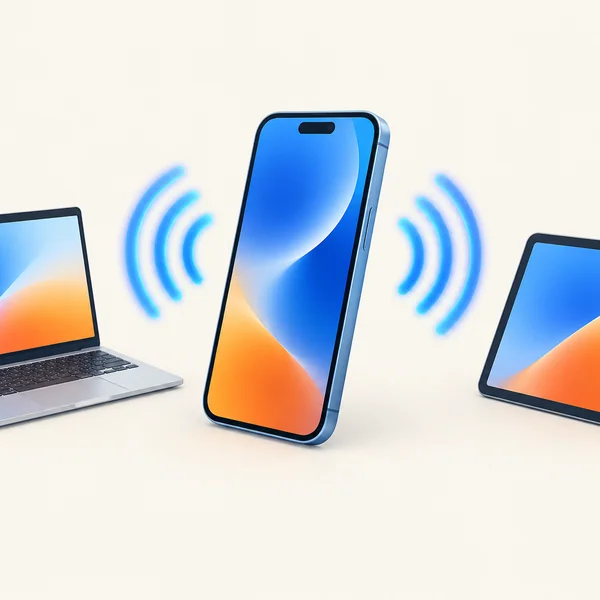
So before you rely on your phone to keep the kids' tablets or your work laptop online, check two things: whether the plan allows tethering, and how much data your other devices will actually use. This guide covers both, plus the settings that make the hotspot switch appear and the fixes when it does not work.
Does every travel eSIM allow hotspot?
Most do, but not all of them on the same terms. The eSIM itself has no hotspot setting; the permission sits in the plan. Here is what you will typically find:
| Plan type | Hotspot | What to watch |
|---|---|---|
| Fixed data (e.g. 10GB, 20GB) | Usually allowed | Everything shared comes out of the same allowance |
| Daily plans (e.g. 2GB a day) | Usually allowed | Once the daily amount is used, every device slows down |
| Unlimited | Often limited | Hotspot may be capped per day or per plan, or slowed by the carrier |
| Some low-cost or promotional plans | Sometimes blocked | Check the plan details before buying |
Examples of hotspot rules on unlimited plans
Rules change often, so treat these as examples of what to look for rather than a ranking:
- Holafly lets you share 1GB of data a day by hotspot on its unlimited plans (stated on its destination pages, checked September 2026).
- Sim Local unlimited plans in Japan allow 3GB of hotspot in total for the whole plan, according to a Tokyo Cheapo test published in August 2026.
- Orange Travel says tethering is allowed with no usage limitation (Orange support page, checked September 2026).
- Zyesims allows hotspot on most plans, and each product page lists the rule. Hotspot data counts toward the same allowance as the phone (on Unlimited Standard, the 1GB a day is shared by the phone and every connected device), and on unlimited plans the local carrier may slow hotspot speeds.
If a family of four plans to share one unlimited eSIM, a 1GB daily hotspot cap will run out before lunch. A large fixed-data plan, or a second eSIM for the heaviest user, usually works out better. Our guide to what "unlimited" really means on a travel eSIM explains the daily caps in detail.
How much data does a hotspot use?
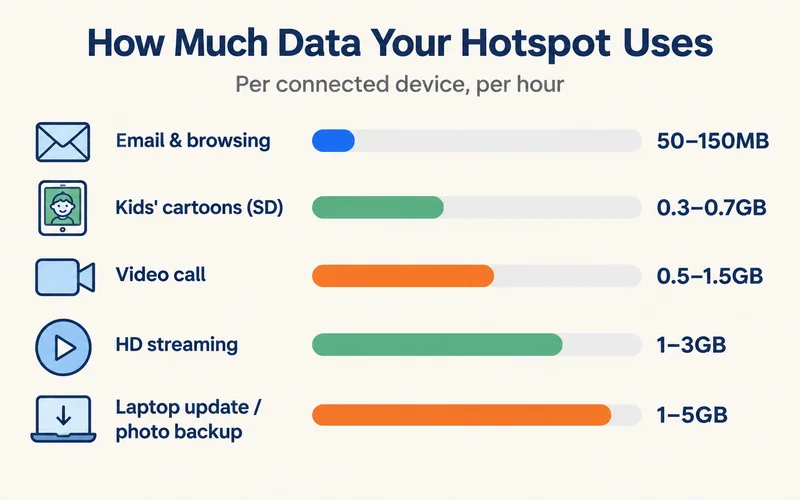
More than people expect, because laptops and tablets behave as if they were on home Wi-Fi. Rough figures per device:
| Activity on the connected device | Data used |
|---|---|
| Email, messaging and web browsing, 1 hour | 50–150MB |
| Video call (Zoom, Teams, Meet), 1 hour | 0.5–1.5GB |
| Kids' cartoons on a tablet, standard definition, 1 hour | 0.3–0.7GB |
| Netflix or YouTube in HD, 1 hour | 1–3GB |
| Laptop system update or cloud photo backup | 1–5GB, often in the background |
A working day of email plus two hours of video calls lands around 2–3GB. A family road day with two tablets streaming cartoons for three hours uses roughly 2–4GB in standard definition, and several times that in HD. Plan the eSIM size around the heaviest day, not the average. If speed matters as much as volume, see what internet speeds really mean for how many Mbps each activity needs.
Need data for your trip? Compare eSIM plans by validity and data volume.
View eSIM plansHow to turn on hotspot with an eSIM
First make sure the eSIM is your data line and that data works on the phone itself. Then:
iPhone
- Settings, Cellular (or Mobile Service), Cellular Data: select the travel eSIM.
- Tap the eSIM line and switch on Data Roaming.
- Settings, Personal Hotspot: switch on Allow Others to Join and set a Wi-Fi password.
- If an older laptop or tablet cannot see the network, switch on Maximize Compatibility.
Android (Samsung, Pixel and most others)
- Set the eSIM as the preferred SIM for mobile data and switch on roaming for it.
- Samsung: Settings, Connections, Mobile Hotspot and Tethering. Pixel: Settings, Network & internet, Hotspot & tethering.
- Switch on Mobile Hotspot (Wi-Fi hotspot) and set a password.
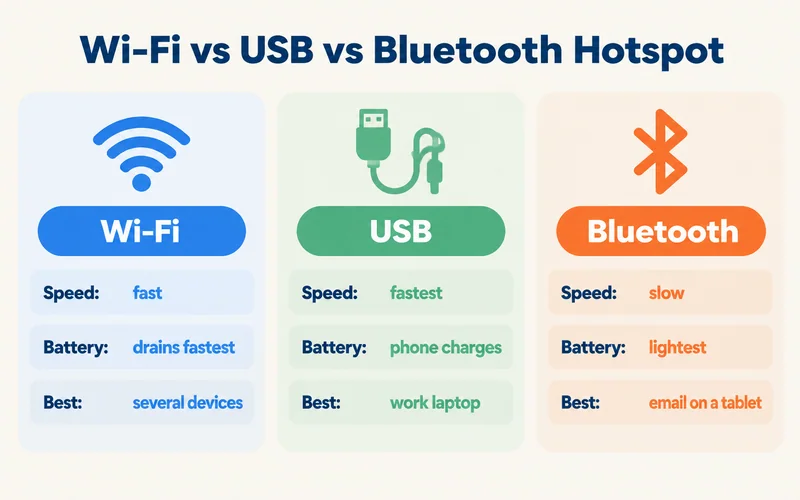
Wi-Fi, USB or Bluetooth: which to use
| Method | Speed | Battery | Best for |
|---|---|---|---|
| Wi-Fi hotspot | Fast | Drains the phone fastest | Several devices, friends and family |
| USB tethering | Fastest and most stable | Phone charges from the laptop | Work laptop, long video calls |
| Bluetooth | Slow | Lightest on battery | Messages and email on a tablet |
On iPhone, switch on Personal Hotspot and plug the phone into the laptop; a Mac picks it up straight away, while Windows may need Apple's device app installed first. On Android, connect the cable, then turn on USB tethering in the same Hotspot and Tethering menu.
Keep hotspot data under control
- Mark the connection as metered on the laptop. Windows: Settings, Network & internet, Wi-Fi, select the hotspot, Metered connection. Mac: System Settings, Wi-Fi, Details next to the hotspot, Low Data Mode. Both hold back large updates and backups.
- Pause cloud sync (iCloud Photos, Google Photos, OneDrive, Dropbox) while on the hotspot.
- Lower streaming quality on tablets to standard definition; it cuts data use by roughly two thirds.
- Use a strong password and turn the hotspot off when you are done, so nobody nearby joins.
- Carry a power bank, or use USB tethering, because a Wi-Fi hotspot can empty a phone battery in a few hours.

eSIM hotspot not working? Fixes that solve most cases
The hotspot switch is greyed out or missing
The phone only offers hotspot once the data line has a working connection. Set mobile data to the eSIM, switch on data roaming for the eSIM line, and restart. If you are travelling with a dual-SIM phone, make sure the home SIM is not still set as the data line; our guide on how dual SIM works shows where that setting lives.
Devices connect but have no internet
First check that data works on the phone itself. If the phone browses fine but connected devices do not, the plan may restrict tethering, or the eSIM's access point (APN) needs a tethering setting. On Android, open the eSIM's Access Point Names and compare them with the APN in your installation email. Your provider can confirm whether tethering is allowed on your plan.
Other devices cannot find the network
Turn the hotspot off and on, then restart the device that is trying to join. On iPhone, switch on Maximize Compatibility; some older laptops and cameras only see 2.4GHz networks.
It worked, then slowed right down
You have probably hit a daily cap or a hotspot limit on an unlimited plan. Speeds usually come back the next day. For heavier sharing, a fixed-data plan avoids the problem. If the phone itself has no service, the cause is elsewhere; see our guide to an eSIM that is not working.
Hotspot with Zyesims
Most Zyesims plans allow hotspot and each product page states the rule before you buy; fixed-data plans share the full allowance, which suits families and remote work, for example 20GB across 33 European countries. On our unlimited plans, such as Japan Unlimited Premium, hotspot data counts toward the same daily allowance (1GB a day on Standard, 3GB on Plus) and the local carrier may slow hotspot speeds.
Frequently Asked Questions
Why can't I hotspot from my eSIM?
The usual reason is that the phone is not using the eSIM for data. Make the eSIM your mobile data line, turn on data roaming for it, and check that data loads on the phone itself. If it still fails, the plan may block or cap tethering, or the eSIM may need an APN that allows tethering. Your provider can confirm which one it is.
Why is Personal Hotspot greyed out on my iPhone with an eSIM?
iPhone only enables Personal Hotspot once the data line has a working connection. Go to Settings, Cellular, set Cellular Data to the eSIM, open the eSIM line and switch on Data Roaming, then restart. If the option is still grey, the plan may not allow tethering or the line needs an updated APN from the provider.
Do travel eSIMs limit hotspot data?
Fixed-data plans usually let you share the whole allowance. Unlimited plans are where limits appear: some providers cap hotspot at 1GB a day or a few GB per plan, and carriers can slow hotspot traffic on unlimited plans. Most Zyesims plans allow hotspot (each product page lists the rule); on unlimited plans, hotspot data counts toward the daily allowance and the carrier may slow hotspot speeds.
How many devices can connect to an eSIM hotspot?
Most phones accept 5 to 10 devices over Wi-Fi, and some Android phones allow more. The real limit is the data and the signal: every extra device shares the same connection, so speeds drop and the allowance runs out faster when several people stream at once.
Can I use my eSIM hotspot for a work laptop?
Yes. Connect over USB if you can, since it is faster and keeps the phone charged, and set the laptop to treat the connection as metered so it postpones large updates. Budget around 0.5 to 1.5GB for each hour of video calls, and choose a fixed-data plan of 20GB or more for a working trip.
Keep reading
- Fair Usage Policy on Unlimited eSIMs: Daily Caps & Throttling
- What Do Internet Speeds Really Mean? Mbps, 4G & 5G for Travelers
- How Does Dual SIM Work? Pairing a Home SIM with a Travel eSIM
- eSIM Not Working? How to Fix No Service on iPhone and Android
- Best eSIM for Europe in 2026: Plans, Coverage and Real Prices Compared

A travel and tech enthusiast who loves to wander and discover new places. Mihi writes Zyesims' guides to eSIMs and mobile data abroad, built from carriers' and app makers' own documentation, published plan terms and Zyesims' current plan data — with sources named in each article. Mihi also writes about travel at MihiTravel and Notemeeting.
Ready for your next trip?
Choose the right eSIM, get your QR code by email, and connect when you land — coverage in 200+ countries.