What Is an ICCID Number? Meaning, Format, and Where to Find It

The ICCID is the unique 19-20 digit serial number of your SIM or eSIM profile. What each digit means, how it differs from IMSI, IMEI, and EID, and where to find it on any device.
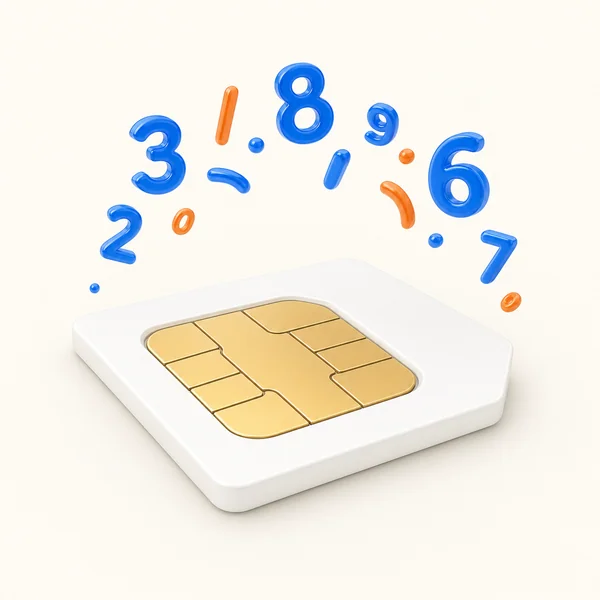
Quick answer: the ICCID (Integrated Circuit Card Identifier) is the unique 19–20 digit serial number of your SIM card or eSIM profile, and it always starts with 89. On iPhone it lives in Settings → General → About; on Android under Settings → About phone → SIM status. When will you actually need it? Usually the day an eSIM won't activate and a support agent asks for the number.
Think of the ICCID as your SIM's fingerprint. Networks use it to recognize, activate, and manage every SIM on the planet, physical or digital. This guide breaks down what the digits mean, how the ICCID differs from IMSI, IMEI, and EID, and exactly where to find it on any device.
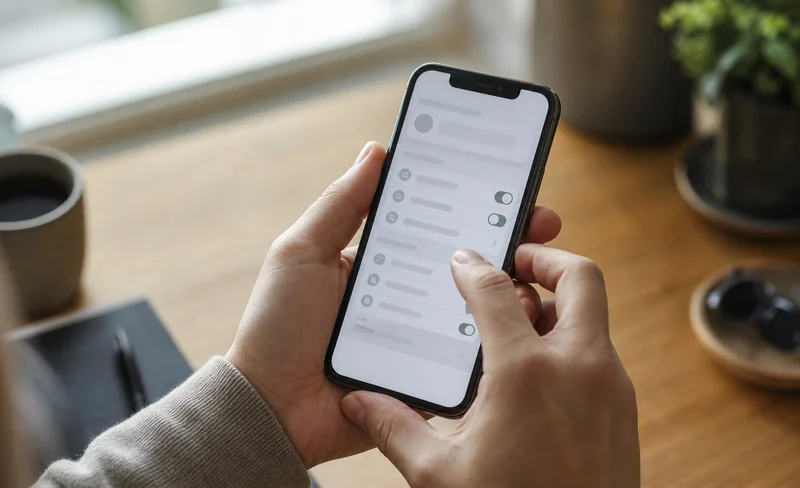
What Is an ICCID Number?
Every SIM card and every eSIM profile ships with one globally unique ICCID. Carriers use it to tell your SIM apart from billions of others: when your phone connects, the network reads the ICCID to know which account, plan, and country it belongs to.
The format: what each part of the number means
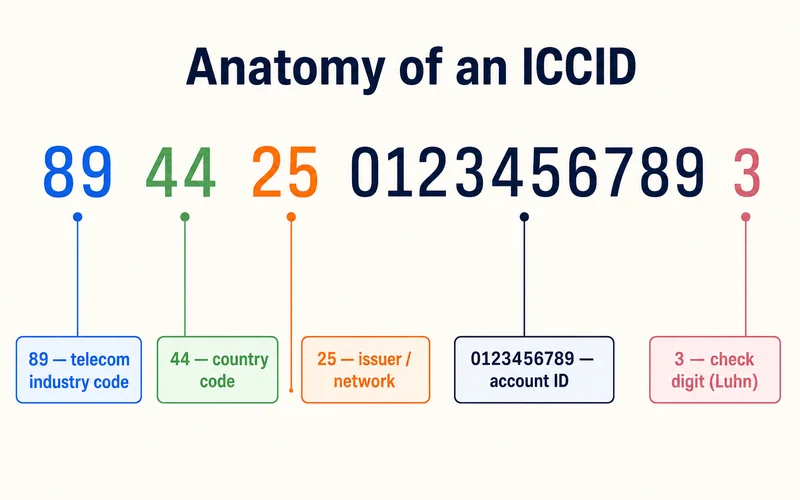
The ICCID is defined by the ITU-T E.118 standard, which borrows the ISO/IEC 7812 numbering scheme for the issuer portion. Every section carries meaning:
- 89 — the Major Industry Identifier for telecommunications, always first
- Country code — follows international dialing codes, like 1 for the US or 44 for the UK
- Issuer identifier — which mobile operator issued the SIM
- Account ID — the unique string that separates your SIM from every other on that network
- Check digit — a final digit computed with the Luhn algorithm, the same formula that validates credit card numbers
Read left to right, a 19-digit ICCID such as 8944102735001987659 decodes like this:
| Segment | Value | What it means |
|---|---|---|
| Major Industry Identifier | 89 | Telecom — every ICCID starts with 89 |
| Country code | 44 | United Kingdom, following international dialing codes |
| Issuer identifier | 10 | The operator that issued the SIM |
| Account ID | 273500198765 | Separates this SIM from every other one from the same issuer |
| Check digit | 9 | Derived from the preceding 18 digits with the Luhn algorithm |
Most ICCIDs are 19 or 20 digits, but the length can run anywhere from 18 to 22 depending on how long the country code is: a US number (country code 1) sits at the short end, Iceland (354) at the longer one. That last check digit is why a typo never slips through: if one digit is wrong when an ICCID is entered manually, the checksum fails and the system rejects it before anything gets provisioned.
Check the last digit yourself with the Luhn algorithm
The check digit isn't random. It's calculated from every digit before it, using the same formula that validates credit card numbers, so you can verify an ICCID by hand in about a minute:
- Set the final digit aside — that's the check digit you're verifying.
- Working right to left across what's left, double the 1st, 3rd, 5th digit and so on. If a result is greater than 9, subtract 9.
- Add every digit together to get a sum S.
- The correct check digit is
(10 − S mod 10) mod 10.
Try it on the example above: the digits before the last one are 894410273500198765, which add up to S = 71, so the check digit must be (10 − 1) mod 10 = 9 — exactly what 8944102735001987659 ends with. Mistype any single digit and the sum no longer lands, which is why hand-copied ICCIDs rarely make it into a carrier's system with an error in them.
Country codes in ICCIDs from common markets
The digits right after 89 are the international dialing code of wherever the SIM was issued — not where you happen to be standing. A travel eSIM used in Japan still carries its issuer's country code:
| Issued in | Code | ICCID starts with |
|---|---|---|
| US / Canada | 1 | 891… |
| United Kingdom | 44 | 8944… |
| Vietnam | 84 | 8984… |
| Japan | 81 | 8981… |
| South Korea | 82 | 8982… |
| Germany | 49 | 8949… |
| France | 33 | 8933… |
| Thailand | 66 | 8966… |
Alongside national codes there are ranges for networks that belong to no single country — 883, for instance, is an ITU-assigned global network range. Plenty of travel eSIM and IoT providers issue on it so their SIMs work across borders, so an ICCID opening with 89883… is perfectly normal and not a sign of a counterfeit SIM.
What Is the ICCID Used For?
- SIM identification: the network's primary way to recognize your SIM for routing and billing
- Activation: when a plan is provisioned, the carrier links it to your ICCID, not your phone
- Troubleshooting: support teams use it to pinpoint your exact SIM and run remote diagnostics
- Security: a lost or stolen SIM can be deactivated instantly by its ICCID; fleet and IoT admins block misbehaving SIMs the same way
- Roaming: partner networks read the ICCID to recognize your home network and configuration abroad
Need data for your trip? Compare eSIM plans by validity and data volume.
View eSIM plansIs the ICCID the Same as My Phone Number?
No. The ICCID identifies the physical or digital SIM itself. Your phone number (technically the MSISDN) is a service the carrier attaches on top. The two are linked but independent: one ICCID can carry different phone numbers over its lifetime, and data-only travel eSIMs have an ICCID but no phone number at all.
Does an eSIM Have an ICCID?
Yes. An eSIM is a digital SIM, but the identification system is identical: every eSIM profile you install gets its own ICCID. Install three travel eSIMs and your phone holds three different ICCIDs. Most modern phones can store 8 to 10 profiles while keeping only one or two active at a time.
With Zyesims, your eSIM's ICCID is in two places from the moment you buy: inside the confirmation email that carries your QR code, and in your phone settings after installation. If you're just getting started, see how to buy an eSIM online.
ICCID vs IMSI vs IMEI vs EID: Which Is Which?
Four identifiers, four different jobs. Support staff ask for a specific one depending on the problem, so here's the map:
| Identifier | What it identifies | Length | Can you see it? | When it is asked for |
|---|---|---|---|---|
| ICCID | The SIM card or eSIM profile (your plan) | 19–20 digits, starts with 89 | Yes, in settings and on the SIM | Activation, transfers, eSIM troubleshooting |
| IMSI | The subscriber on the network | 15 digits | No, internal to the network | Almost never, network-side only |
| IMEI | The phone hardware itself | 15–16 digits | Yes, dial *#06# | Lost or stolen phone, warranty, blacklisting |
| EID | The eSIM chip built into the device | 32 digits | Yes, in settings next to the IMEI | Checking eSIM support, carrier eSIM setup |
| MSISDN | The phone number attached to the SIM | Up to 15 digits, country code included | Yes — it's the number you give people | Porting a number, receiving calls and SMS |
Quick mnemonic: ICCID = the SIM, IMSI = the subscriber, IMEI = the device, EID = the eSIM chip, MSISDN = the phone number. The EID deserves its own explainer, and we have one: EID number explained and where to find it.
How to Find the ICCID Number
On an iPhone
- Open Settings → General → About
- Scroll down to the SIM section
- Physical SIM shows under ICCID; an eSIM shows under Digital SIM, one entry per installed profile
On an Android
- Open Settings → About phone
- Tap Status or SIM status (some models: SIM cards & mobile networks)
- Look for ICCID or SIM card number
What about the *#06# shortcut?
Plenty of guides tell you to dial *#06# to see your ICCID. To be precise: that code is the lookup for your IMEI. On an iPhone the panel returns the IMEI, MEID and EID — no ICCID, which matches Apple's own documentation. Some Android phones (Samsung most often) do add the ICCID or a “SIM serial number” to that panel, but that's a manufacturer extra rather than part of the standard.
So use the Settings route above: it exists on every phone and is always correct. Treat *#06# as a quick gamble — handy when the ICCID shows up, and no cause for concern when it doesn't.
Without touching the phone
- Physical SIM: the ICCID is printed on the card and its carrier packaging
- Travel eSIM: check the provider's confirmation email, or open your account and copy it from the eSIM's details page — Zyesims includes the ICCID with your QR code in both places
- IoT and fleets: the AT command
AT+CCIDover a serial interface returns it, and carrier device-management portals list it per device
The ICCID Is Not Your eSIM Activation Code
This is the single most common mix-up in support tickets. An eSIM QR code does not contain the ICCID. What it holds is a GSMA-standard activation string shaped like LPA:1$<SM-DP+ server address>$<matching ID> — the address of the server that hands out the profile, plus a one-time code used to download it.
In practice they do different jobs:
- Activation code / QR — used once to install the eSIM. Spent as soon as installation finishes.
- ICCID — lives for the whole life of the profile and is what support uses to look it up and troubleshoot afterwards.
So when an agent asks for your ICCID, don't send a screenshot of the QR code instead: the two serve different purposes, and a QR that has already been redeemed reveals nothing about the profile's current status.
ICCID Blank or Missing: What to Check
If you're in the right Settings screen and the ICCID field is empty, it's usually one of four things:
- The eSIM profile is installed but turned off. The ICCID only appears while a profile is active. Enable it in your eSIM management screen and look again.
- No profile is installed yet. Scanning the QR code is what creates the profile — before that your phone only has an EID, with no ICCID to show.
- You're reading the wrong row. On iPhone, an eSIM's ICCID sits inside the Digital SIM block, separate from any physical SIM. With several profiles installed, each gets its own block.
- Android is hiding it. Some Android builds surface the ICCID only under SIM status rather than on the About phone screen.
With a Zyesims eSIM the fastest route is your confirmation email — the ICCID sits right next to the QR code, no matter what your phone is displaying.
When You'll Actually Need It
For most travelers the ICCID stays invisible until something needs fixing:
- An eSIM will not activate — support asks for the ICCID to check the profile's status on the network. Check how long eSIM activation takes first — most finish in 1–5 minutes — then contact support with the ICCID ready
- Transferring a number or plan — the carrier identifies the exact SIM to move service from
- Multiple eSIMs installed — the ICCID tells support which of your profiles to look at
Having it ready turns a back-and-forth support ticket into a two-minute fix.
Conclusion
The ICCID is a small detail that quietly runs your mobile connection: a 19–20 digit fingerprint starting with 89 that identifies your SIM or eSIM profile everywhere in the world. You'll rarely think about it, but knowing where it lives — your phone's Settings, or the confirmation email that came with your Zyesims eSIM — saves real time the day activation support needs it.
Frequently Asked Questions
What is an ICCID number?
The ICCID (Integrated Circuit Card Identifier) is a unique 19–20 digit number assigned to every SIM card and eSIM profile. It always starts with 89, the industry code for telecom, and works like a serial number that identifies your SIM on mobile networks worldwide.
Is the ICCID the same as my phone number?
No. The ICCID identifies the SIM card itself, while your phone number (MSISDN) is a service the carrier assigns on top of it. One ICCID can be linked to different phone numbers over its lifetime.
Does my ICCID change, or is it permanent?
The ICCID is fixed for the life of that specific SIM or eSIM profile and never changes on its own. What changes is which profile you use: install a new eSIM and it comes with its own new ICCID, and deleting a profile retires its ICCID for good. One physical SIM keeps a single ICCID for life; a phone that has held several eSIMs has carried several ICCIDs.
Does an eSIM have an ICCID too?
Yes. Every eSIM profile gets its own ICCID, just like a physical SIM. If you have several travel eSIMs installed, each one has a different ICCID. You can see them in your phone settings, and providers like Zyesims also include the ICCID in the confirmation email with your QR code.
Can I track a lost phone using the ICCID?
No. The ICCID identifies the SIM, not the device's location. Tracking a lost phone works through the IMEI and your carrier or a service like Find My. What the ICCID does let your provider do is quickly deactivate a lost SIM so nobody runs up charges on it.
Is it safe to share my ICCID number?
Share it only with your carrier or eSIM provider's support team, who legitimately need it for activation and troubleshooting. Don't post it publicly: while it exposes no personal data by itself, it can be abused in SIM provisioning attempts. Treat it like any other device identifier.
Can an ICCID be recycled and reissued to another SIM?
The ITU-T E.118 standard permits reuse in theory, but in practice operators almost always avoid it: a retired ICCID lingers in billing systems, technical logs and subscriber databases, so reissuing it causes more confusion than it saves. Treat a used ICCID as gone for good.
Is the ICCID the code inside my eSIM QR?
No. The QR code carries an activation string made of an SM-DP+ server address and a one-time matching ID — it contains no ICCID at all. The ICCID only exists once the profile is installed, and that is the number support needs for lookups.
Why does my ICCID start with 89883 instead of my country's code?
Because the SIM was issued on a global network range (883) rather than a specific country's dialing code. Many travel eSIM and IoT providers use it so their SIMs work across borders. It's a legitimate ITU-assigned range, not a sign of a counterfeit SIM.
Does dialing *#06# show my ICCID?
Not reliably. *#06# is the lookup code for the IMEI: on iPhone the panel returns the IMEI, MEID and EID but no ICCID. Some Android phones add the ICCID or a “SIM serial number” to that screen, but it is a manufacturer extra. The dependable route is Settings: on iPhone go to Settings → General → About, on Android to Settings → About phone → SIM status.
Read More
- EID Number Explained: How It Works and Where to Find It
- How to Buy an eSIM Online: A Quick Guide for Travelers
- How Long Does eSIM Activation Take? (Usually 1–5 Minutes)
Keep reading
- EID Number Explained: How to Find It Fast on iPhone and Android
- SIM vs Nano SIM vs eSIM: Key Differences and Which One to Choose
- eSIM Not Working? How to Fix No Service on iPhone and Android
- What Is an eSIM? A Complete Beginner's Guide for Travelers (2026)
- What Is a Prepaid SIM Card? How It Works, ID Rules, and Real 2026 Costs

A travel and tech enthusiast who loves to wander and discover new places. Mihi writes Zyesims' guides to eSIMs and mobile data abroad, built from carriers' and app makers' own documentation, published plan terms and Zyesims' current plan data — with sources named in each article. Mihi also writes about travel at MihiTravel and Notemeeting.
Ready for your next trip?
Choose the right eSIM, get your QR code by email, and connect when you land — coverage in 200+ countries.