How Much Data Does Viki Use per Hour? Per Episode, by Plan and Offline

Viki does not publish data figures, but its quality caps make the estimate straightforward. Expect roughly 0.6–0.7 GB an hour at 480p (the most the free plan streams), around 1–1.8 GB an hour at 720p (Viki Pass Standard) and up to about 3 GB an hour at 1080p (Viki Pass Plus). One K-drama episode is therefore anywhere from under 1 GB to more than 3 GB.
That makes Viki one of the heavier apps on a travel data plan. Below: the estimate for each Viki plan, data per episode and per series, the settings Viki actually offers to limit data (there are fewer than many guides claim), offline downloads, and how much data to buy if you want to keep watching on a trip.

Viki data usage by plan and quality
Viki adjusts video quality automatically based on your plan, your device and your connection. According to Viki's help centre (updated June 2026), the maximum quality depends on the plan:
| Viki plan | Maximum quality | Estimated data per hour | 1GB lasts about |
|---|---|---|---|
| Weak connection, any plan (auto drops to 240p–360p) | low | ~0.25–0.3 GB | 3–4 hours |
| Free (with ads) | SD 480p | ~0.6–0.7 GB | 1.5 hours |
| Viki Pass Standard | HD 720p | ~1–1.8 GB | 35–60 minutes |
| Viki Pass Plus | Full HD 1080p | up to ~3 GB | about 20 minutes |
| Rentals | 720p–1080p | ~1–3 GB | 20–60 minutes |
Because Viki gives no numbers, the data column uses standard streaming rates: Netflix's published figures (about 0.3 GB an hour at low quality, 0.7 GB at standard definition, 3 GB in HD) and carrier StarHub's estimates for video at 240p, 480p and 720p (about 225 MB, 560 MB and 1.8 GB an hour). These are the same rates behind our tool to estimate how much data you need. Viki also recommends a connection of at least 2 Mbps for streaming; used continuously, that speed works out to around 0.9 GB an hour, which fits the range above.
Data per episode and per series
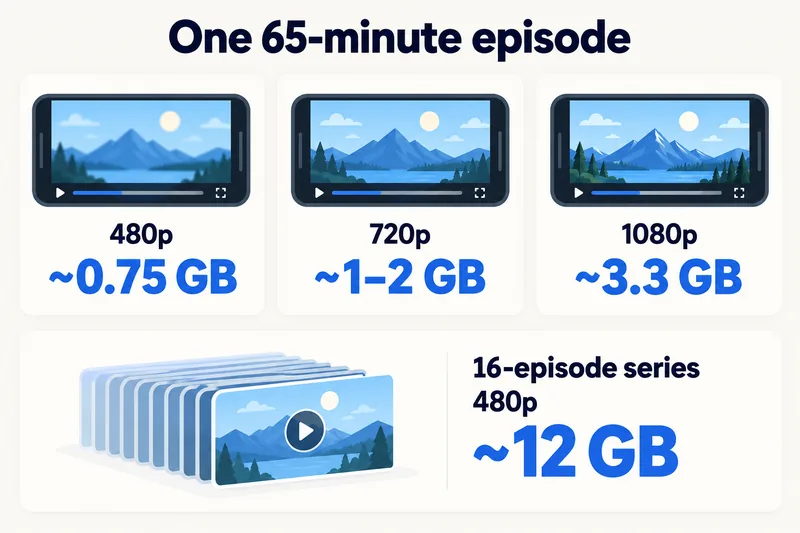
Most K-drama episodes run 60–70 minutes. Using the rates above:
| Quality | One 65-minute episode | 16-episode series |
|---|---|---|
| Low (weak signal) | ~0.3 GB | ~5 GB |
| 480p (free plan maximum) | ~0.7–0.8 GB | ~11–13 GB |
| 720p (Viki Pass Standard) | ~1–2 GB | ~17–31 GB |
| 1080p (Viki Pass Plus) | up to ~3.3 GB | up to ~52 GB |
So binge-watching a full series on mobile data is the territory of large or unlimited plans. One or two episodes a day on a train or in a café is manageable with a mid-size plan. Free users also see video ads, which add a little on top of each episode.
Need data for your trip? Compare eSIM plans by validity and data volume.
View eSIM plansHow Viki compares with other streaming apps
| App | Typical data per hour on a phone | Source |
|---|---|---|
| Viki, free (480p cap) | ~0.6–0.7 GB | estimate from Netflix, StarHub rates |
| Netflix, standard quality | ~0.7 GB | Netflix Help |
| YouTube 720p | ~1.8 GB | StarHub |
| TikTok, default | ~0.84 GB | StarHub |
| Spotify, High | ~0.07 GB | Spotify Support (bitrate) |
Viki on the free plan sits close to Netflix at standard quality. Viki Pass in HD is closer to YouTube at 720p or above. For more services side by side, see our guide to how much data streaming uses and YouTube's data use by quality.
How to make Viki use less data
1. Choose Standard in the Viki app (Viki Pass)
Viki Pass subscribers can cap quality in the mobile app (Android app 6.2.0 or later, iOS app 6.11.0 or later, according to Viki's help centre). While a video plays, tap the icon at the top right, then Video Quality, and choose Standard instead of High. These are the only two options; there is no separate "low" setting.
2. Turn on "Play HD only on WiFi" (Android, Viki Pass)
On Android, go to Me, then Settings at the top right, and in the Video section switch on Play HD only on WiFi. HD then waits for Wi-Fi and mobile data streams at lower quality. On iPhone, use the Video Quality setting above.
3. Download episodes on Wi-Fi (Viki Pass Plus or rentals)
Offline viewing is available to Viki Pass Plus subscribers and on rented titles, in an up-to-date Viki app on Android or iOS, on one device per account. Downloads include subtitles and expire after a while, and not every title can be downloaded. For a trip, download the next few episodes at the hotel each evening.
4. Know what the free plan and the website can do
Free users have no manual quality setting, but the free plan is already capped at 480p. On viki.com in a browser there is no quality control at all; quality follows your connection. If you tether a laptop to your phone to watch on the website, Viki will use as much quality as the connection allows.
5. Use your phone's own limits
Turn on Low Data Mode (iPhone) or Data Saver (Android) for background activity, and check the Viki entry in your phone's per-app data list after the first day.
How much data to buy if you watch Viki while travelling
Our calculator's "moderate" traveller (maps, messaging, an hour of social media, a short video call) uses about 1.3 GB a day including a 20% buffer. Add one 65-minute episode a day at 480p and that becomes about 2.2 GB a day, roughly 15 GB for a week. Watching in 720p or higher pushes it well past that. For 7 days in South Korea, with Zyesims prices on 1 October 2026:
| How you watch | Data for 7 days | Plan that fits | Price |
|---|---|---|---|
| Downloaded episodes on hotel Wi-Fi, little streaming | ~9 GB | South Korea 10GB, 30 days | $8.99 |
| One episode a day at 480p, roughly the same every day | ~15 GB (about 2.2 GB a day) | South Korea Unlimited Plus, 3GB a day at full speed | $10.99 |
| One episode a day, usage varies from day to day | ~15 GB | South Korea 20GB, 30 days | $13.99 |
| Several episodes a day in HD | 30 GB and up | South Korea Unlimited Premium, no speed cap | $27.49 |
For your own mix, run the calculator for South Korea and 7 days and add "movies and YouTube" hours, or browse all South Korea eSIM plans. Our guide to fair usage on unlimited eSIMs explains what happens after a daily allowance. On Unlimited Plus, speed drops after 3GB a day and the provider doesn't publish the exact reduced speed, so plan for messaging and maps, not video, past that point. Premium has no daily speed cap but still follows the network's fair-use terms for personal use.
Why Zyesims for streaming on the road
One 480p episode a day stays inside the 3GB daily allowance of South Korea Unlimited Plus; several HD episodes a day are what call for Premium. Most fixed plans can be topped up on the same eSIM if a series pulls you in.
Frequently Asked Questions
How much data does Viki use per hour?
Viki does not publish a figure. Based on standard streaming rates, expect roughly 0.3 GB an hour at low quality, about 0.6–0.7 GB at 480p (the free plan's maximum), around 1–1.8 GB at 720p (Viki Pass Standard) and up to about 3 GB at 1080p (Viki Pass Plus).
How much data does one K-drama episode use on Viki?
A typical 60–70 minute episode uses roughly 0.7–0.8 GB at 480p, 1–2 GB at 720p and up to about 3.3 GB at 1080p. A 16-episode series watched at 480p comes to roughly 11–13 GB. These are estimates; Viki adjusts quality to your connection.
Can I lower the video quality on Viki to save data?
Viki Pass subscribers can choose High or Standard under Video Quality in the Viki mobile app, and Android users can turn on Play HD only on WiFi. Free users have no manual setting, but the free plan is already capped at 480p. The website has no quality control.
Can I download Viki shows to watch offline?
Yes, if you have Viki Pass Plus or a rental. Downloads work in the Android and iOS apps on one device per account, include subtitles, and expire after a time. Not every title can be downloaded, so check before you travel.
Does the free Viki plan use less data?
Usually yes, because free streaming is capped at standard definition (480p), roughly 0.6–0.7 GB an hour. The free plan also shows video ads, which add a little data on top of the episode itself.
Keep reading
- Fair Usage Policy on Unlimited eSIMs: Daily Caps & Throttling
- What Do Internet Speeds Really Mean? Mbps, 4G & 5G for Travelers
- Can You Hotspot with an eSIM? Limits, Data Use and Fixes for Travelers
- What Is Data Roaming? 2026 Costs and Cheaper Alternatives
- How to Buy an eSIM Online: A Simple Guide for Travelers

A travel and tech enthusiast who loves to wander and discover new places. Mihi writes Zyesims' guides to eSIMs and mobile data abroad, built from carriers' and app makers' own documentation, published plan terms and Zyesims' current plan data — with sources named in each article. Mihi also writes about travel at MihiTravel and Notemeeting.
Ready for your next trip?
Choose the right eSIM, get your QR code by email, and connect when you land — coverage in 200+ countries.