What Is Data Roaming? 2026 Costs and Cheaper Alternatives

Data roaming means using mobile data on a foreign partner network, at up to $10 per MB. How it works, 2026 costs by region, when it is free, and the eSIM alternative from $0.89.
Quick answer: data roaming means using mobile data through a foreign network that has an agreement with your home carrier. It works automatically the moment you land, and that convenience is exactly why it gets expensive: without a plan, rates run $2–10 per megabyte in much of the world. The cheap alternative is a travel eSIM, where the same gigabyte costs under a dollar, Zyesims plans start at $0.89 across 200+ destinations.
This guide explains how roaming actually works, what it costs by region in 2026, when it is genuinely free, and how to stay connected without it.

What Is Data Roaming?
When you leave your carrier's coverage area, your phone scans for local networks and connects to one that has a roaming agreement with your carrier. A Verizon customer landing in France might connect to Orange or SFR. You keep your number, your apps keep working, and nothing on the screen looks different.
Two flavors exist, and only one hurts your wallet. Domestic roaming happens inside your own country when your carrier borrows another network to fill a coverage gap, and it is almost always free. International roaming is connecting on a foreign network abroad, and that is the expensive kind this guide is about.
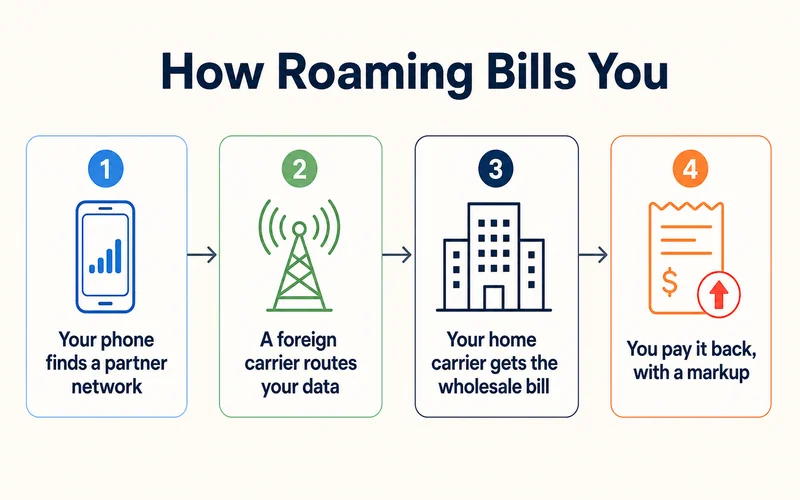
Behind the scenes, four things happen:
- Network detection: your phone finds partner networks in the new country
- Authentication: your home carrier verifies you with the foreign network
- Data exchange: the foreign carrier routes your traffic and bills your carrier
- Charges applied: your carrier passes the cost to your bill, plus margin, unless you are in a regulated zone like the EU
Each carrier sets its own rates, which is why the same 10 minutes of map use can be free in Madrid and cost $30 in Cairo.
Data roaming vs mobile data: what's the difference?
These two get confused constantly because they sit next to each other in Settings, but they are separate switches:
| Mobile data | Data roaming | |
|---|---|---|
| What it permits | Your phone using cellular data instead of WiFi | Your phone using data while on a network that isn't your carrier's |
| Turn it off and | You lose data everywhere, including at home | You lose data only on foreign networks; home works normally |
| How it bills | Comes out of your plan allowance | Billed at roaming rates, usually outside your plan |
The key point: mobile data has to be on for the roaming switch to matter at all. Killing mobile data blocks everything, but it also blocks your travel eSIM. So the right configuration abroad is mobile data on, roaming on your home SIM off, and data flowing through the eSIM.
What Roaming Costs in 2026, by Region
| Region | Typical cost (checked July 2026) | Notes |
|---|---|---|
| EU / EEA (for EU residents) | Free under Roam Like at Home | Guaranteed until mid-2032; wholesale cap €1.10/GB in 2026, €1.00 from 2027. Ukraine and Moldova joined the zone on 1 Jan 2026 |
| UK travelers in the EU | ~£2/day on most carriers | EE, Three, Vodafone, Sky charge; O2 (up to 25GB) and giffgaff (up to 5GB) still free as of mid-2026 |
| US carriers abroad | $2–10/MB pay-per-use, or $5–15/day passes | Daily passes usually carry data caps |
| Asia-Pacific, Middle East, Africa | Up to $5–10/MB without a plan | Widest variation; check before you fly |
The EU case has one catch: fair-use rules. Spend more time abroad than at home over a four-month window and your operator may add surcharges. Some plans also carry a monthly data volume cap (often tens of GB) after which speeds are throttled even inside the free zone, which is why "free EU roaming" can still feel slow on a long trip. And if you're not an EU resident, none of this applies to you — you pay whatever your home carrier charges.
Why roaming costs what it costs
The numbers above look irrational, but they come out of how the industry is wired rather than carriers being arbitrary:
- Wholesale rates are negotiated bilaterally. Your carrier buys capacity from each foreign network under a separate deal. The fewer of its customers travel to a country, the worse the rate it can negotiate there.
- Retail markup is enormous. Actual wholesale prices are typically a few dollars per gigabyte; the jump to several dollars per megabyte is margin, not cost.
- You have no choice at the counter. At home you can switch carriers if pricing is bad. While roaming, which network serves you is set by contract — there is no competition pushing the price down.
- Billing units favor the carrier. Many tariffs round up to a block size, so an app sync of a few kilobytes still bills as a full unit.
It is also why regulated zones like the EU are dramatically cheaper: the regulator caps the wholesale rate, cutting off exactly the layer where the markup is created.
Need data for your trip? Compare eSIM plans by validity and data volume.
View eSIM plansThe Five Real Downsides of Roaming
1. Cost, and how fast it compounds
Five minutes of high-quality YouTube runs roughly 200MB. On pay-per-use roaming at $2–10 per MB, that single clip could cost $400 or more. Worse, background activity — photo backups, app updates, notification syncs — burns data you never see, and the charges can post to your bill weeks later.
2. Unpredictable network quality
Roaming puts you on whatever partner network your carrier negotiated, not the best one available. You may get 3G in a 5G country, weak rural coverage, and dropped connections when the phone switches towers.
3. Security
Roaming pushes many travelers toward sketchy free WiFi to save money, and that is where the real risk lives: data interception on open networks and malicious hotspots in tourist areas. If you handle banking on the road, use a VPN regardless of how you connect.
4. It may simply not work
Not all plans include international roaming, carriers lack partners in some countries, and features like visual voicemail often break abroad.
5. Accidental roaming near borders and at sea
You do not have to cross a border to get charged. Near one, your phone can latch onto a stronger signal from the neighboring country — Albania from a beach in Corfu, Switzerland from a train in northern Italy — and bill you at that country's rate. Ferries, cruise ships, and planes are worse: they use satellite networks that are excluded from every roaming pass and charged at brutal per-MB rates. The fix is the same in both cases: keep data roaming off and let a travel eSIM carry your data instead.
How to Turn Data Roaming On and Off
The switch is buried deeper than most people expect, and the iPhone route has an intermediate step that is easy to miss.
On an iPhone
- Open Settings → Cellular (labelled Mobile Data in some regions)
- Tap Cellular Data Options — this is the step people skip
- Toggle Data Roaming off (or on)
- On a dual-SIM phone, select the SIM at the top first — each line has its own switch
On an Android
Android has two routes depending on manufacturer and version:
- Settings → Network & internet (Samsung: Connections) → Mobile network → Data roaming
- If it isn't there: Settings → Connections → SIM manager → pick the SIM → Data roaming
What still works once it's off
Turning data roaming off is far narrower than airplane mode. Still working:
- WiFi — and everything over it: iMessage, WhatsApp, video calls
- Calls and SMS — they still reach you, billed at your home carrier's international rates
- WiFi Calling — where your carrier supports it, usually still works and often bills as a domestic call
- Your travel eSIM — a separate line entirely, completely unaffected
What stops: MMS (picture messages need cellular data, so they won't send or arrive) and all cellular data on your home SIM.
When your phone picks a bad partner network
If you do have roaming on and the signal is flaky, the usual cause is your phone clinging to a poor partner network. You can override it: on iPhone go to Settings → Cellular → Network Selection, turn off Automatic and pick another network from the list; on Android it's Settings → Mobile network → Network operators. Switch automatic selection back on when you leave the country.
Monitor and Cap Your Roaming Data
If you have to leave roaming on, don't rely on using it sparingly. Set a hard ceiling and let the phone enforce it:
- Android has a real hard cap: Settings → Network & internet → Mobile network → Data warning & limit. Set a warning (say 50MB) and a limit (say 100MB) — at the limit the phone cuts data off by itself, no vigilance required.
- iPhone has no hard cap, so you approximate one: enable Low Data Mode under Cellular Data Options, and switch cellular data off per app for the heavy ones under Settings → Cellular (scroll to the app list).
- Reset the counter before you fly so the trip's usage reads clean and is easy to check against the bill later.
One caveat worth stating plainly: these counters are measured by your operating system while the bill is measured by the carrier, and the two rarely match exactly. Treat it as an early-warning system, not as evidence.
How to Get Online Without Paying Roaming Fees
Turn data roaming off. The first and most effective step — the exact taps for iPhone and Android are in the section above. With it off you still receive calls and SMS (international rates apply), and WiFi keeps working normally.
Use low-data modes. Netflix's Save Data setting, Spotify's Data Saver, and per-app WiFi-only switches cut consumption dramatically if you do keep roaming on.
Silence the background data hogs. The charges you never see come from settings running quietly: turn off Wi-Fi Assist (iPhone) or Adaptive/Smart Wi-Fi (Android) so a weak WiFi signal does not silently fall back to cellular, disable Background App Refresh, and switch app and OS updates to WiFi-only. Pause iCloud and Google Photos backups too, a single overnight sync can burn gigabytes at roaming rates.
Stick to trusted WiFi. Hotels, cafes, and airports cover the basics for free. Fine for browsing; pair with a VPN for anything sensitive.
Buy your carrier's roaming add-on. Daily or weekly packages beat pay-per-use rates, though $10–15/day still adds up to $140–210 over two weeks.
Buy a local SIM. Cheap local rates and a local number, but it costs vacation time to find a shop, and your phone must be unlocked.
Install a travel eSIM. The same local-rate data as a local SIM, bought online before you fly, with no store visit. For most travelers in 2026 this is the sweet spot, so it gets its own section.

Travel eSIM: Local Rates Without the Local SIM Hunt
An eSIM is a digital SIM built into your phone. The flow takes about five minutes: buy a plan online, receive a QR code by email, scan it over WiFi, and turn the line on when you land. Your home SIM stays in place for calls and OTP codes, the eSIM carries the data. (Never bought one before? See how to buy an eSIM online, and how long activation takes.)
The price gap against roaming isn't small — it's orders of magnitude. A Zyesims Europe 20GB / 30-day plan costs $17.99, which is about $0.0009 per MB. Pay-per-use roaming at $2–10 per MB is more than a thousand times that. Even carrier daily passes lose: two weeks of $10/day passes is $140 against $17.99.
What Zyesims plans look like in practice:
- Light use: country plans from $0.89 (500MB/Day in the UK, Germany, Italy, Turkey and more)
- Europe trip: Europe (33 areas) 3GB / 30 days at $3.99, or 10GB at $9.99
- Heavy use: daily-reset plans from $1.49/day with a printed speed floor, the label FUP1Mbps explained here
- Coverage: 200+ destinations on the Zyesims store, delivered by email in minutes
Two requirements: your phone must support eSIM — most models since 2018 do; check our eSIM-compatible devices list or look for an EID number under Settings → About — and it must be carrier-unlocked.
How Travel eSIMs Compare to Other Options
| Option | Typical cost for 2 weeks in Europe | Setup effort | Catch |
|---|---|---|---|
| Pay-per-use roaming | $100s to $1,000s if used freely | None | Bill shock |
| Carrier daily pass | $70–210 | One call or app tap | Daily caps, cost compounds |
| Local SIM | $10–25 | Find a shop, show passport | Vacation time, unlocked phone needed |
| Travel eSIM (Zyesims) | $3.99–17.99 | 5 minutes before you fly | eSIM-capable unlocked phone needed |
| WiFi only | Free | None | Offline between hotspots, security risk |
Business traveler? The usual setup is keeping the work SIM live for calls and one-time passcodes while data runs on the eSIM — how dual SIM works walks through that configuration.
When Roaming Still Makes Sense
- You are an EU resident traveling in the EU: Roam Like at Home is free, use it
- Your company pays and connectivity is business-critical
- Your phone has no eSIM support and you will not swap physical SIMs
Outside those cases, roaming is the most expensive way to do something a $4 plan does better.
Conclusion
Data roaming is a convenience feature with a premium price tag: automatic, effortless, and up to a thousand times more expensive per megabyte than the alternatives. In 2026 the practical playbook is short. EU residents inside the EU roam free. Everyone else: turn roaming off, and land with a travel eSIM already installed, from $0.89 at the Zyesims store, or $3.99 for a whole European trip.
Frequently Asked Questions
What happens if I don't turn off data roaming while abroad?
Your phone connects to a local partner network automatically, and every megabyte is billed at your carrier's roaming rate, often $2–10 per MB without a plan. Background app refreshes and photo backups can rack up charges before you notice. Either turn data roaming off, buy a daily pass, or install a travel eSIM before you fly.
Is data roaming always expensive?
No. EU residents roam free across the EU/EEA under Roam Like at Home, and some carriers include cheap daily passes. Outside regulated zones it gets expensive fast: $2–10 per MB pay-per-use, or $5–15 per day for a capped pass. A travel eSIM typically costs under $1 per GB, not per MB.
Can I use mobile internet abroad without turning on data roaming?
Yes. A travel eSIM connects you as a local line, so data roaming on your home SIM stays off. WiFi in hotels and cafes also works, and a local physical SIM is a third option if your phone is unlocked.
Is roaming free in Europe in 2026?
For EU residents with an EU plan, yes: Roam Like at Home covers all 27 EU countries plus Iceland, Liechtenstein, and Norway, and is guaranteed until mid-2032. Fair-use rules apply if you stay abroad longer than at home. UK travelers lost this after Brexit; most UK carriers charge about £2 per day, and visitors from outside the EU pay their own carrier's rates.
How much does data roaming cost per MB?
Without a plan: roughly $2–10 per MB in the US and much of Asia-Pacific, up to $5–10 per MB in parts of the Middle East and Africa. Inside the EU, wholesale rates are capped at €1.10 per GB in 2026. For comparison, a Zyesims Europe 20GB plan works out to about $0.0009 per MB, over 1,000 times cheaper than pay-per-use roaming.
Do I need to unlock my phone to use an eSIM instead of roaming?
Yes. Your phone must be carrier-unlocked to use a third-party eSIM. On iPhone check Settings > General > About > Carrier Lock; it should say "No SIM restrictions". Phones bought outright from Apple or Samsung are usually unlocked; carrier-financed phones often are not until paid off.
Should I leave data roaming on or off?
Leave it off by default when you travel, unless you are an EU resident inside the EU or have bought a roaming pass. Simply having data roaming enabled costs nothing — charges only start when data actually flows — but background apps make that happen the moment you land. Off is the safe setting; turn it on deliberately when you have a plan that covers it.
What is the difference between airplane mode and turning off data roaming?
Airplane mode kills everything — cellular, WiFi, and Bluetooth — so you receive no calls, texts, or data at all (you can switch WiFi back on manually). Turning off data roaming is narrower: it blocks only foreign mobile data, while calls and SMS still come through at international rates and WiFi keeps working. For most travelers, data roaming off plus a travel eSIM is the better combination.
Do I get charged for receiving calls or texts while abroad?
Receiving SMS is normally free. Incoming calls, answering them, and sending texts can trigger charges even inside a daily pass, because your home carrier reroutes calls internationally to reach you abroad. Using a data eSIM for WhatsApp, iMessage, or other internet-based calls and messages sidesteps these fees entirely.
Is roaming data slower than local data?
Usually, yes. Roaming doesn't let you pick the best network — it puts you on whichever partner your carrier contracted, which can mean 3G only, or lower priority than local subscribers when the cell is congested. Some carriers also grant 4G but not 5G to roamers. A local SIM or eSIM generally performs better because you are a full subscriber on that network.
Do WiFi Calling and MMS still work with data roaming off?
WiFi Calling still works if your carrier supports it — it runs over WiFi rather than the cellular network, and often bills as a domestic call. MMS does not: picture messages need cellular data, so they won't send or arrive while roaming is off. Use WhatsApp or iMessage over WiFi instead.
Does domestic roaming cost extra?
Almost never. Domestic roaming is your own carrier borrowing another network inside your country to fill a coverage gap, and the usage comes out of your normal plan allowance. Some budget plans cap how much data you may use while domestically roaming, but surcharges are rare.
Should I use a VPN while roaming?
Yes, if you're touching banking or work accounts — especially on public WiFi. But be clear on what it does not do: a VPN won't reduce your bill. The traffic still crosses the roaming network and is still metered, marginally higher in fact because of encryption overhead. It's a security tool, not a cost-saving one.
Read More
- What Is an eSIM? A Plain-English Guide for Travelers
- How Does Dual SIM Work? Travel Setups for iPhone and Android
- Fair Usage Policy on Unlimited eSIMs: What It Really Means
Keep reading
- Fair Usage Policy on Unlimited eSIMs: Daily Caps & Throttling
- What Is an eSIM? A Complete Beginner's Guide for Travelers (2026)
- Best eSIM for Europe in 2026: Plans, Coverage and Real Prices Compared
- Best eSIM for USA Travel in 2026: Plans, Networks and Real Prices Compared
- How Does Dual SIM Work? Pairing a Home SIM with a Travel eSIM

A travel and tech enthusiast who loves to wander and discover new places. Mihi writes Zyesims' guides to eSIMs and mobile data abroad, built from carriers' and app makers' own documentation, published plan terms and Zyesims' current plan data — with sources named in each article. Mihi also writes about travel at MihiTravel and Notemeeting.
Ready for your next trip?
Choose the right eSIM, get your QR code by email, and connect when you land — coverage in 200+ countries.