How Much Data Does Discord Use? Voice, Video and Go Live per Hour (2026)

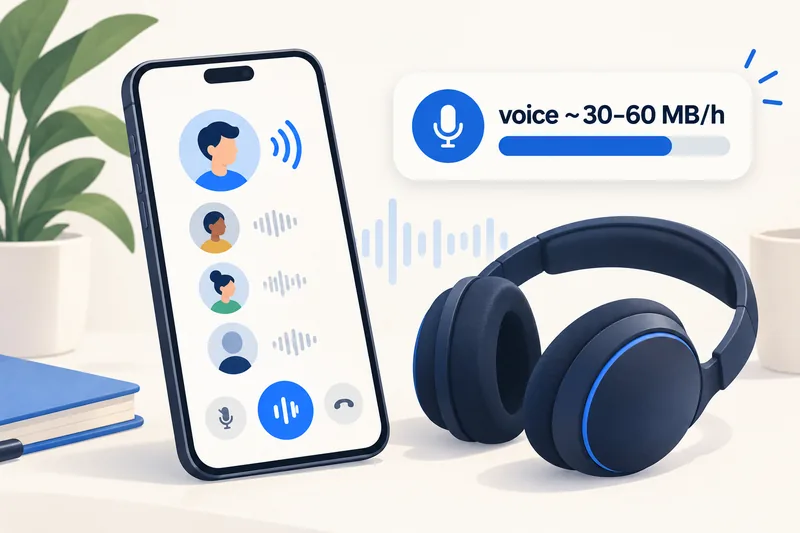
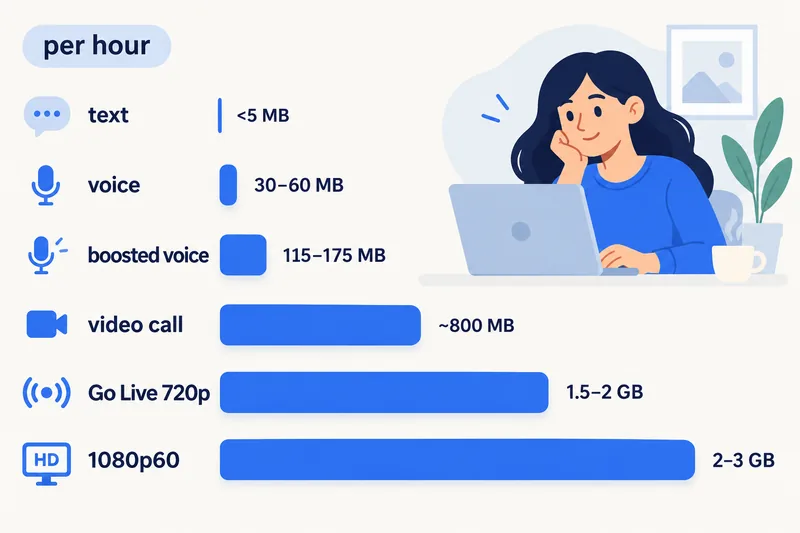
Discord voice chat uses about 30–45 MB an hour, because most voice channels run at 64–96 kbit/s. Video calls are heavier, several hundred MB an hour (we plan with about 800 MB), and watching or streaming with Go Live at 720p takes an estimated 1.5–2 GB an hour. Text chat barely registers. On mobile data, voice is cheap and streams are expensive.
Below: data per activity worked out from Discord's own bitrate limits, how boosted servers change the numbers, how long 1GB lasts, the settings that actually cut data (and what Data Saving Mode does not do), and how much data to buy for a trip.
Discord data usage by activity
Discord publishes bitrates for voice but no data figures for video or streams, so the table combines official limits with estimates. For the travel-wide picture, our travel data calculator uses 60 MB an hour for app voice calls and 800 MB an hour for one-to-one video calls.
| Activity | Data per hour | Basis | 1GB lasts about |
|---|---|---|---|
| Text chat, no media | under 5 MB | estimate | hundreds of hours |
| Voice channel, 64–96 kbit/s | ~30–45 MB | Discord bitrate limits | 22–33 hours |
| Voice on a boosted server, 256–384 kbit/s | ~115–175 MB per active speaker | Discord bitrate limits | 6–9 hours |
| Video call, 1-to-1 | ~300–900 MB (plan with 800) | estimates; our calculator | about 1 h 15 min |
| Group video call | up to ~1.5 GB | estimate; grows with people on camera | 40 minutes |
| Watching or streaming Go Live, 720p/30 | ~1.5–2 GB | Firsty, Holafly estimates (June 2026) | 30–40 minutes |
| Go Live at 1080p/60 | ~2–3 GB | Firsty estimate (June 2026) | 20–30 minutes |
How the voice numbers are worked out
An audio stream at 1 kbit/s for an hour is about 0.45 MB. Discord's developer documentation allows voice channels from 8 to 96 kbit/s without boosts, and new channels typically start at 64 kbit/s:
| Channel bitrate | Data per hour, one stream | Where you see it |
|---|---|---|
| 64 kbit/s | ~29 MB | typical default |
| 96 kbit/s | ~43 MB | highest without boosts |
| 128 kbit/s | ~58 MB | server Boost level 1 |
| 256 kbit/s | ~115 MB | server Boost level 2 |
| 384 kbit/s | ~173 MB | server Boost level 3 |
You only send audio while you speak (with voice activity or push-to-talk) and receive a stream from whoever is talking. So a relaxed call with a friend at 64 kbit/s sits near 30 MB an hour, while a busy group on a level 3 boosted server can pass 170 MB. On a boosted server, the higher bitrate can raise voice data up to four times.
Video, Go Live and screen share limits
Discord's help centre sets these limits (checked 1 October 2026):
- Go Live and screen share: everyone can stream up to 720p at 30fps. Nitro subscribers can stream up to 4K at 60fps (1080p at 60fps on iOS). Server boosts lift every member's streams to 720p/60 (level 1) or 1080p/60 (level 2).
- Viewers: up to 50 people can watch one Go Live stream.
- Video calls: up to 25 people can join a video call in a server; group DMs hold up to 10 members.
- Browser: when you stream from a browser, you cannot adjust the stream quality.
Higher resolution and frame rate mean more data for the streamer and for every viewer. On a phone screen, watching a friend's 1080p/60 stream at 720p is hard to tell apart and uses noticeably less.
Need data for your trip? Compare eSIM plans by validity and data volume.
View eSIM plansHow Discord compares with other apps
| App or activity | Data per hour | Source |
|---|---|---|
| Discord voice | ~30–45 MB | Discord bitrates |
| Voice calls in other apps (WhatsApp, FaceTime Audio and similar) | 30–90 MB | our calculator range, based on Zoom and Microsoft Teams audio bandwidth |
| Video call in any app, 1-to-1 | 540 MB–1.5 GB | Zoom, Google Meet, Microsoft Teams |
| YouTube 720p | ~1.8 GB | StarHub |
For other call apps, see how much data FaceTime uses; for video, YouTube's data use by quality and the overview of streaming data use.
How to make Discord use less data
1. Know what Data Saving Mode does
On mobile, open your avatar, then App Settings, Text & Media, Data Consumption, and switch on Data Saving Mode. According to Discord, this sends images and videos in lower quality (360p) when you are on a cellular network. It does not reduce voice, video calls or streams you watch, so do not count on it for those. In the same section you can set Video Uploads to Data Saver.
2. Stay on voice when you are on mobile data
Turning the camera off in a call cuts usage from hundreds of MB to tens of MB an hour. Leave video for Wi-Fi.
3. Watch streams at lower quality, or later
Go Live is the biggest data cost on Discord. On mobile data, lower the stream quality or skip it until you are on Wi-Fi. If you are the one streaming, choose 720p/30 rather than 1080p/60.
4. Turn off autoplaying GIFs and animated emoji
In Discord's Accessibility or Text & Media settings, switch off automatic GIF playback and animated emoji, or turn on Reduced Motion, which disables both.
5. Check Discord's real usage
Reset your phone's data counter before the trip and check the Discord entry after a session. Our guide to checking data usage on iPhone shows where to find it.
How much data to buy for a trip with Discord
Using our calculator's rates (20% buffer included), here is a 7-day trip to Japan with Zyesims prices on 1 October 2026:
| How you use Discord | Per day | 7 days | Plan that fits | Price |
|---|---|---|---|---|
| Two hours of voice chat, otherwise maps and messaging | ~0.6 GB | ~4 GB | Japan 5GB, 30 days | $5.49 |
| An hour of voice plus typical social media and a short video call | ~1.4 GB | ~10 GB | Japan 20GB, 30 days | $13.99 |
| Watching Go Live streams for an hour every day | ~3.4 GB | ~24 GB | Japan Unlimited Premium, no speed cap | $15.49 |
The middle row lands right on 10 GB, which is why we suggest the next size up. For the stream-heavy row, an unlimited plan with a daily cap would slow down after the allowance, so a plan without a daily speed cap fits better; Premium still follows the network's fair-use terms for personal use. For your own pattern, try the calculator with Japan and 7 days or see all Japan eSIM plans. If you plan to play from a laptop on your phone's connection, read our guide to hotspot with an eSIM first.
Why Zyesims for gaming and voice chat abroad
Voice chat is light enough for a small plan such as Japan 5GB; daily Go Live viewing is what pushes a trip toward Japan Unlimited Premium. Most fixed plans can be topped up on the same eSIM if a late-night session runs long.
Frequently Asked Questions
How much data does a 1-hour Discord voice call use?
Usually about 30–45 MB. Discord voice runs at 64 or 96 kbit/s on most servers, which works out to roughly 29–43 MB an hour for each audio stream, and you only send and receive while people are talking. Boosted servers that use 256 or 384 kbit/s can reach about 115–175 MB an hour.
Does Discord use a lot of data?
Text chat and voice are light: a few MB to around 45 MB an hour. Video calls and especially Go Live streams and screen shares are heavy, from several hundred MB to 2–3 GB an hour. Watching streams on mobile data is what drains a plan.
How long does 1GB last on Discord?
About 22–33 hours of voice chat, around 1 hour 15 minutes of video calls at our planning rate, roughly 30–40 minutes of watching a 720p stream, and hundreds of hours of text chat without media.
Does Discord Data Saving Mode reduce voice or stream data?
No. According to Discord, Data Saving Mode sends images and videos in lower quality when you are on a cellular network. It does not lower the quality of voice, video calls or streams you watch. For those, stay on voice, lower the stream quality or wait for Wi-Fi.
Does Discord use call minutes?
No. Discord calls use mobile data or Wi-Fi, not your carrier's call minutes. On a travel eSIM, voice chat is one of the lightest things you can do, while video and streams are among the heaviest.
Keep reading
- Can You Hotspot with an eSIM? Limits, Data Use and Fixes for Travelers
- What Do Internet Speeds Really Mean? Mbps, 4G & 5G for Travelers
- Fair Usage Policy on Unlimited eSIMs: Daily Caps & Throttling
- Best eSIM for Japan in 2026: Plans, Networks and Real Prices Compared
- What Is Data Roaming? 2026 Costs and Cheaper Alternatives

A travel and tech enthusiast who loves to wander and discover new places. Mihi writes Zyesims' guides to eSIMs and mobile data abroad, built from carriers' and app makers' own documentation, published plan terms and Zyesims' current plan data — with sources named in each article. Mihi also writes about travel at MihiTravel and Notemeeting.
Ready for your next trip?
Choose the right eSIM, get your QR code by email, and connect when you land — coverage in 200+ countries.