How Much Data Does YouTube Use? MB per Hour by Quality (2026)

YouTube uses roughly 225–300 MB an hour with Data saver, 560–700 MB an hour at 480p and around 3 GB an hour at 1080p. These are estimates from carrier StarHub and Netflix's published tiers, since YouTube publishes no figures of its own. 4K is in another league: 7 GB an hour or more. In practice, 1GB of mobile data buys you about 3 hours of low-quality video, 1.5 hours at 480p or 20 minutes in Full HD.

The quality setting is the whole story. The same 10-minute clip can cost 50 MB or 500 MB depending on what YouTube picks for you, and on a fast 4G or 5G connection it usually picks high. Below you will find the numbers per resolution, how 1GB stretches, how to lock YouTube to a lower quality, and how much data to buy if you plan to watch on a trip.
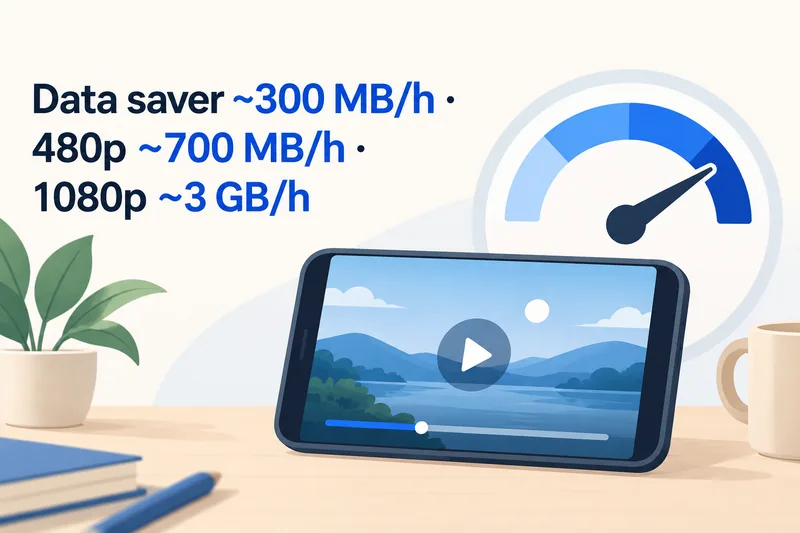
YouTube data usage per hour, by video quality
YouTube itself does not publish a data figure for each resolution. Its help page only describes the settings (Auto, Higher picture quality, Data saver, Advanced). So every number online is an estimate, and that is why sites disagree so much: we found 720p quoted anywhere from 600 MB to 1.8 GB an hour. Real use depends on the bitrate of each video, its frame rate (30 or 60 fps), how much motion is on screen and the codec your phone supports.
The table uses the same three figures as our travel data calculator (low, standard and HD), which come from Netflix's published usage and match Telstra's carrier estimates (Telstra's page checked in October 2026). The middle column shows StarHub's figures for YouTube specifically, checked on 1 October 2026.
| Quality | Typical data per hour | StarHub estimate for YouTube | When it makes sense |
|---|---|---|---|
| Data saver / 240p–360p | ~300 MB | ~225 MB (240p) | Weak signal, small data plan, talk or music videos |
| 480p (standard definition) | ~700 MB | ~560 MB | Good default on a phone screen |
| 720p (HD) | 1.5–1.8 GB | ~1.8 GB | Larger phones, tablets |
| 1080p (Full HD) | ~3 GB | not listed | Wi-Fi, or an unlimited plan without a speed cap |
| 4K (2160p) | 7 GB and up | ~15 GB | Wi-Fi only |
A useful way to read the table: each step up roughly doubles the data, and on a 6-inch screen the jump from 720p to 1080p is hard to see. If you want your own number for a whole trip rather than per hour, you can plug in your destination and trip length and add YouTube as one of your activities.
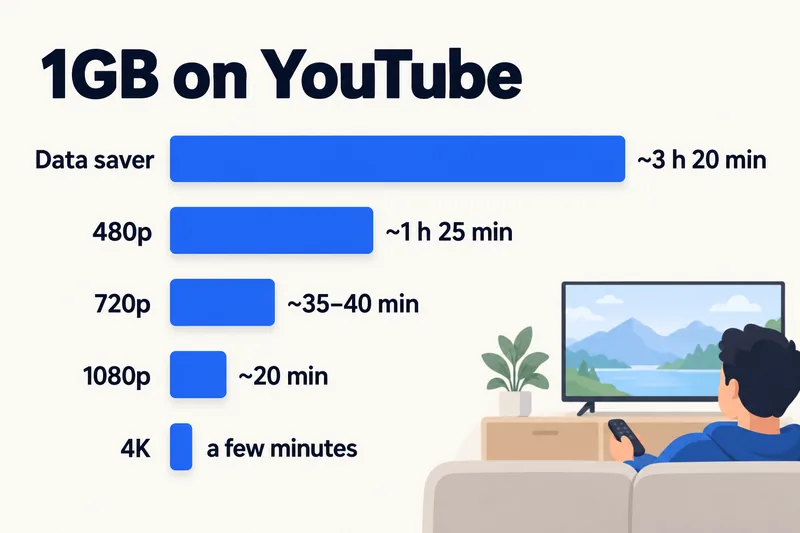
How long does 1GB last on YouTube?
Flip the table around and it becomes easier to plan. Using the same rates:
- Data saver: about 3 hours and 20 minutes per GB
- 480p: about 1 hour 25 minutes per GB
- 720p: roughly 35–40 minutes per GB
- 1080p: about 20 minutes per GB
- 4K: a few minutes per GB
So a 5GB travel plan holds roughly 7 hours of 480p video, or less than 2 hours of Full HD, and that is before maps, messages and photos take their share. If you only watch a couple of 10-minute clips a day at 480p, YouTube costs you about 230 MB, which almost any plan can absorb.
Need data for your trip? Compare eSIM plans by validity and data volume.
View eSIM plansYouTube Shorts and YouTube Music
Shorts: same quality, more minutes
A Short at 480p costs about the same per minute as a regular video at 480p. The difference is behaviour. The feed loads the next clips before you reach them, and short clips make it easy to scroll for 40 minutes without noticing. YouTube gives no figure for Shorts, so we use the carrier estimate for short-video feeds that also covers TikTok's data usage and Reels: about 840 MB an hour by default and about 360 MB an hour with a data saver on. That is the same range our calculator uses for short video.
YouTube Music: the one Google publishes
For audio, Google does give numbers. In the YouTube Music app you can set a separate quality for mobile networks and for Wi-Fi, and each level has a stated upper bound:
| YouTube Music quality | Bitrate (Google) | Data per hour, at most |
|---|---|---|
| Low | 48 kbps | ~22 MB |
| Normal (default) | 128 kbps | ~58 MB |
| High / Always High | 256 kbps | ~115 MB |
Those are audio-only figures. If the app is playing the music video instead of the song, you are back in video territory at hundreds of MB an hour. The app also has a "Stream via Wi-Fi only" switch under Settings, Data saving, which is worth turning on before a trip if you download your playlists at the hotel. For a comparison with other music apps, see how much data Spotify uses.
YouTube compared with other apps
At the same quality, YouTube and Netflix land in the same place, because both scale data with resolution. What makes YouTube expensive is that it often defaults higher on a fast mobile connection and keeps playing the next video. The figures below are the per-hour rates behind our calculator.
| App or activity | Data per hour | Source |
|---|---|---|
| YouTube or Netflix, low / Data saver | ~300 MB | Netflix Help |
| YouTube or Netflix, SD | ~700 MB | Netflix Help, Telstra |
| YouTube or Netflix, HD | ~3 GB | Netflix Help, Telstra |
| TikTok, Reels, Shorts | 360–840 MB | StarHub |
| Instagram or Facebook feed, mostly photos | 120–150 MB | StarHub; our calculator |
| Instagram Stories and Reels mix | ~600 MB | StarHub |
| Spotify, Apple Music | 45–145 MB | Spotify Support |
| Google Maps navigation | 5–10 MB | Telstra, StarHub |
One hour of HD YouTube costs about as much as 300 hours of map navigation. If you are trying to make a small plan last, video is the first place to look. Our guide to how much data streaming uses covers Netflix, Disney+ and other services in more detail.
Why YouTube can use more data than you expect
Auto quality goes up on fast networks
With Auto selected, YouTube picks quality from your connection speed. On a strong 5G or 4G+ signal it will often choose 720p or 1080p, even on mobile data. In a 2020 study, Opensignal measured 5G users consuming 1.7 to 2.7 times more mobile data than 4G users, and video apps stepping up quality is a large part of that. A setting that felt fine at home on Wi-Fi can drain a travel plan fast. If you are not sure what speeds you will get abroad, our explainer on what internet speeds really mean helps.
Autoplay and preloading
When one video ends, autoplay starts the next one. The player also loads part of the video ahead of where you are, so closing a video halfway still costs some data. Fast-moving content (sport, gaming, concerts) needs a higher bitrate than a talking head at the same resolution, so it also costs more.
Other things running at the same time
If your data disappears faster than these numbers suggest, YouTube may not be the culprit. Check for app updates or photo backups running over mobile data, and for anyone connected to your hotspot. Our guide to using hotspot with an eSIM explains how a laptop can quietly use several GB.
How to check how much data YouTube has used
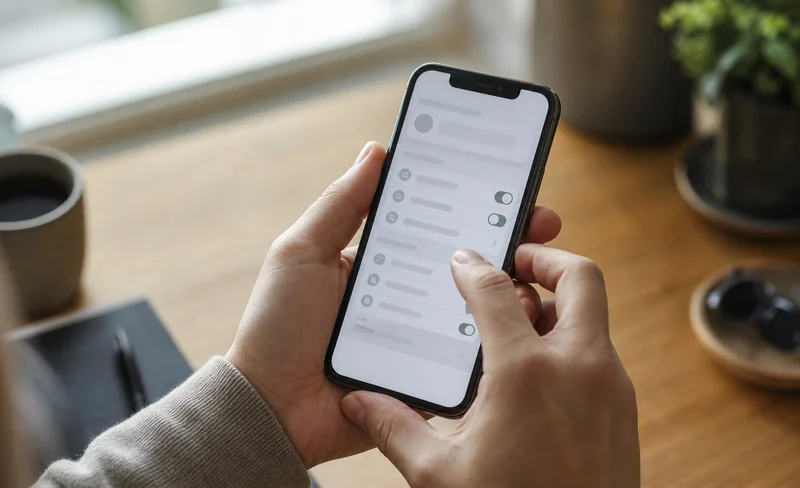
Your phone counts data per app. On iPhone it is under Settings, Cellular (tap Reset Statistics before you fly); on Android, under the mobile data usage screen (Pixel: Settings, Network & internet, SIMs; Samsung: Settings, Connections, Data usage). Our guide to checking data usage on iPhone walks through the full screen.
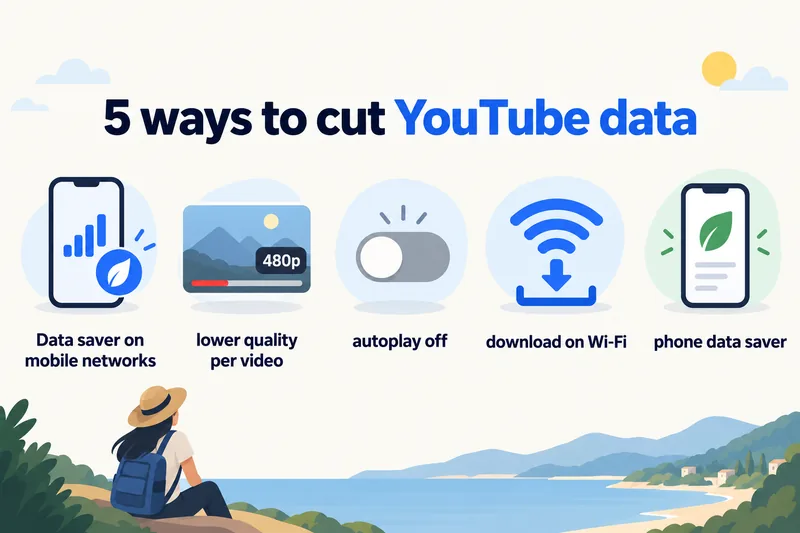
How to make YouTube use less data
1. Set Data saver for mobile networks
In the YouTube app, tap your profile picture, then Settings, Video quality preferences. Under "On mobile networks", choose Data saver. Leave "On Wi-Fi" at Auto or Higher picture quality. This one change caps every video you watch on mobile data, so you do not have to adjust each one. It is the setting to change the night before you fly.
2. Lower quality for a single video
While a video plays, tap the gear icon, then Quality, then Advanced, and pick 480p or 360p. Use this when one video looks too soft at Data saver but you do not want to change your default.
3. Turn off autoplay
Switch off Autoplay in the YouTube settings (or with the toggle inside the player). The next video then waits for you instead of streaming on its own.
4. Download on Wi-Fi, watch offline
YouTube Premium lets you download videos to watch later. Download on hotel or home Wi-Fi, then watch on the train or the plane with no mobile data used. YouTube Music downloads work the same way for playlists.
5. Use the phone's own data saver
On iPhone, turn on Low Data Mode under Settings, Cellular, Cellular Data Options (on a dual SIM phone, choose your travel eSIM line first). On Android, turn on Data Saver under Network & internet. Both reduce background activity across all apps, not only YouTube.
Watching YouTube abroad: how much data to buy
Start from your normal day and add video on top. With our calculator's "moderate" profile (maps, messaging, an hour of social media, a short video call), a typical traveller uses about 1.3 GB a day, or roughly 9 GB over 7 days. Add one hour of 480p YouTube a day and the total climbs to around 15 GB. Switch that hour to 1080p and you are past 30 GB.
For a week in Japan, for example, that looks like this with Zyesims prices on 1 October 2026:
| How you watch | Data for 7 days | Plan that fits | Price |
|---|---|---|---|
| Little or no YouTube | ~9 GB | Japan 10GB, 30 days | $8.99 |
| About 1 hour a day at 480p | ~15 GB | Japan 20GB, 30 days | $13.99 |
| Hours of HD, or hotspot for a laptop | 30 GB and up | Japan Unlimited Premium (no speed cap), 7 days | $15.49 |
One thing to check before buying an unlimited plan for video: many come with a daily high-speed allowance. Our standard Japan Unlimited, for instance, gives 1GB a day at full speed and then slows down; the provider doesn't publish the exact reduced speed, so plan for messaging and maps, not video. The Premium tier has no daily speed cap, though it still follows the network's fair-use terms for personal use. Our guide to fair usage policies on unlimited eSIMs explains what each limit means. Other destinations work the same way: browse the Japan eSIM plans or the full unlimited eSIM range.
Why Zyesims for streaming on a trip
If you plan to watch on mobile data, the Japan table above is the short version: a 20GB fixed plan covers about an hour of 480p a day, while hours of HD only fit the Premium tier (Japan and South Korea), the one without a daily speed cap. Each plan page lists its data, validity and speed limit before you pay, and most fixed plans can be topped up on the same eSIM.
Frequently Asked Questions
How much data does YouTube use per hour on mobile?
Roughly 225–300 MB an hour with Data saver or at 240p–360p, about 560–700 MB at 480p (standard definition) and around 3 GB at 1080p. 4K can pass 7 GB and, by StarHub's estimate, reach about 15 GB an hour. YouTube does not publish official figures, so these are estimates based on carrier and streaming-service data.
How long does 1GB of data last on YouTube?
About 3 hours with Data saver, close to 1.5 hours at 480p, around 20 minutes at 1080p and only a few minutes in 4K. If you only listen to music in YouTube Music on Normal quality, 1GB lasts well over 15 hours.
Do YouTube Shorts use more data than regular videos?
Per minute, a Short at the same quality uses about the same data as a regular video. Shorts feel heavier because the feed preloads the next clips and you rarely stop scrolling. Carriers estimate short-video feeds at roughly 360–840 MB an hour, depending on whether a data saver is on.
Does watching downloaded YouTube videos use mobile data?
Playing a video you already downloaded does not stream it again, so it uses next to no mobile data. The download itself is the expensive part, so do it on hotel or home Wi-Fi. Downloads need YouTube Premium in most countries, and the app has to go online now and then to keep them available.
Is 10GB enough to watch YouTube on a one-week trip?
Only if YouTube is a small part of your day. Typical travel use without much video is about 1.3 GB a day, or roughly 9 GB for a week. Adding one hour of 480p YouTube a day brings that to around 15 GB, so a 20GB plan is the safer pick. Heavy HD viewers are usually better off with an unlimited plan that has no daily speed cap.
Keep reading
- Fair Usage Policy on Unlimited eSIMs: Daily Caps & Throttling
- Can You Hotspot with an eSIM? Limits, Data Use and Fixes for Travelers
- What Do Internet Speeds Really Mean? Mbps, 4G & 5G for Travelers
- What Is Data Roaming? 2026 Costs and Cheaper Alternatives
- Best eSIM for Japan in 2026: Plans, Networks and Real Prices Compared

A travel and tech enthusiast who loves to wander and discover new places. Mihi writes Zyesims' guides to eSIMs and mobile data abroad, built from carriers' and app makers' own documentation, published plan terms and Zyesims' current plan data — with sources named in each article. Mihi also writes about travel at MihiTravel and Notemeeting.
Ready for your next trip?
Choose the right eSIM, get your QR code by email, and connect when you land — coverage in 200+ countries.