Does FaceTime Use Data? How Much per Call, Abroad and on Wi-Fi (2026)

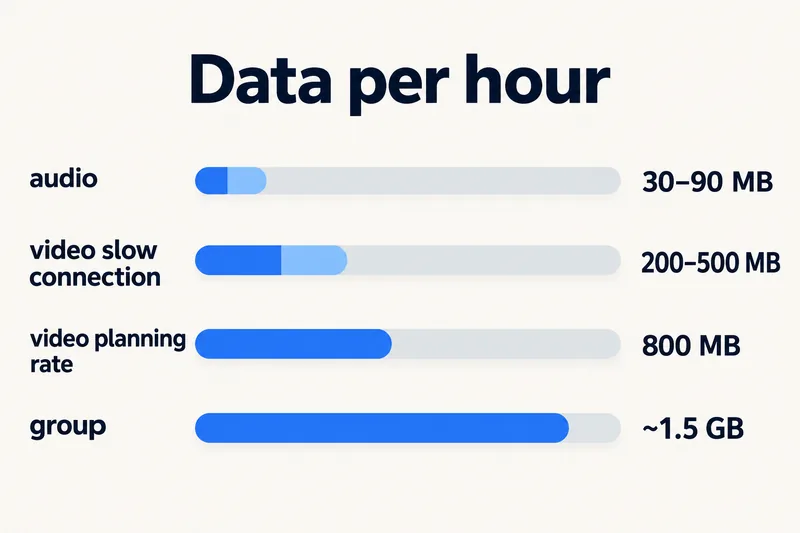
Yes, FaceTime uses data, not call minutes. On Wi-Fi it costs nothing from your mobile plan; on cellular it uses your data allowance. A video call typically takes a few hundred MB an hour and can reach 1–1.5 GB an hour on a fast connection, so we suggest budgeting about 800 MB per hour. FaceTime Audio is much lighter at roughly 30–90 MB an hour.

Abroad, that makes FaceTime one of the cheapest ways to call home, as long as the data comes from Wi-Fi or a travel eSIM rather than roaming on your home plan. Below: why the numbers online disagree, how long 1GB or 5GB lasts, what group calls and SharePlay add, and the iPhone settings that keep FaceTime off your mobile data when you want it to.

Does FaceTime use data or minutes?
FaceTime is an internet service. Calls travel as data between Apple devices (and people who join through a FaceTime link), so they never touch your carrier's call minutes or SMS. Apple's support page puts it simply: you can use FaceTime over Wi-Fi or cellular, and "data rates may apply".
- On Wi-Fi: the call uses the Wi-Fi network. Nothing comes off your mobile data.
- On cellular: the call uses mobile data from whichever line is set for data, which abroad should be your travel eSIM.
- Not on your bill as calls: FaceTime shows up only as data used, not as call records with your carrier.
How much data FaceTime uses
Apple does not publish a data figure for FaceTime. FaceTime adjusts video quality to your connection, which is why estimates range so widely. A figure of 180–240 MB an hour for video is often quoted, usually without a source or method. Measurements and carrier figures come out higher: a test published by iPhoneLife (January 2024) recorded 23.7 MB for a 3-minute cellular call (roughly 470 MB an hour), and Australian carrier Telstra says one-to-one video calls can use up to 1.5 GB an hour.
| Call type | Typical data per hour | Plan with | 1GB lasts about |
|---|---|---|---|
| FaceTime Audio | 30–90 MB | 60 MB | 17 hours |
| FaceTime video, slower mobile connection or Low Data Mode | 200–500 MB | 500 MB | 2 hours |
| FaceTime video, good 4G or 5G | 500 MB–1.5 GB | 800 MB | 1 h 15 min |
| Group FaceTime video | more, grows with people on screen | 1.5 GB | 40 minutes |
The "plan with" column is what our data calculator uses: 800 MB an hour for a one-to-one video call (the same rate as WhatsApp or Zoom, based on the bandwidth Zoom, Google and Microsoft publish) and 60 MB for an app voice call. We deliberately sit above the common blog figure. Running short on data in the middle of a call home costs more than having some left over.
What pushes FaceTime's data up
- Network speed. On fast 5G or strong Wi-Fi, FaceTime sends sharper video.
- Newer cameras and larger screens. Higher-resolution video means more data each second.
- More people. In Group FaceTime you receive a video stream from each participant. Telstra puts group video calls at up to 8 GB an hour at the extreme end.
- SharePlay. When you watch a show together, each person streams the show on their own device on top of the call, so the video service's data adds to FaceTime's.
Need data for your trip? Compare eSIM plans by validity and data volume.
View eSIM plansHow long 1GB, 3GB and 5GB last on FaceTime
| Data | FaceTime Audio (60 MB/h) | Video, planning rate (800 MB/h) | Video, slow connection (500 MB/h) |
|---|---|---|---|
| 1GB | ~17 hours | ~1 h 15 min | ~2 hours |
| 3GB | ~50 hours | ~4 hours | ~6 hours |
| 5GB | ~85 hours | ~6 hours | ~10 hours |
A 15-minute video call every day for a week comes to about 1.4 GB at the planning rate. The same calls as FaceTime Audio come to about 100 MB.
FaceTime compared with other ways to call home
| Option | What it uses | Data per hour (estimate) |
|---|---|---|
| FaceTime video | data | ~800 MB (planning rate) |
| WhatsApp or Zoom video call | data | ~800 MB (planning rate; Zoom publishes 600 kbit/s each way for high quality, about 540 MB an hour) |
| FaceTime Audio, WhatsApp voice | data | 30–90 MB |
| Wi-Fi Calling | your carrier's phone call, carried over Wi-Fi | small; billed by your carrier's rules |
| Normal phone call abroad | roaming minutes on your home SIM | none, but roaming call charges may apply |
Wi-Fi Calling is easy to confuse with FaceTime. It is your carrier's ordinary phone service using a Wi-Fi network instead of a cell tower, so it calls any phone number, but how your carrier bills it when you are abroad is up to them. FaceTime only reaches Apple devices and FaceTime link guests, and is billed purely as data. If you also message a lot, our guide on how much data iMessage uses covers the texting side.
Using FaceTime abroad with a travel eSIM
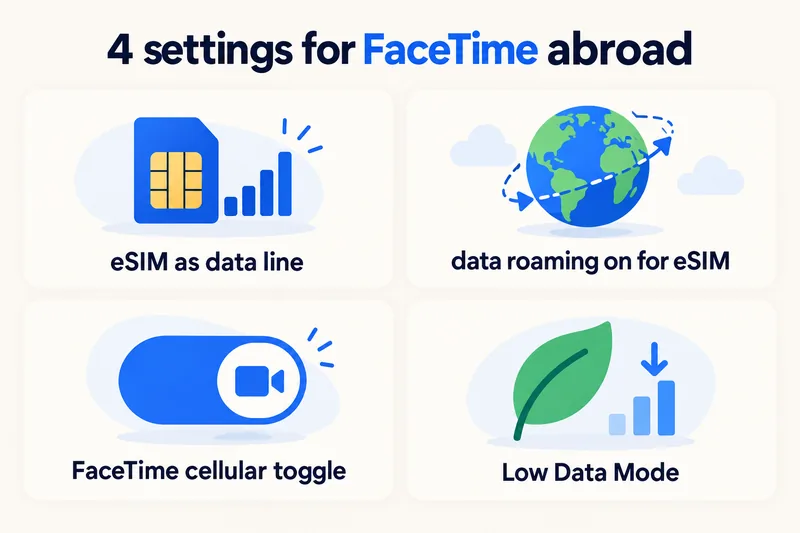
With a travel eSIM, FaceTime works like it does at home. A few settings make the difference:
- Set the travel eSIM as your mobile data line (Settings, Cellular, Cellular Data) and keep your home SIM on for calls and texts only if you want to stay reachable on your number.
- Turn on Data Roaming for the eSIM line, and leave it off for your home SIM. Most travel eSIMs, including ours, connect through partner networks and need it on.
- Allow FaceTime on cellular: in Settings, Cellular, scroll to the app list and make sure FaceTime is switched on.
- Turn on Low Data Mode for the eSIM line if your plan is small. Apple says that in Low Data Mode FaceTime "optimizes video bitrate for lower bandwidth".
Worried about the phone quietly switching from hotel Wi-Fi to mobile data? Apple has replaced Wi-Fi Assist with Connectivity Assist, which can use cellular data when Wi-Fi is poor, and Apple's support page (September 2026) states it is not used while the iPhone is roaming internationally. If you want to be sure, check Settings, Wi-Fi, Connectivity Assist.
One more point: Apple notes that FaceTime, Group FaceTime or FaceTime Audio may not be available in every country or region. The United Arab Emirates is the example travellers mention most often. Check before you rely on FaceTime as your only way to reach home.
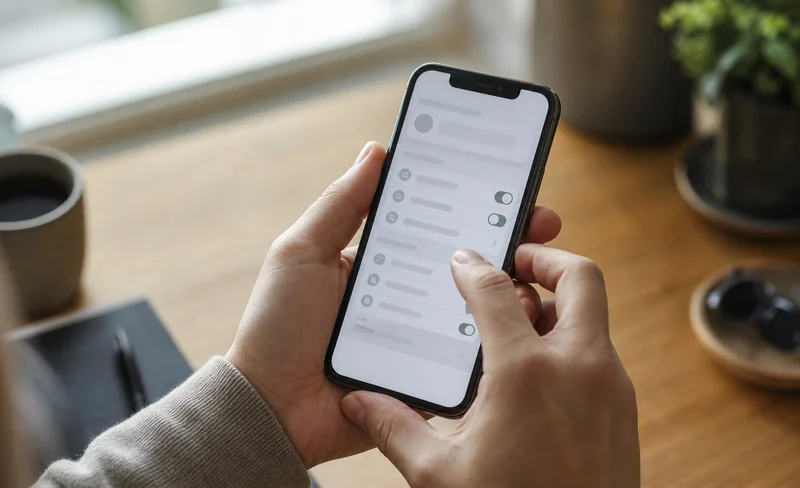
How to check and limit FaceTime's data use
Check how much FaceTime has used
FaceTime has its own line in the app list under Settings, Cellular, showing the total since the last reset, so reset the statistics on the day you fly. Our guide on checking data usage on iPhone explains the rest of that screen.
Block FaceTime from mobile data
In the same list, switch FaceTime off. FaceTime then works only on Wi-Fi. This is the setting to use if you are on your home SIM's roaming and do not want any surprises.
Switch to audio when the video freezes
On a weak signal, turning the camera off or starting the call as FaceTime Audio keeps the conversation going and uses a fraction of the data.
How much data to buy if you FaceTime home every day
Using our calculator's rates with a 20% buffer, here is a 7-day trip to the UK with Zyesims prices on 1 October 2026:
| How you call home | Per day | 7 days | Plan that fits | Price |
|---|---|---|---|---|
| 30 minutes of FaceTime Audio, plus maps and messaging | ~0.46 GB | ~3.2 GB | United Kingdom 5GB, 30 days | $4.99 |
| 20 minutes of FaceTime video, plus light use | ~0.75 GB | ~5.2 GB | United Kingdom 10GB, 30 days | $8.49 |
| An hour of video calls, plus social media | ~2 GB | ~14 GB | United Kingdom 20GB, 30 days | $13.99 |
If your hotel Wi-Fi is reliable and you make the long calls in the evening from your room, you can go a size down. To model your own trip, open the calculator with the UK and 7 days, or browse all UK eSIM plans.
Why Zyesims for calling home
A travel eSIM turns FaceTime into a flat, predictable cost: you see the data, validity and any speed limit before you pay, and most fixed plans can be topped up on the same eSIM if the calls run long. Before you buy, confirm your iPhone supports eSIM on our compatible devices list.
Frequently Asked Questions
Does FaceTime use data or minutes?
FaceTime uses data, not call minutes or texts. On Wi-Fi it uses the Wi-Fi connection and nothing from your mobile plan. On cellular it draws on your data allowance, which is why Apple's own page says data rates may apply.
How much data does a 1-hour FaceTime call use?
A one-hour FaceTime video call on mobile data typically uses a few hundred MB and can reach 1–1.5 GB on a fast connection. For planning, budget about 800 MB per hour of video. A FaceTime Audio call uses far less, around 30–90 MB an hour.
How long will 5GB last on FaceTime?
At our planning rate of about 800 MB an hour, 5GB covers roughly 6 hours of FaceTime video. On a slower connection that keeps video at lower quality it can stretch to 10 hours or more. With FaceTime Audio, 5GB lasts well over 50 hours.
Is FaceTime free when traveling abroad?
Apple does not charge for FaceTime and it does not use international call minutes. What you pay for is the data: free on hotel Wi-Fi, part of your plan on a travel eSIM, or potentially expensive if your home carrier bills roaming data. Apple also notes FaceTime may not be available in every country or region.
Does FaceTime use more data than WhatsApp video calls?
Neither Apple nor Meta publishes figures, and both adjust quality to your connection, so they land in a similar range for a one-to-one video call. Our calculator uses the same planning rate for both, about 800 MB an hour. Audio-only calls on either app are much lighter.
Keep reading
- What Is Data Roaming? 2026 Costs and Cheaper Alternatives
- How Does Dual SIM Work? Pairing a Home SIM with a Travel eSIM
- eSIM Not Working? How to Fix No Service on iPhone and Android
- Can You Hotspot with an eSIM? Limits, Data Use and Fixes for Travelers
- What Is an eSIM? A Complete Beginner's Guide for Travelers (2026)

A travel and tech enthusiast who loves to wander and discover new places. Mihi writes Zyesims' guides to eSIMs and mobile data abroad, built from carriers' and app makers' own documentation, published plan terms and Zyesims' current plan data — with sources named in each article. Mihi also writes about travel at MihiTravel and Notemeeting.
Ready for your next trip?
Choose the right eSIM, get your QR code by email, and connect when you land — coverage in 200+ countries.