How Much Data Does iMessage Use? Texts, Photos, Videos and Voice Messages

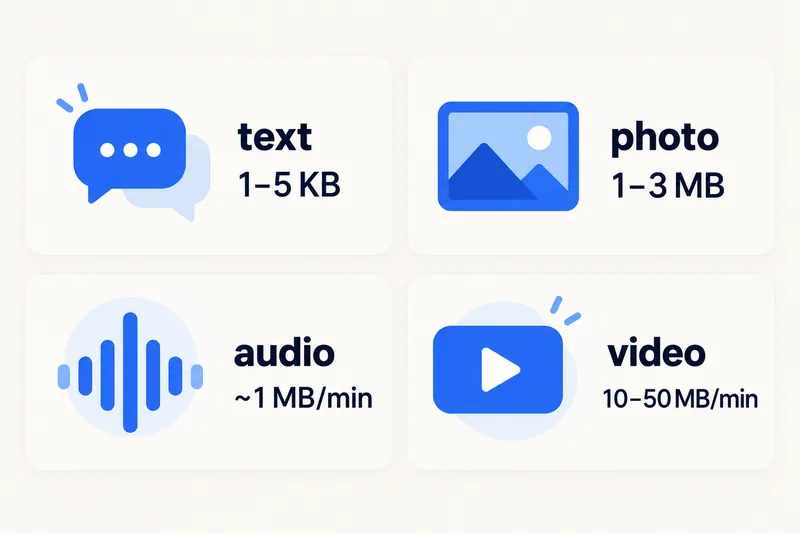
An iMessage text uses only 1–5 KB, so text alone barely registers. What costs data is media: a photo is typically 1–3 MB, a one-minute video 10–50 MB and a one-minute audio message about 0.4–1 MB. A typical day of messaging with some photos comes to roughly 40 MB, and you pay for photos you receive as well as those you send.

iMessage is the blue-bubble service, and it always runs on mobile data or Wi-Fi. If you are wondering which messages work with data switched off, see our guide on whether texting uses data. Below: sizes for each kind of iMessage, a day and a trip in numbers, how to see exactly what Messages has used, and the settings that shrink it.

How much data each kind of iMessage uses
Apple does not publish iMessage sizes. These are typical figures from published estimates; your numbers depend on photo resolution, video length and quality.
| What you send or receive | Typical size | 1GB covers about |
|---|---|---|
| Text message | 1–5 KB | 200,000+ messages |
| Tapback, sticker, small GIF | a few KB to ~0.5 MB | thousands |
| Photo, default quality | 1–3 MB | 350–1,000 photos |
| Photo with Low Quality Image Mode | much smaller (Apple gives no figure) | several thousand |
| Audio message, 1 minute | ~0.4–1 MB | 1,000+ minutes |
| Video, 1 minute | ~10–50 MB (higher resolution, larger file) | 20–100 minutes |
Two things make real usage higher than people expect. First, receiving uses data too: every photo in a group chat is downloaded to your phone. Second, Messages in iCloud keeps your conversations in sync across devices, which can move attachments over mobile data.
Blue vs green: when iMessage is not the one sending
Blue bubbles are iMessage, which Apple says works over Wi-Fi or cellular data. Green bubbles are SMS, MMS or RCS, which are carrier services. Plain SMS does not use your data plan; MMS and RCS do. If an iMessage fails, your iPhone can resend it as a text when Send as Text Message is on, which matters abroad because SMS and MMS are billed by your home carrier. Our texting and data guide covers each type in detail.
A day and a trip of iMessage, in numbers
A fairly active day: 50 texts (well under 1 MB), 10 photos sent or received (about 20 MB), three short audio messages (about 2 MB) and one 30-second video (around 15 MB). That totals roughly 40 MB. A busy family group chat that shares dozens of photos and clips can reach a few hundred MB.
Over a week that is typically 0.3–1 GB for messaging, which is why it rarely decides your plan size on its own. Maps, social media and video do. Our tool to estimate how much data you need counts messaging at a flat 0.3 MB per message or photo, a blended average that is far more than a text needs and less than a full-quality photo; if you share a lot of full-quality photos, add a little more.
| How you use your iPhone on a 7-day US trip | Data for 7 days | Plan that fits | Price (1 Oct 2026) |
|---|---|---|---|
| Lots of iMessage with photos, plus maps and light browsing | ~3.5 GB | United States 5GB, 30 days | $6.49 |
| Messaging plus an hour of social media and a short video call each day | ~9 GB | United States 10GB, 30 days | $11.49 |
To model your own trip, open the calculator with the US and 7 days, or browse all US eSIM plans.
Need data for your trip? Compare eSIM plans by validity and data volume.
View eSIM plansHow to check how much data Messages has used
Apple's per-app counter under Settings, Cellular shows what Messages has used since the last reset, so reset the statistics before a trip; if Messages looks low but your data is draining, check iCloud and Photos in the same list. Our guide on checking and managing data usage on iPhone explains every entry.
How to make iMessage use less data
1. Turn on Low Quality Image Mode
Go to Settings, Apps, Messages and switch on Low Quality Image Mode. Images you send are compressed much more. Apple suggests it, along with the Send Photo Previews setting in the same screen, when messages with photos are slow or failing; both are worth checking before a trip.
2. Turn on Low Data Mode for your travel line
In Settings, Cellular, Cellular Data Options (choose the eSIM line first on a dual SIM phone), set Data Mode to Low Data Mode. It reduces background activity such as automatic syncing.
3. Send videos on Wi-Fi
Videos are where iMessage data goes. Record now, send from the hotel Wi-Fi later, or share a shorter clip.
4. Mute or leave media-heavy group chats
Muting a chat silences it, but it does not stop people sending photos and videos. If a group shares a lot of clips, ask people to hold big files for Wi-Fi, or use a shared album you open later on Wi-Fi.
5. Keep an eye on iCloud sync
Messages in iCloud can sync attachments over mobile data, and photos you save from a chat to your library are uploaded by iCloud Photos, which may also use mobile data depending on your settings. Turning off mobile data for iCloud Photos in the Cellular list keeps those uploads for Wi-Fi.
iMessage abroad with a travel eSIM
Apple's own guidance on travel eSIMs is straightforward: FaceTime and iMessage keep working on your home number while the travel eSIM provides the data. If you leave your home line on as well (for SMS codes from your bank, for example), Apple warns you might still incur roaming fees from it, so turn off Data Roaming on the home line and keep the eSIM as your mobile data line. For FaceTime calls home, our guide to FaceTime data use has the numbers, and how dual SIM works explains the two-line setup.
Why Zyesims for staying in touch abroad
Messaging needs very little data but needs it constantly, so even the smallest plan in the US table above covers a week of iMessage with photos, maps and light browsing. Our plans show their data and validity before you pay and start under a dollar.
Frequently Asked Questions
How much data does an iMessage text use?
Only a few kilobytes, roughly 1–5 KB including encryption and delivery overhead. Even a thousand text-only iMessages add up to just a few MB. Apple does not publish an exact figure, so these are typical estimates.
How much data does sending a photo by iMessage use?
A standard iPhone photo sent by iMessage is typically 1–3 MB. With Low Quality Image Mode turned on (Settings, Apps, Messages), images are sent much smaller. Receiving a photo costs about the same as sending it, so busy group chats add up.
Does iMessage work abroad with a travel eSIM?
Yes. Apple says that when you use a travel eSIM, FaceTime and iMessage continue to work on your home number, while the eSIM provides the data. If you keep your home line switched on, turn off Data Roaming on it to avoid roaming charges.
How much data does iMessage use per day?
For most people, tens of MB. Fifty texts, ten photos, a few voice messages and a short video come to roughly 40 MB. Heavy photo and video sharing in group chats can push it to a few hundred MB a day.
Keep reading
- How Does Dual SIM Work? Pairing a Home SIM with a Travel eSIM
- What Is Data Roaming? 2026 Costs and Cheaper Alternatives
- eSIM Not Working? How to Fix No Service on iPhone and Android
- Best eSIM for USA Travel in 2026: Plans, Networks and Real Prices Compared
- What Is an eSIM? A Complete Beginner's Guide for Travelers (2026)

A travel and tech enthusiast who loves to wander and discover new places. Mihi writes Zyesims' guides to eSIMs and mobile data abroad, built from carriers' and app makers' own documentation, published plan terms and Zyesims' current plan data — with sources named in each article. Mihi also writes about travel at MihiTravel and Notemeeting.
Ready for your next trip?
Choose the right eSIM, get your QR code by email, and connect when you land — coverage in 200+ countries.