How Much Data Does TikTok Use? Per Hour, Per Minute and With Data Saver

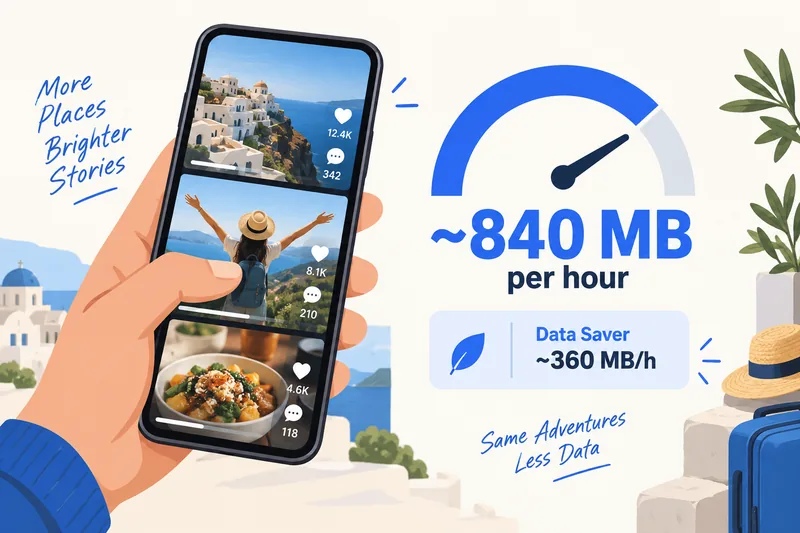
TikTok uses about 840 MB per hour at its default quality, roughly 14 MB a minute or 3–4 MB per short clip. With Data Saver on, it drops to around 360 MB an hour, and high-quality playback can push it to about 1.8 GB an hour. So 1GB of mobile data gives you a little over an hour of scrolling, or close to three hours with Data Saver.

TikTok is one of the heaviest apps on a travel plan because it is almost all video and it loads the next clips before you reach them. Below are the figures per hour, per minute and per GB, how TikTok compares with Instagram and YouTube, the setting that cuts its data use by more than half, and how much data to buy if TikTok is part of your trip.
TikTok data usage per hour, minute and video
TikTok does not publish its own figures. The most widely cited numbers come from Singapore carrier StarHub, and they are the same ones our data calculator uses for short-video apps:
| TikTok setting | Per hour | Per minute | Per 15-second clip | 1GB lasts about |
|---|---|---|---|---|
| Data Saver on | ~360 MB | ~6 MB | ~1.5 MB | 2 h 50 min |
| Default quality | ~840 MB | ~14 MB | ~3.5 MB | 1 h 10 min |
| High quality (HD) | ~1.8 GB | ~30 MB | ~7.5 MB | 35 min |
Per-hour figures are StarHub's, checked on 1 October 2026; per-minute and per-clip values are simply divided from them. They are estimates, and real use moves around. A one-week test by blogger Lilach Bullock (January 2026) found 0.9–1.4 GB an hour without Data Saver and about 570 MB with it, while US carrier AirVoice Wireless (April 2024) measured around 840 MB and 240 MB. The range depends on how fast you scroll, your phone's screen and the network: on fast 5G the app tends to pick sharper video.
Why TikTok uses so much data
- It is continuous video. Unlike a photo feed, every second on screen is streamed video with sound.
- It preloads. The app downloads the next clips in advance so swiping feels instant. Skip a video after two seconds and most of it has still been loaded.
- Sessions are long. Short clips make 30 minutes feel like five, and data scales with minutes, not with the number of videos you meant to watch.
TikTok compared with Instagram, YouTube and other apps
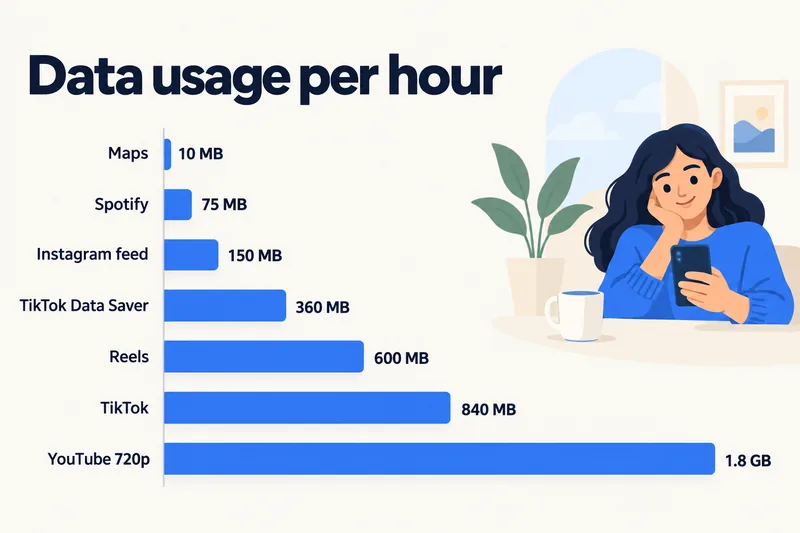
| App or activity | Data per hour | Source |
|---|---|---|
| TikTok, Data Saver on | ~360 MB | StarHub |
| TikTok, default | ~840 MB | StarHub |
| Instagram feed, mostly photos | ~120–150 MB | StarHub; our calculator |
| Instagram Stories and Reels | ~600 MB | StarHub |
| YouTube with Data saver | ~225–300 MB | StarHub; Netflix Help (same quality tier) |
| YouTube 720p | ~1.8 GB | StarHub |
| Spotify, Apple Music | 45–145 MB | Spotify Support |
| Google Maps navigation | 5–10 MB | Telstra, StarHub |
So an hour of TikTok costs about as much as 80 hours of map navigation. If you split your evenings between apps, the details are in our guides to Instagram data usage and YouTube data usage by quality.
Need data for your trip? Compare eSIM plans by validity and data volume.
View eSIM plansLive, uploads and TikTok Lite
Watching TikTok Live
A live stream cannot be preloaded at a lower quality the way recorded clips can, and it often runs at higher quality. TikTok gives no figure; eSIM provider Firsty estimates about 1–1.5 GB an hour (June 2026), close to StarHub's ~1.2 GB for Instagram Live, so treat Live like HD video when planning.
Posting videos
Uploading counts too. A one-minute high-resolution clip was about 15 MB to send in AirVoice Wireless's test (April 2024), and longer or sharper videos are larger. On the post screen, the "Allow high-quality uploads" option under More options makes files bigger. If you post a lot while travelling, save your clips as drafts and publish them on hotel Wi-Fi.
TikTok Lite
TikTok describes Lite as a data-light version of the app built for slow networks. According to TikTok's Ads Help page (updated December 2025) it is Android only and available in more than 150 countries, though not in Japan or South Korea. TikTok does not say how much less data it uses, so test it with your phone's data counter before you rely on it.
How to cut TikTok's data use
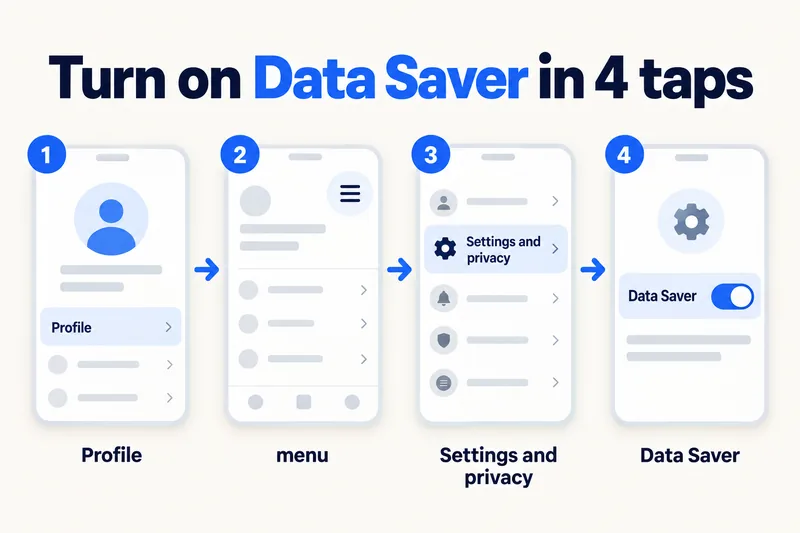
1. Turn on Data Saver
- Open TikTok and tap Profile.
- Tap the menu icon (☰) at the top right, then Settings and privacy.
- Scroll to the cache and cellular section and tap Data Saver.
- Switch it on.
Menu labels shift a little between app versions, but Data Saver has stayed under Settings and privacy. It is aimed at mobile data, so you can leave it on for the whole trip. This one setting takes TikTok from about 840 MB to about 360 MB an hour.
2. Download on Wi-Fi for the flight or train
While you are on Wi-Fi, use the Share button and Save video on clips you want for later (where the creator allows downloads). Saved videos go to your photo gallery and play without streaming again. Favorites, by contrast, only bookmark a clip and still stream it.
3. Set a daily screen time limit
TikTok's Screen time settings let you set a daily limit and a reminder. On a fixed data plan, a 30-minute cap at default quality is roughly 420 MB a day, which is easy to plan around.
4. Check background data
On iPhone, turn off Background App Refresh for TikTok (Settings, General, Background App Refresh). On Android, open TikTok in the app data usage screen and switch off Background data. You can also turn on the phone-wide saver: Low Data Mode on iPhone or Data Saver on Android.
How to check how much data TikTok has used
Your phone counts data per app: on iPhone under Settings, Cellular (tap Reset Statistics before you fly, or switch TikTok off mobile data there), on Android in the mobile data usage screen (Pixel: Settings, Network & internet, SIMs; Samsung: Settings, Connections, Data usage). Our guide to checking data usage on iPhone walks through the full screen.
How much data you need for a trip if you use TikTok
Our calculator's "moderate" traveller (maps, messaging, an hour of social media, 15 minutes of short video and a short video call a day) uses about 1.3 GB a day, roughly 9 GB a week, already including a 20% buffer. Add one extra hour of TikTok a day and that rises to about 2.3 GB a day, or 16 GB for a week. With Data Saver on, the same hour adds far less: about 1.7 GB a day, 12 GB a week.
Here is how that looks for 7 days in South Korea with Zyesims prices on 1 October 2026:
| How much TikTok | Data for 7 days | Plan that fits | Price |
|---|---|---|---|
| 15 minutes a day | ~9 GB | South Korea 10GB, 30 days | $8.99 |
| About 1 extra hour a day, Data Saver on | ~12 GB | South Korea 20GB, 30 days | $13.99 |
| About 1 extra hour a day, default quality | ~16 GB (about 2.3 GB a day) | South Korea Unlimited Plus, 3GB a day at full speed, 7 days | $10.99 |
| Several hours a day, Live, HD or hotspot | 25 GB and up | South Korea Unlimited Premium, no speed cap, 7 days | $27.49 |
Note how the plan type changes with your daily pattern: for a 7-day trip, Unlimited Plus (3GB a day, $10.99) also covers the ~12 GB Data Saver row for less than the 20GB plan, as long as you use a similar amount every day; the 20GB plan suits uneven days or a trip that may run past a week. Past the daily allowance Plus slows down, and the provider doesn't publish the exact reduced speed, so plan for messaging and maps, not video. Premium has no daily speed cap but still follows the network's fair-use terms for personal use. Our guide to fair usage on unlimited eSIMs explains those caps. For your own numbers, try the calculator with South Korea and 7 days, or browse all South Korea eSIM plans.
Why Zyesims if TikTok is part of your trip
For a week of TikTok in South Korea, the table above is the short version: 10GB covers 15 minutes a day, Unlimited Plus fits an extra hour a day at a steady pace, and only Premium has no daily speed cap. Each plan page lists its data, validity and daily speed allowance before you buy, and most fixed plans can be topped up on the same eSIM.
Frequently Asked Questions
How much mobile data does TikTok use in an hour?
About 840 MB an hour at the default quality, according to carrier StarHub, which is roughly 14 MB a minute. Data Saver brings it to around 360 MB an hour, and high-quality playback can reach about 1.8 GB an hour. TikTok publishes no official figure, and real-world tests have measured about 0.84 to 1.4 GB an hour without Data Saver.
How long does 1GB last on TikTok?
About 1 hour 10 minutes of scrolling at the default quality, close to 3 hours with Data Saver on, and around half an hour if videos play in high quality. Posting, watching Live and loading comments with video replies all shorten that time.
Does TikTok use more data than Instagram or YouTube?
Per hour, TikTok at default quality (about 840 MB) uses more than an Instagram feed of mostly photos and roughly the same as Reels. It uses less than YouTube in HD, which is around 1.8–3 GB an hour, but more than YouTube with Data saver, around 300 MB an hour.
Does TikTok work without Wi-Fi?
Yes. TikTok works on any mobile data connection, including a travel eSIM, as long as the app is allowed to use cellular data in your phone settings. On a slow or capped connection, videos take longer to start, and Data Saver helps them load faster.
Is TikTok Lite better for saving data?
TikTok Lite is built to use less data and run on slow networks, but TikTok does not publish how much less. It is Android only and not offered in Japan or South Korea. For most travellers, turning on Data Saver in the regular app is the simpler fix, and you can compare both with your phone's per-app data counter.
Keep reading
- Fair Usage Policy on Unlimited eSIMs: Daily Caps & Throttling
- Can You Hotspot with an eSIM? Limits, Data Use and Fixes for Travelers
- What Do Internet Speeds Really Mean? Mbps, 4G & 5G for Travelers
- What Is Data Roaming? 2026 Costs and Cheaper Alternatives
- How to Buy an eSIM Online: A Simple Guide for Travelers

A travel and tech enthusiast who loves to wander and discover new places. Mihi writes Zyesims' guides to eSIMs and mobile data abroad, built from carriers' and app makers' own documentation, published plan terms and Zyesims' current plan data — with sources named in each article. Mihi also writes about travel at MihiTravel and Notemeeting.
Ready for your next trip?
Choose the right eSIM, get your QR code by email, and connect when you land — coverage in 200+ countries.