How Much Data Does Snapchat Use? Snaps, Stories, Calls and Data Saver

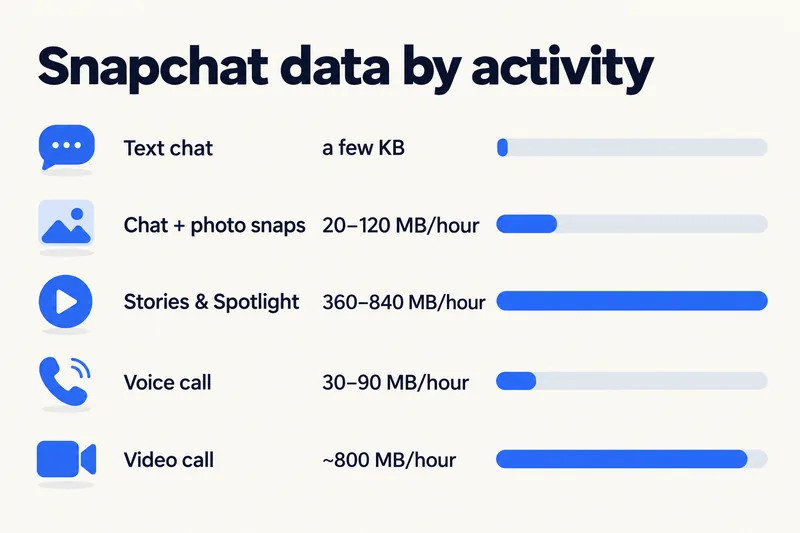
Snapchat's data use depends on what you do in it. Chatting and sending snaps takes roughly 20–120 MB an hour, while scrolling Stories and Spotlight behaves like other short-video apps at about 360–840 MB an hour. One published test (Tech Advisor, 2022) measured 720 MB for an hour of mixed use. Snapchat publishes no official figure, but its Data Saver mode (the old Travel Mode) stops content loading automatically on mobile data.

Below: data by activity, per snap and per GB, how Snapchat compares with TikTok and Instagram, the current menu path for Data Saver, and how much data to buy if Snapchat comes on your trip.
Snapchat data usage by activity
None of these figures comes from Snapchat itself. They are third-party estimates and one published test, set against the short-video rates our data calculator uses for apps like TikTok, Reels and Spotlight.
| What you are doing | Data (estimate) | 1GB lasts about |
|---|---|---|
| Text chat | a few KB per message | effectively unlimited |
| Chatting and sending a few photo snaps | ~20–120 MB per hour | 8 hours and more |
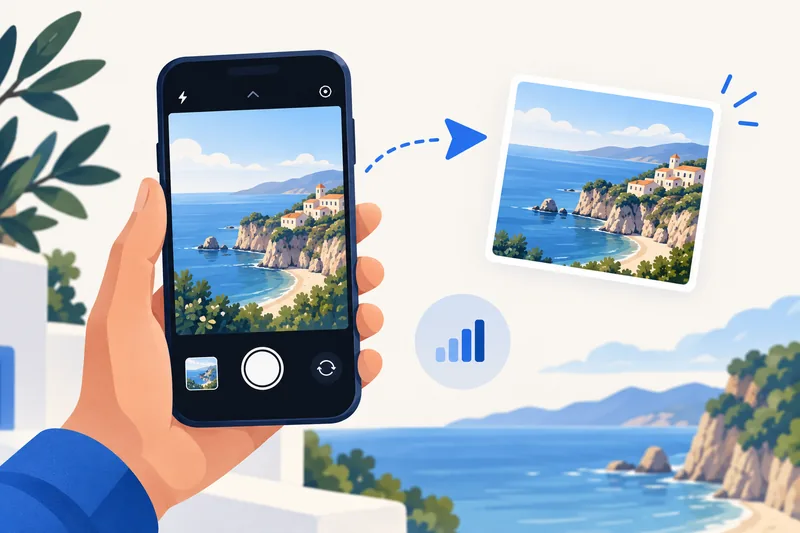
| Sending one photo snap | ~1–2 MB | 500+ snaps |
| Sending one 10-second video snap | ~5 MB | about 200 snaps |
| Scrolling Stories, Spotlight, Discover | ~360–840 MB per hour | 1 h 15 min – 2 h 50 min |
| Voice call | ~30–90 MB per hour | 11–34 hours |
| Video call | plan with ~800 MB per hour | about 1 h 15 min |
Sources and caveats: the 360 MB an hour for scrolling is Firsty's estimate (June 2026) and 720 MB is Tech Advisor's 2022 test of mixed watching and snapping; both sit inside the 360–840 MB range that carrier StarHub publishes for TikTok with and without its data saver. Per-snap sizes are from Firsty and Roamless. Published video-call figures vary about tenfold, so we use the same planning rate as for any one-to-one video call. We found no reliable figure for Snap Map; it loads map tiles and friends' locations, so expect it to be light unless you browse Stories on the map.
Why watching costs more than sending
A snap you send is one small file. Opening Stories and Spotlight is a continuous stream of video clips, and the app loads upcoming ones before you tap them so they start instantly. That background loading is exactly what Data Saver switches off.
Snapchat compared with TikTok and Instagram
| App or activity | Data per hour | Source |
|---|---|---|
| Snapchat, chat and snaps | ~20–120 MB | Firsty, Roamless |
| Snapchat, Stories and Spotlight | ~360–840 MB | Firsty, Tech Advisor test |
| TikTok, default / Data Saver | ~840 / ~360 MB | StarHub |
| Instagram, Stories and Reels mix | ~600 MB | StarHub |
| Instagram, photo feed | ~120–150 MB | StarHub; our calculator |
| Google Maps navigation | 5–10 MB | Telstra, StarHub |
In short: as a messenger, Snapchat is light; as a video feed, it is as heavy as TikTok. See our guides on TikTok's data use and Instagram's data use for those apps in detail.
Need data for your trip? Compare eSIM plans by validity and data volume.
View eSIM plansHow to turn on Snapchat Data Saver (Travel Mode)
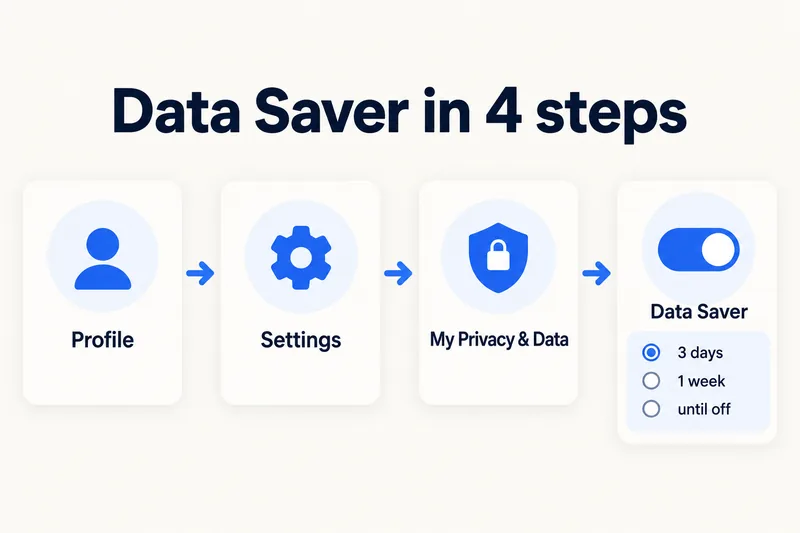
Snapchat renamed Travel Mode to Data Saver. According to Snapchat's help page, with it on you "just tap to load content like Snaps and Stories while using mobile data". The steps below follow that help page and are the same on iPhone and Android; Snapchat moves menu labels between app versions, so look for Data Saver in Settings if one is missing:
- Open your Profile and tap the gear icon for Settings.
- Scroll to App & Privacy and tap My Privacy & Data.
- Under Manage My Data, tap Data Saver.
- Switch it on and choose how long: 3 days, 1 week or Until Turned Off.
The one-week option fits a short trip neatly. Snapchat does not say how much data the mode saves, so check your usage after a day with it on.
Other ways to keep Snapchat's data down
Watch Spotlight and Stories on Wi-Fi
Since browsing video is where the data goes, keep chatting and snapping on mobile data and save the scrolling for hotel Wi-Fi in the evening.
Switch video calls to voice
A voice call uses roughly a tenth of a video call. On a weak or small plan, start with voice and turn the camera on only when it matters.
Limit background activity
On iPhone, turn off Background App Refresh for Snapchat (Settings, General, Background App Refresh) or turn on Low Data Mode for your travel line. On Android, open Snapchat in the app data usage screen and switch off Background data.
Check what Snapchat actually used
Reset your phone's data counter before the trip and check the Snapchat entry after the first day. Our guide to checking data usage on iPhone shows where to find it and how to read it.
How much data to buy if Snapchat comes along
Using our calculator's rates with a 20% buffer, a 7-day trip to Vietnam looks like this with Zyesims prices on 1 October 2026:
| How you use Snapchat | Per day | 7 days | Plan that fits | Price |
|---|---|---|---|---|
| Chat and snaps with Data Saver on, plus maps and messaging | ~0.45 GB | ~3.2 GB | Vietnam 5GB, 30 days | $7.49 |
| Typical use: an hour of social media, 15 minutes of Stories, a short video call | ~1.3 GB | ~9 GB | Vietnam 10GB, 30 days | $11.99 |
| As above plus 30 more minutes of Spotlight every day | ~1.8 GB | ~12.6 GB | Vietnam 20GB, 30 days | $19.99 |
To check your own mix, open the calculator with Vietnam and 7 days, or see all Vietnam eSIM plans.
Why Zyesims for social apps on the road
For a week in Vietnam, chat and snaps with Data Saver on fit the 5GB plan above, while daily Spotlight scrolling points to the 10GB or 20GB plan. Most fixed plans can be topped up on the same eSIM if you end up scrolling more than planned.
Frequently Asked Questions
How much data does Snapchat use in an hour?
It depends on what you do. Chatting and sending a few snaps uses roughly 20–120 MB an hour. Scrolling Stories and Spotlight is closer to short-video apps at about 360–840 MB an hour; one published test (Tech Advisor, 2022) measured 720 MB for an hour of mixed use. Snapchat does not publish an official figure.
How much data does sending a snap use?
A photo snap is roughly 1–2 MB and a 10-second video snap around 5 MB, according to third-party estimates. Text messages are tiny, a few kilobytes each. Watching snaps and Stories from others usually costs more than sending your own.
How long does 1GB last on Snapchat?
Roughly 1 hour 15 minutes to almost 3 hours of Stories and Spotlight, depending on how much loads automatically, or 8 hours and more of chatting and sending snaps. A video call uses 1GB in about 1 hour 15 minutes at our planning rate of ~800 MB an hour.
Is Snapchat Travel Mode still available?
Yes, under a new name. Snapchat now calls it Data Saver, also known as Travel Mode. It is in Settings, App & Privacy, My Privacy & Data, and you can keep it on for 3 days, 1 week or until you turn it off.
Does Snapchat use more data than TikTok or Instagram?
Chatting and sending snaps uses less than scrolling any video feed. Scrolling Stories and Spotlight lands in the same range as TikTok (about 840 MB an hour by default) and Instagram Reels. With Data Saver on, Snapchat stops loading content automatically on mobile data, which cuts usage further.
Keep reading
- Best eSIM for Vietnam in 2026: Plans, Networks and Real Prices Compared
- Fair Usage Policy on Unlimited eSIMs: Daily Caps & Throttling
- What Is Data Roaming? 2026 Costs and Cheaper Alternatives
- Can You Hotspot with an eSIM? Limits, Data Use and Fixes for Travelers
- How to Buy an eSIM Online: A Simple Guide for Travelers

A travel and tech enthusiast who loves to wander and discover new places. Mihi writes Zyesims' guides to eSIMs and mobile data abroad, built from carriers' and app makers' own documentation, published plan terms and Zyesims' current plan data — with sources named in each article. Mihi also writes about travel at MihiTravel and Notemeeting.
Ready for your next trip?
Choose the right eSIM, get your QR code by email, and connect when you land — coverage in 200+ countries.