Russia eSIM 24-Hour Data Block: Why It Happens and How to Lift It (2026)

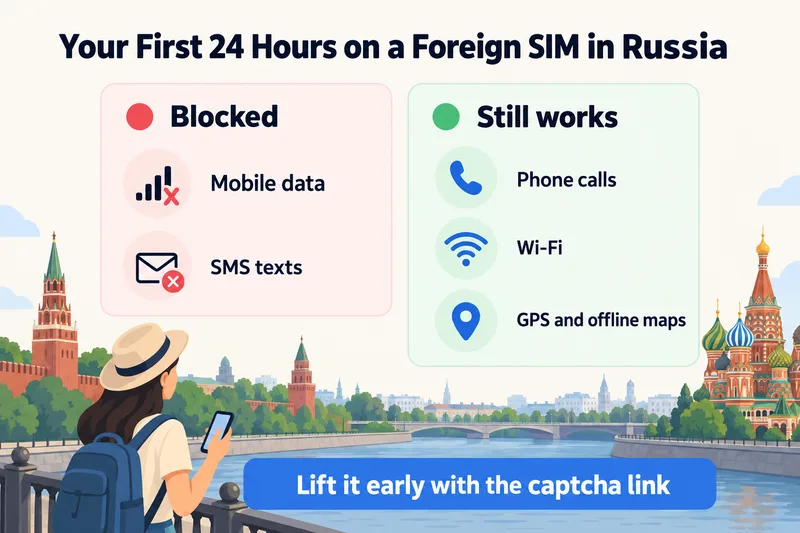
Since October 6, 2025, Russian networks block mobile data and SMS for 24 hours on every foreign SIM and eSIM the first time it connects. Calls and Wi-Fi keep working. You do not have to wait the full day: the network texts you a captcha link, and with Wi-Fi and VPN switched off, solving it usually brings data back within a few minutes.
So if your travel eSIM shows bars but nothing loads after you land in Moscow or St Petersburg, the eSIM is very likely fine. This guide explains how the block works, how to lift it, what triggers it again, and the bigger 2026 changes that matter once your data is back. Facts were checked against operator notices and Russian press on October 6, 2026.
What the 24-hour block is, and what still works
Russian mobile operators call it a cooling period. When a SIM that belongs to a foreign operator registers on MTS, MegaFon, Beeline or T2 (formerly Tele2), the network holds back mobile internet and text messages for 24 hours. It does not matter whether the SIM is a physical card from your home carrier, a roaming SIM or a travel eSIM you installed from a QR code. Any number that shows up in Russia as roaming gets the same treatment.
The block sits on the Russian network, not on your phone or your plan. That is why reinstalling the eSIM or buying a different one does not help. It is also why your phone can look completely normal, with the operator name and full signal bars, while every app says it is offline.
| Service | First 24 hours | After the block lifts |
|---|---|---|
| Mobile data | Blocked | Works, with Russian filtering (see below) |
| SMS (texts, bank codes) | Blocked, except the operator's captcha text | Works if your plan includes SMS |
| Normal phone calls | Work if your plan includes voice | Work |
| Wi-Fi (hotel, airport, café) | Works, but public hotspots may need an SMS login | Works |
| GPS and offline maps | Work, with maps downloaded in advance | Work |
Most travel eSIMs, including Zyesims Russia plans, are data-only. They have no phone number for calls, so during the block they are close to useless away from Wi-Fi. That is the main reason to lift the block early rather than sit it out.
How to lift the block in a few minutes
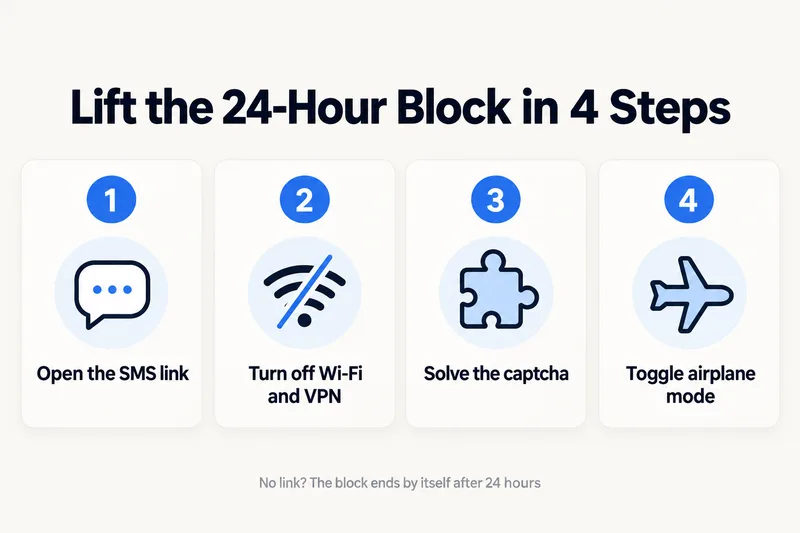
Since mid to late November 2025, foreign subscribers can end the block early by proving a person, not a device, is using the SIM. Beeline and MegaFon confirmed the option, and on December 1, 2025 Russia's Ministry of Digital Development described it as a way to make roaming more comfortable for foreigners. Roaming notices from foreign operators describe the same steps on Beeline, MegaFon and MTS:
- Wait for the SMS. Shortly after your phone registers on the network, the operator sends a text with a link to a captcha page. On Beeline the link starts with
balance.beeline.ru/guest/. - Turn off Wi-Fi and any VPN. The link only opens over that operator's mobile network. It is zero-rated, which means it loads even though the rest of your data is blocked.
- Solve the captcha. On Beeline it is five digits; other networks use a short picture or slider puzzle. You get a few attempts.
- Toggle airplane mode on and off. A second SMS usually confirms the restriction is gone. Reconnecting makes the phone pick up data straight away.
The unblock applies to that SIM on that device. If you travel with two phones or two SIMs, each one goes through the captcha separately.
If the captcha SMS never arrives
Travelers on data-only eSIMs have reported receiving the operator's text, because it comes from the Russian network rather than from your eSIM provider. That is not guaranteed for every profile. Give it 20 to 30 minutes with mobile data on and Wi-Fi off. If nothing arrives, or the page will not load, the block still ends on its own 24 hours after registration. Meanwhile, rely on hotel Wi-Fi and the offline tools covered in the checklist below.
The notices name Beeline, MegaFon and MTS as the networks sending the link. We found no confirmation that T2 sends it to foreign SIMs. Zyesims Russia plans can use both T2 and Beeline, so if your phone sits on T2 and no link arrives, switch manually to Beeline and wait for the text there. Switching networks restarts the 24-hour countdown, so only do it if no link has come.
Lock your phone to one network
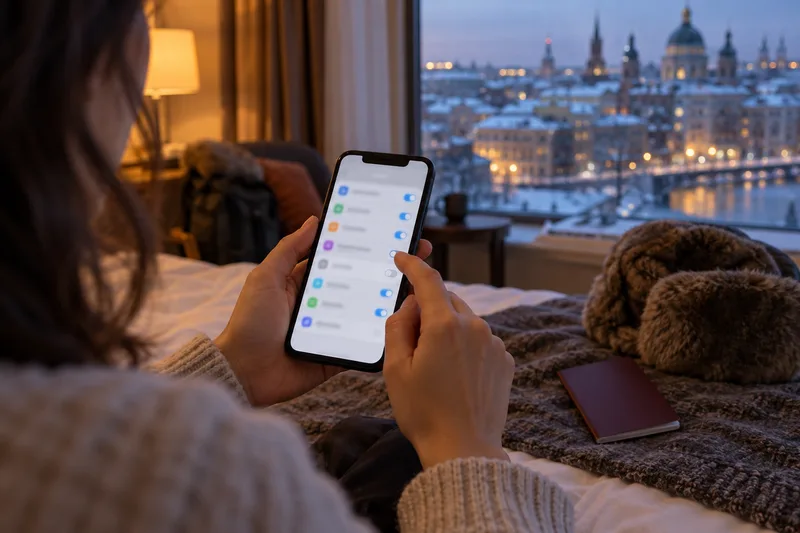
Many travel eSIMs, including ours, can connect to more than one Russian operator. That is normally a strength, but under this rule a hop from one network to another restarts the timer. Operators therefore recommend turning off automatic network selection and picking one network by hand. On iPhone, go to Settings, Mobile Data, your travel eSIM, Network Selection. On Android, look under SIM settings, Mobile network, Network operators. If your eSIM is not connecting at all, see our guide to fixing an eSIM with no service first, because that is a different problem.
Need data for your trip? Compare eSIM plans by validity and data volume.
View eSIM plansWhat makes the block come back
Clearing the block once does not always mean you are done for the trip. Operator notices list these triggers:
- Three days without activity. If the SIM is not used for 3 days after the block lifts, it is applied again for 24 hours. Leaving the eSIM switched off while you rely on hotel Wi-Fi can cause this.
- Switching to another Russian network. Within the first 24 hours this restarts the countdown. Within 72 hours of clearing the block, moving to another network and back can put the block on again.
- Restarting the phone. At least one roaming partner, Malaysia's CelcomDigi, warns that a restart can reset the block. Avoid unnecessary restarts during the first day.
- Leaving Russia and coming back. Each new entry is a new registration, so expect a fresh block after a trip to Belarus, Kazakhstan or anywhere else.
Long overland journeys are where travelers report repeats most often, because the phone may change networks between regions. Locking to one network and keeping a small amount of data use going every day is the simplest protection.
Why Russia blocks foreign SIMs: a short timeline
The official reason is security. Russia's Ministry of Digital Development says SIM cards, including foreign ones, have been used to guide drones over mobile networks, and a 24-hour pause on new connections makes that harder. The rule grew out of a 2025 package of SIM controls and has been tightened several times since.
| Date | What changed |
|---|---|
| January 1, 2025 | Foreigners need biometrics, a Gosuslugi account and SNILS to buy a Russian SIM, with a limit of 10 cards per person |
| August 2025 | Voice and video calls on WhatsApp and Telegram restricted; Minister Maksut Shadayev proposes a cooling period for SIMs entering Russia |
| October 6, 2025 | 24-hour data and SMS block starts for all foreign SIMs and eSIMs; early rollout was messy, with some users blocked for longer |
| November 2025 | Same cooling period applied to Russian SIMs returning from abroad or idle for 72 hours |
| November 18–21, 2025 | Captcha unblock opens to foreign subscribers on Beeline and MegaFon |
| February 2026 | WhatsApp blocked nationwide |
| February to March 2026 | Telegram throttled from February 10, then blocked for most users from mid-March; still unreliable in autumn 2026 |
| July 10, 2026 | Roaming traffic from foreign SIMs and eSIMs filtered under the same rules as Russian traffic |
Rules in Russia have changed every few months since 2025. Treat this table as the state of play on October 6, 2026, and check recent traveler reports in the week before you fly.
After the block: what your eSIM can and cannot do in Russia
Clearing the 24-hour block gives you ordinary mobile data. It does not give you unrestricted internet. A few other 2026 realities shape what you can actually use.
Blocked apps stay blocked, even on a foreign eSIM
Until mid-2026, many people used foreign SIMs in Russia precisely because roaming traffic was routed back through the home operator and skipped Russian filtering. That ended on July 10, 2026, when the Ministry of Digital Development confirmed that roaming traffic is now filtered by the same rules as local traffic. What counts is where you are, not where your SIM comes from. In practice, WhatsApp, Instagram, Facebook and X stay blocked, YouTube is throttled or blocked, Telegram is unreliable, and WhatsApp and Telegram calls have been restricted since August 2025. Services that pulled out of Russia on their own, such as Netflix, may still open on a foreign eSIM because Russia never blocked them.
Be careful with any seller that promises its eSIM skips the 24-hour block or unlocks blocked apps. Operator notices describe the block as applying to every roaming SIM at registration, and the July 2026 change removed the routing trick those claims relied on. If you need to reach family, agree on plain phone calls or an app that works in Russia before you go.
Regional shutdowns and whitelists
Separately from the cooling period, Russian authorities switch off mobile internet in specific regions, sometimes for hours and sometimes for weeks. During a shutdown, only a whitelist of approved services keeps working, typically Yandex apps, the Gosuslugi portal, VK, big marketplaces and Russian banks. Moscow saw a long mobile outage in March 2026, and St Petersburg and Leningrad Oblast were cut back to the whitelist on July 10, 2026. No eSIM gets around a shutdown, because the cut happens on the Russian network itself. Wi-Fi in hotels and cafés usually keeps working. Lists vary by region and operator, so treat any published whitelist as a guide.
Public Wi-Fi asks for a phone number
Russian law requires public Wi-Fi, including at airports, to identify users by phone number, usually with a code sent by SMS. On day one that text may not reach a foreign number, and a data-only eSIM has no number at all. Some airport networks offer a call-back login instead, which your home SIM can use because calls still work. Hotel Wi-Fi with a room password is the most reliable fallback, and a travel companion whose data already works can share a hotspot without any login.
Some Russian apps and services also ask for a Russian +7 number when you sign up, which no travel eSIM provides. Set up the accounts you plan to use, such as Yandex Go, before you leave home where possible.
Buy and install your eSIM before you fly
Visa and Mastercard cards issued outside Russia have not worked there since 2022, and Apple Pay and Google Pay do not work for foreign cards either. Buying or topping up an eSIM from inside the country can therefore be hard. Choose a plan with enough data for the whole stay, install it at home, and check how much you will need with our guide to how much data Google Maps uses, since maps and ride-hailing are what most visitors rely on.
Your options compared: travel eSIM, home roaming, Russian SIM or Wi-Fi
Every option that uses a foreign number faces the same 24-hour block. The difference is how much effort each one takes and what it costs.
| Option | 24-hour block? | Setup | Good for | Watch out for |
|---|---|---|---|---|
| Travel eSIM (for example Zyesims Russia) | Yes, can be lifted by captcha | Install at home in 5 minutes | Trips of a few days to a month | Data-only, no Russian number, cannot get around app blocks |
| Home carrier roaming | Yes, can be lifted by captcha | None, if your carrier still covers Russia | Keeping your own number for calls and call-back Wi-Fi logins | Russia is often excluded from travel passes and billed as expensive roaming; check your carrier first |
| Russian SIM card | No, it is local | Biometrics, Gosuslugi and SNILS; often about a week | Long stays, residents | Paperwork, limit of 10 SIMs per foreigner, regional shutdowns still apply |
| Wi-Fi only | Not relevant | None | Short stays with a fixed itinerary | No connection in taxis, on the street or during transfers |
For most visitors staying a week or two, a travel eSIM installed before departure plus the captcha on arrival is the least effort. If you are keeping your home SIM active for bank codes, check its roaming charges first. Our guide on turning off data roaming shows how to keep the home line on for texts without paying for data.
Before you fly: a 10-minute checklist
The captcha usually solves the problem in minutes, but it helps to arrive ready for a Wi-Fi-only first hour, or a full day if the link never comes.
- Install the eSIM at home and leave it switched off until you land. Installing early does not start the 24-hour countdown; registering on a Russian network does.
- Download offline maps for every city on your route. GPS works without data, so your position still shows on an offline map.
- Save bookings offline: hotel address in Russian and English, train and flight tickets, visa or e-visa, insurance.
- Download the Russian offline pack in your translation app.
- Arrange the first ride: a hotel transfer or an official taxi desk, rather than counting on airport Wi-Fi, which may need an SMS code you cannot receive yet.
- Print backup codes for email and bank two-factor logins, since SMS codes to your home number are blocked during the first 24 hours too.
- Carry enough cash, as foreign cards do not work in Russia.
- Tell family which app or number you will use, since WhatsApp and Telegram may not work.
Using a Zyesims eSIM in Russia
Our Russia eSIM plans run on T2 and Beeline, and the plan's validity starts when it first connects to a network rather than on the day you buy it. Prices on October 6, 2026 start at $2.69 for 1GB over 7 days. A 5GB, 30-day plan costs $8.99, 10GB for 30 days is $16.49, and a daily plan with 1GB a day costs $1.99 per day, slowing to 512 kbps once the day's 1GB is used.
To be clear about the limits: our Russia plans are data-only, they face the 24-hour block like every other foreign eSIM, and since July 10, 2026 they do not get around Russian app blocks. On a short plan, lifting the block with the captcha matters, because the first day may count toward your validity. If you need help on arrival, email us as soon as you have any connection and we will walk you through it.
Frequently Asked Questions
Why is my eSIM not working in Russia?
If you see signal bars but no data, it is almost always the 24-hour block. Since October 6, 2025, Russian networks cut mobile data and SMS on every foreign SIM and eSIM for the first 24 hours after it registers. Calls still work. You can lift the block early with the captcha link the network sends by SMS, or wait for it to end on its own.
Can I remove the 24-hour block early?
Yes. Since late November 2025, Beeline, MegaFon and MTS send foreign SIMs an SMS with a captcha link. Turn off Wi-Fi and any VPN, open the link over mobile data, solve the captcha, then toggle airplane mode. Data usually returns within minutes. If the link fails or never arrives, the block lifts by itself after 24 hours.
Does WhatsApp work in Russia with an eSIM?
No, not reliably. Roskomnadzor blocked WhatsApp in February 2026, and since July 10, 2026 traffic from foreign SIMs and eSIMs is filtered the same way as Russian traffic, so a travel eSIM no longer gets around the block. Telegram has also been heavily restricted since March 2026. Plan to use phone calls or apps that work in Russia.
Will the 24-hour block happen again during my trip?
It can. Operator notices say the block comes back if the SIM shows no activity for 3 days, and the countdown restarts if your phone switches to a different Russian network. Leaving Russia and coming back also counts as a new registration. Keep mobile data on and lock your phone to one network to avoid repeats.
Does the 24-hour block affect Russian SIM cards too?
Yes. Since November 2025, Russian SIM cards get the same 24-hour cooling period when they return from roaming abroad or after 72 hours without activity. Russian subscribers lift it the same way, with a captcha or a call to their operator. The rule is not aimed only at tourists.
Keep reading

A travel and tech enthusiast who loves to wander and discover new places. Mihi writes Zyesims' guides to eSIMs and mobile data abroad, built from carriers' and app makers' own documentation, published plan terms and Zyesims' current plan data — with sources named in each article. Mihi also writes about travel at MihiTravel and Notemeeting.
Ready for your next trip?
Choose the right eSIM, get your QR code by email, and connect when you land — coverage in 200+ countries.