How Much Data Does Instagram Use? Feed, Reels and Live per Hour (2026)

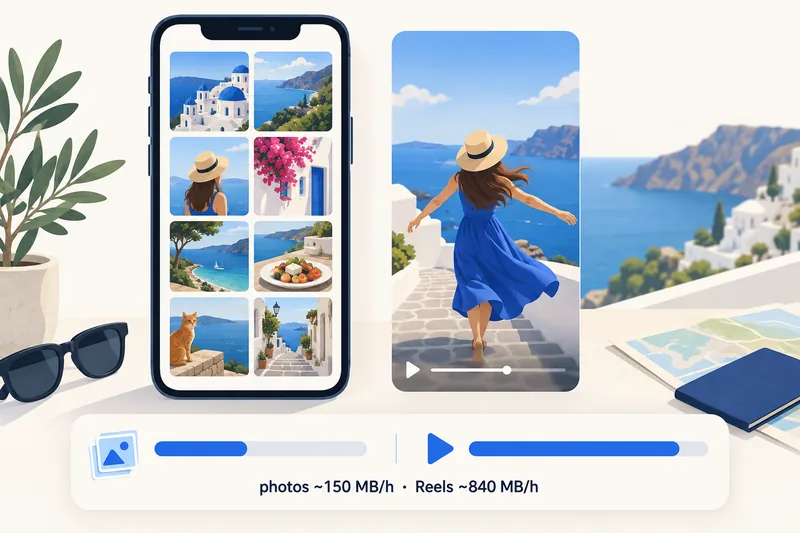
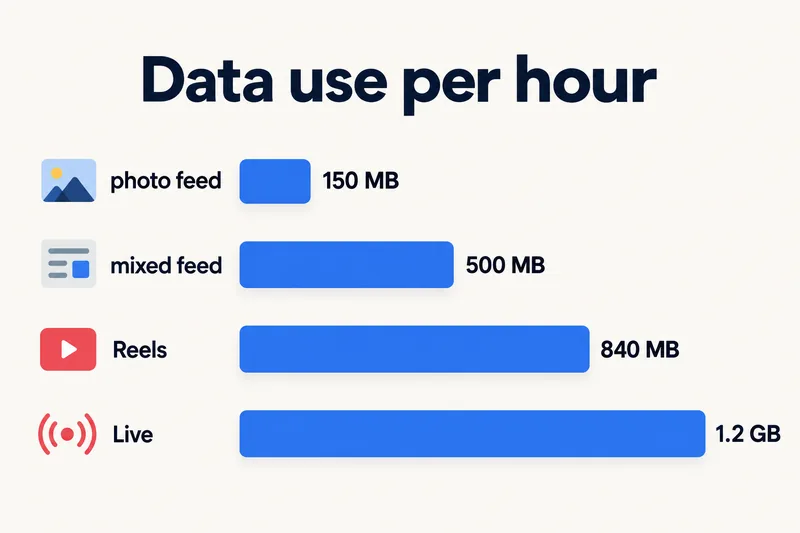
An hour of Instagram uses roughly 150 MB if you mostly look at photos and around 500–600 MB for a normal mix of feed, Stories and some video. Reels-heavy scrolling is closer to TikTok at 600–840 MB an hour, and watching Live can reach about 1.2 GB an hour. In practice, 1GB lasts about two hours of everyday Instagram use.
The big variable is video. Photos are small; autoplaying clips and Reels are what move the number. Below are the figures by activity, why different websites quote such different numbers, the setting that stops Instagram from preloading video on mobile data, and how much data to buy for a trip.
Instagram data usage by activity
Instagram does not publish data figures. The table uses the rates from our travel data calculator for social apps, checked against carrier StarHub's published estimates (page dated March 2026, checked on 1 October 2026).
| What you are doing | Data per hour (estimate) | 1GB lasts about |
|---|---|---|
| Feed, mostly photos, little autoplay | 120–150 MB | 7–8 hours |
| Typical mix: feed, Stories, some video | ~500 MB (up to ~600) | 2 hours |
| Mostly Reels | 600–840 MB | 1 h 10 min – 1 h 40 min |
| Watching Instagram Live | ~1.2 GB | 50 minutes |
| Posting a photo | ~2 MB per post (up to ~5 MB at highest quality) | about 200–500 posts |
Sources for the bands: 120 MB (photo feed), 600 MB (Stories and Reels mix) and 1.2 GB (Live) are StarHub's; 150 MB and 500 MB are the "autoplay limited" and "mixed feed" rates our calculator uses; 840 MB is StarHub's figure for short-video feeds like TikTok, which Reels resemble. The photo upload size is our own estimate.
Why websites quote such different numbers
Search this question and you will see an hour of feed quoted anywhere from 60 MB to 900 MB, and Reels from 120 MB to over 1 GB. Most of those pages give no source. The spread comes from a few real factors:
- How much video is in your feed. A feed of friends' photos and a feed of creator videos are different apps as far as data goes.
- Preloading. Instagram loads upcoming videos and Stories before you reach them so they play instantly. That data is spent even if you scroll past.
- Screen and network. Larger, sharper screens and fast 5G get higher-quality images and video.
- Data saver settings. With Instagram's data saver on, videos stop loading in advance on mobile data, which cuts the heavy end of the range.
Instagram compared with TikTok, YouTube and other apps
| App or activity | Data per hour | Source |
|---|---|---|
| Instagram, photo feed | 120–150 MB | StarHub; our calculator |
| Instagram, mixed feed and Stories | 500–600 MB | StarHub; our calculator |
| TikTok, default quality | ~840 MB | StarHub |
| YouTube with Data saver | ~225–300 MB | StarHub; Netflix Help (same quality tier) |
| YouTube 720p | ~1.8 GB | StarHub |
| Video call, 1-to-1 | 540 MB–1.5 GB | Zoom, Google Meet, Microsoft Teams |
| Google Maps navigation | 5–10 MB | Telstra, StarHub |
So Instagram sits in the middle: lighter than video streaming, heavier than almost everything else. If TikTok is also on your phone, see how much data TikTok uses; Snapchat users can compare with Snapchat's data use.
Need data for your trip? Compare eSIM plans by validity and data volume.
View eSIM plansHow to make Instagram use less data
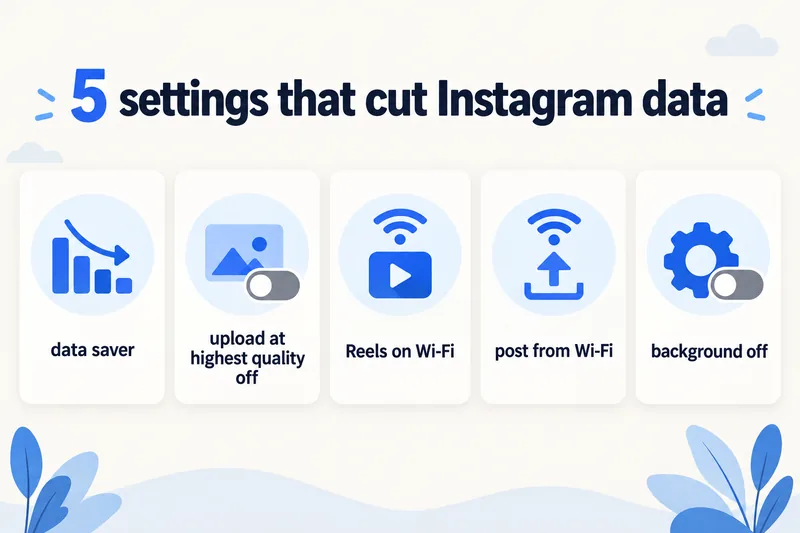
1. Turn on Instagram's data saver
- Open your profile and tap the menu (☰) at the top right.
- Open Data usage and media quality (in the settings list, under your app and media settings).
- Turn on Data saver on Android or Use less mobile data on iPhone.
Instagram renames its settings menu from time to time, so the labels above may differ slightly on your version, but the option lives in the same "data usage and media quality" screen. With it on, videos stop preloading on mobile data and start loading when you tap them.
2. Turn off "Upload at highest quality"
The same screen has an Upload at highest quality switch. Turned off, Instagram compresses photos and videos before sending them, which makes uploads smaller and faster on a travel connection. On Android you may also see a High-resolution media option; set it to Wi-Fi only.
3. Save Reels and Live for Wi-Fi
Reels and Live are where most of Instagram's data goes. Watching them on hotel Wi-Fi in the evening and sticking to the feed and DMs during the day can cut your Instagram data a lot, often by half or more if Reels were most of your scrolling.
4. Post from Wi-Fi when you can
Instagram keeps drafts, so you can edit a post or Reel on the go and share it once you are back on Wi-Fi.
5. Limit background activity
On iPhone, turn off Background App Refresh for Instagram (Settings, General, Background App Refresh), or turn on Low Data Mode for your travel line. On Android, open Instagram in the app data usage screen and switch off Background data.
How to check how much data Instagram has used
Your phone counts data per app: on iPhone under Settings, Cellular (tap Reset Statistics before your trip), on Android in the mobile data usage screen (Pixel: Settings, Network & internet, SIMs; Samsung: Settings, Connections, Data usage).
Checking after the first day of a trip is the most useful habit: multiply that day's figure by your remaining days and you will know early whether your plan will last. Our guide on managing data usage on iPhone goes through every setting on that screen.
How much data you need for a trip if you use Instagram
Using our calculator's rates (with a 20% buffer and a little background data included), here is what typical Instagram habits add up to over a 7-day trip, with Zyesims plans for Thailand priced on 1 October 2026:
| Your Instagram habit | Per day | 7 days | Plan that fits | Price |
|---|---|---|---|---|
| 30 minutes of feed, maps and messaging otherwise | ~0.4 GB | ~3 GB | Thailand 5GB, 30 days | $5.49 |
| An hour of feed and Stories, 15 minutes of Reels, a short video call | ~1.3 GB | ~9 GB | Thailand 10GB, 30 days | $8.99 |
| Two hours of feed plus an hour of Reels | ~2.6 GB | ~18 GB | Thailand 20GB, 30 days | $13.99 |
For the heaviest pattern, Thailand Unlimited Plus (3GB a day at full speed, then slower; the provider doesn't publish the exact reduced speed) costs $22.49 for 7 days, so the 20GB plan is cheaper unless you also want room for video calls or hotspot, which counts toward the same daily allowance. If your habits are different, you can estimate your own total for Thailand or another destination, and see all Thailand eSIM plans.
Why Zyesims for social-heavy trips
For a social-heavy week in Thailand, the table above is the short version: 10GB covers an hour of feed and Stories a day, and 20GB covers two hours plus an hour of Reels, for less than Unlimited Plus. Each plan page lists its data, validity and any daily speed limit before you pay; check that your phone is on our eSIM compatible devices list first.
Frequently Asked Questions
How much data does 1 hour of Instagram use?
Between roughly 150 MB and 600 MB for a normal mix of feed and Stories, depending on how much video autoplays. An hour that is mostly Reels lands around 600–840 MB, and watching Live can reach about 1.2 GB. Instagram does not publish official figures, so these are carrier-based estimates.
How long does 1GB last on Instagram?
About 7–8 hours if you mostly look at photos with autoplay limited, around 2 hours of a typical mixed feed, a little over an hour of Reels, and under an hour of Live. Uploading photos and videos comes on top of that.
Does Instagram use more data than TikTok or YouTube?
A photo-heavy Instagram feed uses much less than TikTok, which averages about 840 MB an hour. Reels come close to TikTok. YouTube depends on quality: about 300 MB an hour with Data saver, but around 1.8 GB at 720p, which is more than an hour of Instagram.
Does Instagram use data in the background?
A little. With Background App Refresh (iPhone) or background data (Android) allowed, Instagram can refresh your feed and prepare content before you open it. You can switch that off per app in your phone settings; Instagram still works normally when it is open.
How much data does posting on Instagram use?
A photo post typically takes about 2 MB to upload, and up to around 5 MB at the highest quality. Videos and Reels are much larger and grow with length and resolution, so post longer clips on Wi-Fi or turn off the highest-quality upload setting while you travel.
Keep reading
- Fair Usage Policy on Unlimited eSIMs: Daily Caps & Throttling
- What Is Data Roaming? 2026 Costs and Cheaper Alternatives
- Can You Hotspot with an eSIM? Limits, Data Use and Fixes for Travelers
- How to Buy an eSIM Online: A Simple Guide for Travelers
- What Is an eSIM? A Complete Beginner's Guide for Travelers (2026)

A travel and tech enthusiast who loves to wander and discover new places. Mihi writes Zyesims' guides to eSIMs and mobile data abroad, built from carriers' and app makers' own documentation, published plan terms and Zyesims' current plan data — with sources named in each article. Mihi also writes about travel at MihiTravel and Notemeeting.
Ready for your next trip?
Choose the right eSIM, get your QR code by email, and connect when you land — coverage in 200+ countries.