Wi-Fi in Russia for Tourists (2026): Free Networks, Login Rules and Day-One Tips

Free Wi-Fi is easy to find in Russia's big cities, in the Moscow metro, on city streets and at airports, but Russian law requires every public hotspot to identify you, usually by phone number. A foreign number is sometimes accepted, but SMS codes will not reach a foreign SIM in its first 24 hours in Russia, so pick the call-back login where one is offered. Hotel Wi-Fi with a room password is the most dependable option, and no Wi-Fi gets around Russia's app blocks.
Most guides either promise "free Wi-Fi everywhere" or tell you to forget about it. The truth is in between, and it depends on how a network checks your identity. This guide explains the rule, what works on your first day, the main networks at airports, in the metro and in hotels, and what Wi-Fi cannot fix in 2026. Everything was checked on October 10, 2026.
Why Russian Wi-Fi asks for your phone number
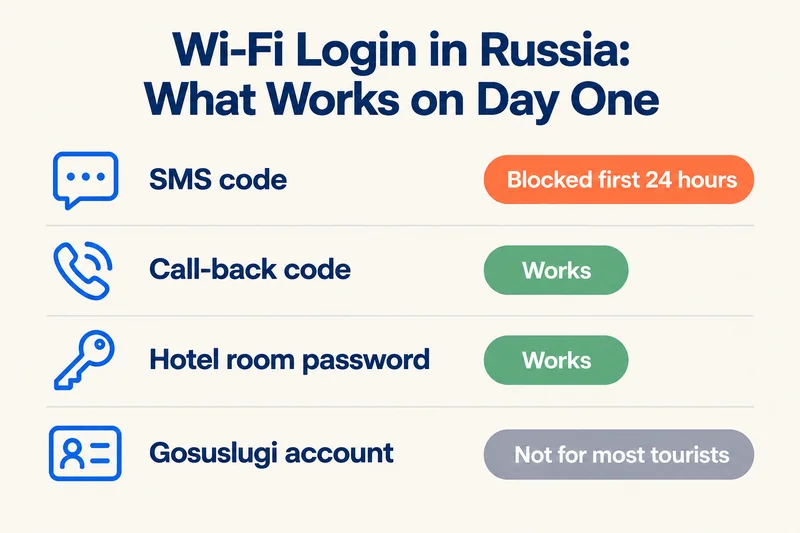
Since 2014, two government decrees (No. 758 and No. 801) have required operators of public Wi-Fi to identify every user. The allowed methods are a phone number confirmed by a code, a Gosuslugi government account, or a name checked against an ID document. Social-network logins are not among the allowed methods, and operators must keep user records, typically for at least six months.
The duty falls on the telecom company running the hotspot, which is why most cafés, malls, stations and airports show a login page asking for a number. Private Wi-Fi with a simple password, which many hotels and apartments use, works differently: you get the password at check-in and connect like anywhere else, because the hotel has already registered your passport.
The day-one problem: SMS codes and the 24-hour block
Here is the catch most guides miss. Since October 6, 2025, every foreign SIM and eSIM loses mobile data and SMS for the first 24 hours after it connects to a Russian network. Calls still come through, and in practice the block sometimes lasts longer than 24 hours. That means a Wi-Fi login that texts you a code will often fail on your first day, exactly when you need Wi-Fi most.
| Login method | Foreign SIM, first 24 hours | Foreign SIM, after the block |
|---|---|---|
| SMS code to your number | Usually fails: SMS is blocked | Sometimes works, if the network accepts foreign numbers |
| Call-back (you receive a call; the last 4 digits are your code) | Works, because incoming calls are not blocked | Works, if the network accepts foreign numbers |
| Gosuslugi account | Not available to most tourists | Not available to most tourists |
| Hotel or apartment password | Works | Works |
Two practical points follow. Keep your home SIM switched on in the phone, even if you use a travel eSIM for data, because a data-only eSIM has no phone number to receive a code or call. And clear the 24-hour block as soon as you land; our guide to Russia's 24-hour data block shows how to do it with the operator's captcha link.
Need data for your trip? Compare eSIM plans by validity and data volume.
View eSIM plansFree Wi-Fi network by network
Login rules differ between networks, and even Moscow's own official websites disagree on whether foreign numbers are accepted: the city tourism portal says they are, while the city government's English help page and the city transport site say you need a Russian number. Treat the table as a guide and expect to try more than once.
| Where | Network | How you log in | Foreign number? |
|---|---|---|---|
| Moscow metro, MCC, MCD, Aeroexpress | MT_FREE | Call-back or SMS; ads shown | Not guaranteed; number field defaults to +7 |
| Moscow streets, parks, museums | Moscow_WiFi_Free | SMS, mos.ru or Gosuslugi account | Official sources disagree |
| St Petersburg city | SPB_FREE | SMS or Gosuslugi | Not stated |
| Sheremetyevo airport (Moscow) | _Sheremetyevo Wi-Fi | Phone number only | Not confirmed |
| Pulkovo airport (St Petersburg) | OBIT free Wi-Fi | Call-back to your number in +country format | Yes, officially accepted |
| Vnukovo and Domodedovo (Moscow) | Airport networks | Phone-based login | Unconfirmed; check on site |
| Long-distance trains | RZD onboard portal | SMS, Gosuslugi, or passport with ticket and seat number | Passport option is your best bet; often paid, depending on train and class |
| Hotels and apartments | Private network | Room or apartment password | Not needed |
Moscow metro and city Wi-Fi
MT_FREE covers the Moscow metro, the MCC and MCD rail lines and Aeroexpress trains. Choose the call option rather than SMS when it is offered: you receive a call, do not answer, and type the last four digits of the calling number. If the login does not stick, turn off your phone's private or random Wi-Fi address (MAC address) for that network, and expect a few ads before you connect. Both city networks may ask you to log in again every few months. Moscow_WiFi_Free adds more than 29,000 access points in parks, libraries, museums, bus stops and streets in the centre, and on April 29, 2026 MTS launched another free network, MTS_WiFi_Free, inside the Third Ring, with login through an MTS ID account.
Airports
Pulkovo in St Petersburg is the easiest: its official page says numbers from foreign operators are accepted, and the code comes by call-back, so it works even on day one. At Sheremetyevo the official network is "_Sheremetyevo Wi-Fi", with phone-number login only, and travelers report problems with foreign numbers. Ignore networks called "SVO_Free" or similar: in 2025 a fake hotspot with that name was used to steal Telegram accounts. For Vnukovo and Domodedovo we could not confirm the current login rules, so plan as if you will not get online at the airport.
Trains, hotels and cafés
Long-distance RZD trains run an onboard portal that offers a login with your passport, ticket and seat number, which is the most realistic option for a foreign visitor; access is often paid, depending on the train and class, and Wi-Fi drops between cities. Hotels and rented apartments usually give you a password at check-in and are the most reliable connection you will have. Cafés and malls mostly use operator hotspots with SMS login, so success with a foreign number varies; small cafés sometimes just post a password on the wall.
Wi-Fi does not unblock apps
Russia's filtering equipment sits at every internet provider, so the same blocks apply on Wi-Fi as on mobile data. WhatsApp has been blocked since February 2026, Telegram since spring 2026, Instagram and Facebook since 2022, and YouTube is heavily throttled. Many VPN services are blocked too: Russia's regulator had restricted 469 of them by the end of February 2026. Our guide to whether WhatsApp works in Russia lists the messaging apps that still work.
When mobile internet is switched off
Since 2025, Russian authorities have repeatedly cut mobile internet in specific regions, leaving only a whitelist of approved services such as Yandex, VK and Russian banks. These shutdowns mainly target mobile networks, so hotel Wi-Fi and other fixed-line connections usually keep working, which makes your hotel the best place to plan the day. Fixed lines are not immune, though: widespread home internet outages were reported in Moscow on May 2, 2026, although the cause was unclear. Download offline maps and save bookings before you go out.
Staying safe on public Wi-Fi
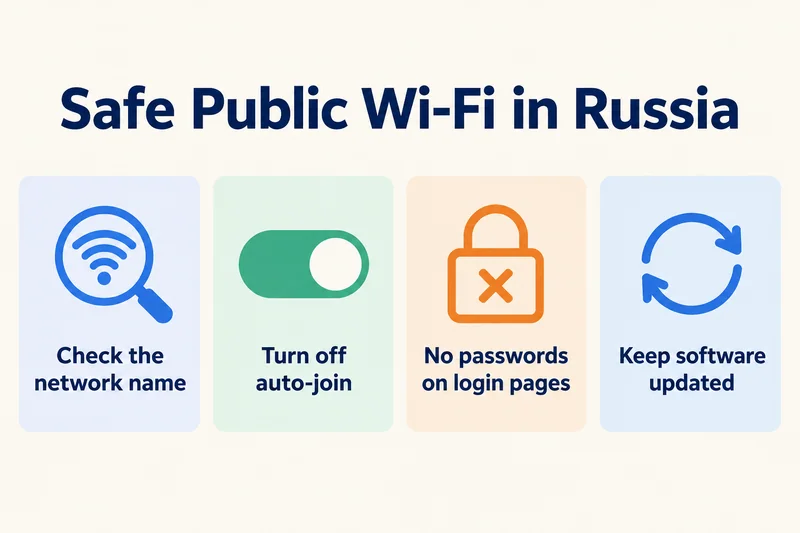
- Check the network name against official signs; fake hotspots with airport-style names exist.
- Turn off auto-join for open networks so your phone does not connect to look-alikes.
- Never enter banking passwords or messenger codes on a Wi-Fi login page; a real login only asks for your phone number and a code.
- Use apps that encrypt traffic and keep your phone's software up to date.
Don't rely on Wi-Fi alone
Wi-Fi in Russia is a useful backup, not a plan. You will need data in taxis, on the street and the moment you land, and getting a Russian SIM now requires SNILS, a Gosuslugi account and biometrics, as our Russia SIM card guide explains. Most visitors install a travel eSIM at home instead. Our Russia eSIM plans run on T2 and Beeline, from $2.69 for 1GB over 7 days, with a 5GB, 30-day plan for $8.99. Like every travel eSIM, they are data-only, face the same 24-hour block and do not unblock blocked apps, so keep your home SIM active for calls and Wi-Fi login codes.
Frequently Asked Questions
Is there free Wi-Fi in Russia for tourists?
Yes. Moscow has free Wi-Fi in the metro (MT_FREE) and at more than 29,000 city access points, St Petersburg has SPB_FREE, and airports offer free networks. By law you must log in with a phone number or another form of ID, and acceptance of foreign numbers varies by network.
Can I use Moscow's free Wi-Fi with a foreign phone number?
Sometimes. Moscow's tourism portal says foreign numbers are accepted, but the city's English help page says a Russian number is needed, and the MT_FREE login field defaults to +7. Choose the call-back option where available, and remember that SMS codes will not reach a foreign SIM during its first 24 hours in Russia.
Why am I not getting the Wi-Fi SMS code in Russia?
Most likely because of the 24-hour block: since October 2025, foreign SIMs cannot receive SMS for their first 24 hours on a Russian network. Use a call-back login if offered, clear the block with your operator's captcha link, or use hotel Wi-Fi. A data-only travel eSIM has no number, so the code must go to your home SIM.
Does Moscow airport Wi-Fi work without a Russian number?
It is not guaranteed. Sheremetyevo's official network logs you in by phone number only, and travelers report problems with foreign numbers. Pulkovo in St Petersburg officially accepts foreign numbers by call-back. Do not plan to book your first taxi on airport Wi-Fi; arrange a transfer or make sure you have mobile data.
Does Wi-Fi in Russia unblock WhatsApp or Telegram?
No. The same filtering applies to Wi-Fi and mobile data, so WhatsApp, Telegram, Instagram and Facebook stay blocked on hotel, café and public Wi-Fi. Many VPN services are blocked as well. Use ordinary calls, iMessage or WeChat to stay in touch.
Do hotels in Russia require a phone number for Wi-Fi?
Usually not. Most hotels and rented apartments give you a password at check-in, since they have already registered your passport. Some hotels use an operator login page instead; if it asks for an SMS code you cannot receive, ask reception for an access code.
Keep reading
- Russia eSIM 24-Hour Data Block: Why It Happens and How to Lift It (2026)
- Does WhatsApp Work in Russia? 2026 Status, Telegram and What to Use Instead
- Russia SIM Card for Tourists in 2026: Local SIM Rules, Operators and eSIM Prices
- Can You Hotspot with an eSIM? Limits, Data Use and Fixes for Travelers
- How to Buy an eSIM Online: A Simple Guide for Travelers

A travel and tech enthusiast who loves to wander and discover new places. Mihi writes Zyesims' guides to eSIMs and mobile data abroad, built from carriers' and app makers' own documentation, published plan terms and Zyesims' current plan data — with sources named in each article. Mihi also writes about travel at MihiTravel and Notemeeting.
Ready for your next trip?
Choose the right eSIM, get your QR code by email, and connect when you land — coverage in 200+ countries.