Best eSIM USA World Cup 2026: Plans, Prices and Setup Compared

Compare the best eSIMs for the USA during World Cup 2026: real per-GB prices, USA-only vs North America plans, stadium data tips, and 5-minute setup.
Quick answer: for most fans still flying in for the last matches, a USA eSIM in the 10–20GB range is the sweet spot. Zyesims' USA 20GB / 30-day plan costs $17.99, about $0.90 per GB, and a realistic match day burns 1–2GB. The tournament runs through the final at MetLife Stadium on 19 July 2026, and everything in this guide keeps working for regular USA trips after the confetti drops.
Searching for the best eSIM USA World Cup 2026 is not really about finding the cheapest line on a pricing page. You need data that works when you are pulling up a digital ticket at the gate, calling a ride from the airport, and coordinating with friends while 70,000 people around you try to do the same thing. This guide compares real plans and prices, explains USA-only vs North America coverage, and walks through the checks that prevent a dead phone on match day.
What Makes the Best eSIM for USA World Cup 2026?
The best eSIM is the one that fits your route, your data habits, and your phone, not the one with the loudest banner. For most travelers that means four things: solid coverage in your host cities, enough data for match days, hotspot support if you share with a laptop or a travel buddy, and validity that covers the whole trip rather than just the match window. For the record, Zyesims plans clear all four: hotspot sharing is enabled on every plan, and US coverage runs on 5G-capable networks such as AT&T and Verizon.
During a tournament, your phone becomes trip infrastructure. It is your ticket, your map, your translator, and your ride home after the stadium empties out. Judge any USA travel eSIM by practical use, not hype.
Why event travel is heavier than normal tourism
Regular tourism means maps, messaging, and a few searches a day. Match days add digital ticket checks, live location sharing with your group, refreshing ride-hailing apps while surge pricing cools off, restaurant waitlists, and a steady stream of photos and stories. A realistic all-in estimate for an active match day is 1–2GB, two to four times a normal travel day. Plan around that number and the sizing decision gets easy.
Where that data actually goes on a match day:
- Maps and navigation: 30–50 MB
- Ride-hailing (Uber/Lyft): 20–40 MB per session
- Group chats and messaging: 50–150 MB
- Social posts and stories: 200–500 MB
- Uploading match clips: 300 MB–1 GB
- Live streaming video: around 1 GB per hour
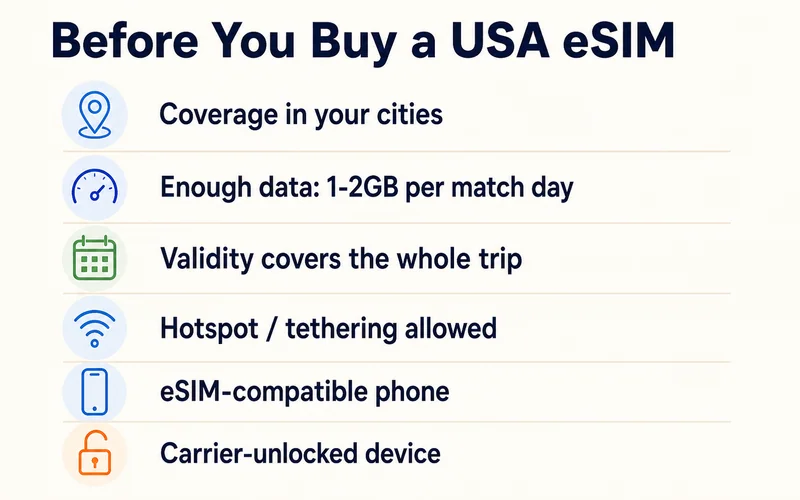
Must-check features before buying
- Coverage across your host cities, not just the first one you land in
- Data allowance sized for 1–2GB per match day plus normal days
- Validity that covers the full trip, including days before and after matches
- Hotspot support if a laptop or second phone rides on your data
- eSIM compatibility for your exact model — roughly iPhone XS, Galaxy S20, and Pixel 3 or newer; check our eSIM-compatible devices list if you are not sure
- Unlocked phone, because a carrier-locked device will fail at setup no matter how good the plan is
- Activation timing, so data is ready the moment you land
Best eSIM Types for Different World Cup Trips
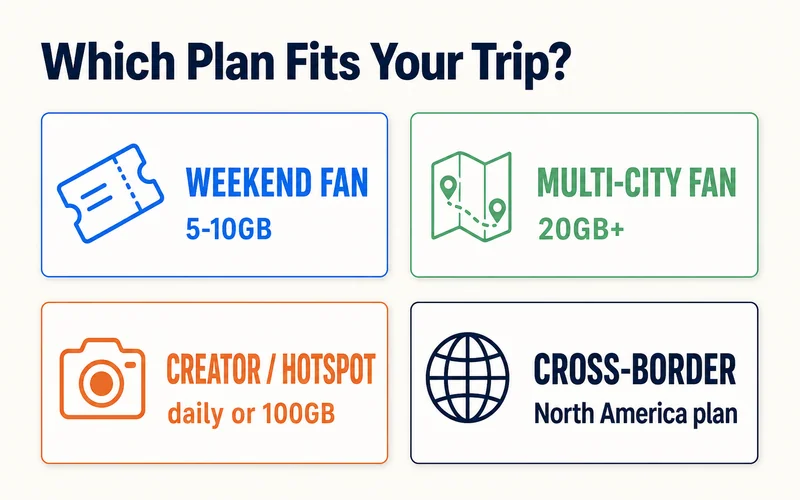
There is no single winner for every fan. Match the plan type to the trip.
Short match trip: one city, a few days
A fixed-data plan is the simplest buy and usually the best value. Maps, WhatsApp, tickets, and ride-hailing fit comfortably in a small allowance.
- Typical fit: 5–10GB for up to a week
- Zyesims example: USA 5GB, 30 days at $6.49, or 1GB for a weekend at $1.99
Multi-city tournament route
Following your team across several host cities means airports, train stations, and unfamiliar neighborhoods on repeat. Buy data headroom and longer validity instead of hunting the lowest sticker price.
- Typical fit: 20GB or more over 10–30 days
- Zyesims example: USA 20GB, 30 days at $17.99, or 50GB at $43.49 if you stream highlights nightly
Creators, remote workers, and hotspot users
Uploading video, working from the hotel, or feeding a laptop through your phone burns data fast. A daily-refresh plan removes the mental math: the allowance resets every day, so one heavy upload session cannot eat a whole trip's worth of data.
- Typical fit: daily plans from 1GB/day at $1.89 up to 5GB/day at $4.89
- Going all-in on the tournament? The dedicated FIFA plan: USA 100GB for 10 days at $104.99 covers even nightly full-match streaming
- Note: "unlimited" plans elsewhere often hide a Fair Usage Policy, a rule that slows your speed after heavy use. Fixed and daily plans state their numbers up front
USA plus Canada or Mexico
If you are entering through Toronto, adding a beach week in Mexico, or chasing knockout matches across borders, one North America eSIM saves you from juggling three profiles. Zyesims covers all three host countries on one plan, from 20GB for 30 days at $38.49.
Need data for your trip? Compare eSIM plans by validity and data volume.
View eSIM plansUSA-Only vs North America eSIM: Which Should You Choose?
Choose by route. Staying inside the States? USA-only wins on price. Crossing any border? Regional wins on convenience.
| Option | Best if | Zyesims price (30 days) | Trade-off |
|---|---|---|---|
| USA-only eSIM | Your whole trip stays in the US | 20GB for $17.99 (~$0.90/GB) | No coverage across borders |
| North America eSIM | You also visit Canada or Mexico | 20GB for $38.49 (~$1.92/GB) | Costs about double per GB |
Both beat classic roaming by a wide margin. Home-carrier roaming in the US commonly runs $5–12 per day, which is $150–360 over a month, before any speed caps. Browse all destinations on the Zyesims store, or jump straight to the USA, Canada, and Mexico pages.
Do You Need a US Phone Number?
A travel eSIM gives you data, not a US phone number, and for most fans that is all you need: maps, WhatsApp, iMessage, email, and ride-hailing all run over data. Two things are worth sorting out before you fly.
Keep your home SIM active for OTP codes. Your bank and your apps back home send verification codes to your existing number. On a dual-SIM phone, leave your home line switched on for calls and SMS while the eSIM carries data, so those codes still arrive. Turn the home line's data roaming off and you get the texts without the roaming bill.
When a US (+1) number actually helps. A few US services expect a local number: SMS verification for Uber, Lyft, or dating apps, and booking confirmations from OpenTable or Resy. If you rely on those, either keep your home number reachable for the SMS or add a separate US number product. Zyesims USIP plans do not include a phone number; what they add is a US IP address, which makes US banking, streaming, and store apps treat you as local — a different problem from the phone number, and the one most travelers actually hit.
Host Cities and Match-Day Connectivity
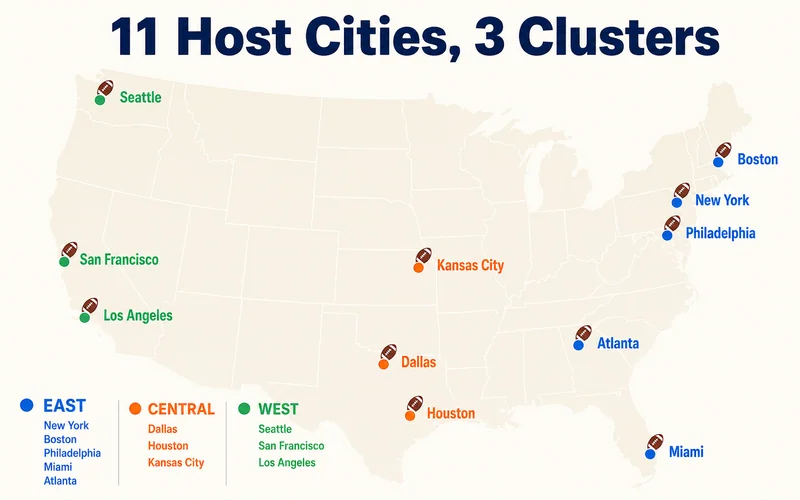
The tournament runs from 11 June to the final on 19 July 2026 and spans 16 host cities: 11 in the USA, 2 in Canada, and 3 in Mexico, with the opening match at Estadio Azteca in Mexico City and the final at MetLife Stadium in New Jersey. Think of the US cities in three clusters when planning travel legs:
- East: New York/New Jersey, Boston, Philadelphia, Miami, Atlanta
- Central: Dallas, Houston, Kansas City
- West: Seattle, San Francisco Bay Area, Los Angeles
Coverage inside those metro areas is strong on AT&T, T-Mobile, and Verizon, and all three have reportedly added capacity around host stadiums for the tournament. Crowds still win sometimes. Four habits keep a stadium day smooth:
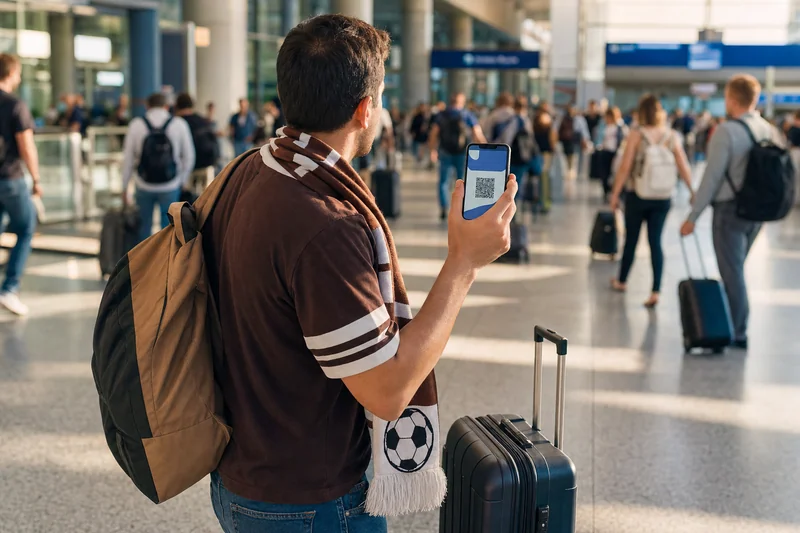
- Download your ticket offline (screenshot plus wallet app) before you approach the stadium, where networks are busiest
- Save offline maps of the stadium district and your route home
- Arrive early — stadiums recommend up to 2 hours before kickoff, and gates involve bag checks
- Go cashless-ready: most US stadiums no longer take cash at concessions, so make sure a payment card works in your phone's wallet
If the network still crawls at the venue, our guide to fixing slow stadium WiFi and data covers the practical workarounds.
How Top eSIM Providers Compare for the USA
Prices below were checked in mid-July 2026 and can change, so confirm on the live product pages before paying.
| Provider | Example plan | Price | Per GB | Best for |
|---|---|---|---|---|
| Zyesims | USA 20GB / 30 days | $17.99 | ~$0.90 | Best per-GB value; USIP plans give you a US IP address so US banking and streaming apps behave |
| Sim Local | USA 18GB / 30 days | $26.75 | ~$1.49 | Includes calls and SMS on the Three network |
| Jetpac | North America 20GB / 14 days | $42.00 | ~$2.10 | Regional coverage with add-on perks |
| Simbye | USA unlimited / 10 days | $24.95 | n/a | Unlimited-style with a real US number on AT&T |
| Holafly | Unlimited by days | $29 (5d) to $99 (30d) | n/a | Heavy users who prefer not to count GB, fair-use rules apply |
For most fans the math lands in the same place: plan around 10GB minimum, 20GB+ for a multi-city week, and only pay unlimited prices if you genuinely stream for hours on mobile data. Keep in mind that "unlimited" plans here usually carry a fair-use soft cap and slow to 2G/3G after heavy use, so a fixed 20GB plan often gives steadier real-world speed.
One more angle worth a check: some providers run tournament promotions. GigSky, for example, has offered eligible Visa cardholders a few days of free data during the event window. If you hold a qualifying card, it can be worth stacking on top of your main plan.
Why Zyesims Is a Strong Pick for World Cup Travel
Zyesims is built around exactly this kind of trip:
- Value that survives comparison: $0.87–0.90 per GB on 20–50GB USA plans, roughly half of what most travel eSIM brands charge
- USIP plans route your traffic with a US IP address, so US-only apps, banks, and streaming libraries treat you like a local
- A real tournament plan: the FIFA 100GB / 10-day plan exists because match weeks are not normal weeks
- Instant email delivery: QR code arrives right after checkout, install over WiFi in about 5 minutes, keep your home SIM active for OTP codes
- All three host countries covered: USA, Canada, Mexico, plus North America combos
Which Plan Fits Your Trip? Four Quick Profiles
Weekend fan, one city: USA 5GB at $6.49 covers maps, tickets, chats, and a few uploads. Add the 1GB/day plan at $1.89 if you want a daily reset instead.
Two-week, three-city follower: USA 20GB / 30 days at $17.99. Validity outlasts the trip, and 20GB absorbs match days at 1–2GB each.
Creator or remote worker: 5GB/day at $4.89 or the FIFA 100GB plan. Hotspot your laptop without watching a countdown.
Cross-border route: North America 20GB / 30 days at $38.49, one profile from Vancouver to Mexico City. Traveling as a group? See our family eSIM guide for World Cup trips.
Conclusion
The best eSIM for the USA during World Cup 2026 is the one sized for your route and your habits: 5–10GB for a short single-city trip, 20GB+ for multi-city weeks, a daily or 100GB plan for heavy users, and North America coverage only when you actually cross a border. Check coverage in your host cities, confirm your phone is unlocked and eSIM-capable, and install before you fly.
The final whistle blows on 19 July, but the checklist above works for any US trip. Compare USA eSIM plans, pick your size, and land with data already working. And before you pack, run through our World Cup packing checklist and the must-have travel apps.
Frequently Asked Questions
What is the best eSIM for the USA at World Cup 2026?
For most fans, a USA plan in the 10–20GB range is the sweet spot. Zyesims' USA 20GB/30-day plan costs $17.99, about $0.90 per GB, and there is a dedicated FIFA plan with 100GB for 10 days if you stream heavily. If your trip also covers Canada or Mexico, pick a North America plan instead.
How much data do I need for a match day?
A realistic estimate for an active match day is 1–2GB: digital tickets, maps, ride-hailing, group chats, and social uploads. Plan for at least 10GB for a one-week trip, or 20GB+ if you visit several host cities.
Should I get a USA-only or North America eSIM?
USA-only is cheaper if you stay in the States. A North America eSIM covers the USA, Canada, and Mexico on one profile, which is better if you cross borders. Zyesims offers both: USA 20GB for $17.99 or North America 20GB for $38.49, each valid 30 days.
Which networks do USA eSIMs use, and do they work in packed stadiums?
Most travel eSIMs run on AT&T, T-Mobile, or Verizon. All three have reportedly added capacity around host stadiums for the tournament, but a crowd of 70,000 can still slow any network. Download tickets and maps offline before you enter the stadium area.
Do I need a US phone number for the World Cup?
For data, no — a travel eSIM covers maps, WhatsApp, iMessage, and ride-hailing without one. You only need a +1 number for SMS verification on some apps (Uber, Lyft, dating apps) and a few US booking services. The simplest fix is to keep your home SIM active in a dual-SIM phone so those codes still reach you; add a dedicated US number only if an app refuses your home number.
Can I keep my home number active while using the eSIM?
Yes, and you should. On a dual-SIM phone, run the eSIM for data and leave your home line on for calls and SMS, so bank and app OTP codes still arrive. Just switch the home line's data roaming off to avoid roaming charges; the eSIM handles all your data.
When should I install and activate my eSIM?
Install over WiFi before you fly. On nearly all Zyesims plans the validity clock only starts when the eSIM first connects to a network at your destination, so installing early costs you nothing — a small number of plans start on install instead, and the plan page says which. Setup takes about 5 minutes: scan the QR code from your email, enable the line, and turn on data roaming for that line.
Continue Exploring
- The 7 Best World Cup 2026 Cities to Visit
- Stadium WiFi Slow? How to Stay Connected on Match Day
- The Best Travel Apps for World Cup 2026
Keep reading
- Best eSIM for USA Travel in 2026: Plans, Networks and Real Prices Compared
- How to Buy an eSIM Online: A Simple Guide for Travelers
- Fair Usage Policy on Unlimited eSIMs: Daily Caps & Throttling
- What Do Internet Speeds Really Mean? Mbps, 4G & 5G for Travelers
- What Is Data Roaming? 2026 Costs and Cheaper Alternatives

A travel and tech enthusiast who loves to wander and discover new places. Mihi writes Zyesims' guides to eSIMs and mobile data abroad, built from carriers' and app makers' own documentation, published plan terms and Zyesims' current plan data — with sources named in each article. Mihi also writes about travel at MihiTravel and Notemeeting.
Ready for your next trip?
Choose the right eSIM, get your QR code by email, and connect when you land — coverage in 200+ countries.