What Do Internet Speeds Really Mean? Mbps, 4G & 5G for Travelers

Internet speed is measured in Mbps, and travelers need less than they think: 5 Mbps for the essentials, 25+ only for heavy uploads. What each speed does, 4G vs 5G, and why data slows down.
Quick answer: internet speed is measured in Mbps (megabits per second), and higher means faster. The good news for travelers: you need far less than you think. About 5 Mbps handles maps, messaging, and social media; 10–25 Mbps covers streaming and video calls; only heavy uploaders need 25 Mbps and up. And 4G is plenty for almost everything, no need to chase 5G abroad.
This guide translates the numbers into real life: what each speed can actually do, what 4G and 5G really mean, how much you need for your travel style, and why your data sometimes crawls even on a fast plan.
What Mbps Actually Measures
Mbps is the rate data flows to and from your phone. It is not the amount of data (that is GB) but the speed it moves. Think of it like a water pipe: GB is how much water you have, Mbps is how wide the pipe is. A wider pipe (more Mbps) fills the glass faster, whether that glass is a map tile, a photo upload, or a video stream.
Watch the capital letters, because this trips up almost everyone: Mbps is megabits per second, while MB/s is megabytes per second, and there are 8 bits in a byte. So a 100 Mbps connection downloads at about 12.5 MB/s (100 ÷ 8). That is why a "fast" plan can feel slow when you watch a file download in MB — the number is doing exactly what it should, just in different units.
One more term worth knowing: latency, the delay before data starts moving, measured in milliseconds. Low latency matters for video calls and gaming; high latency makes a call feel laggy even when Mbps looks fine.
What Each Speed Can Do
| Speed | Works well | Struggles with |
|---|---|---|
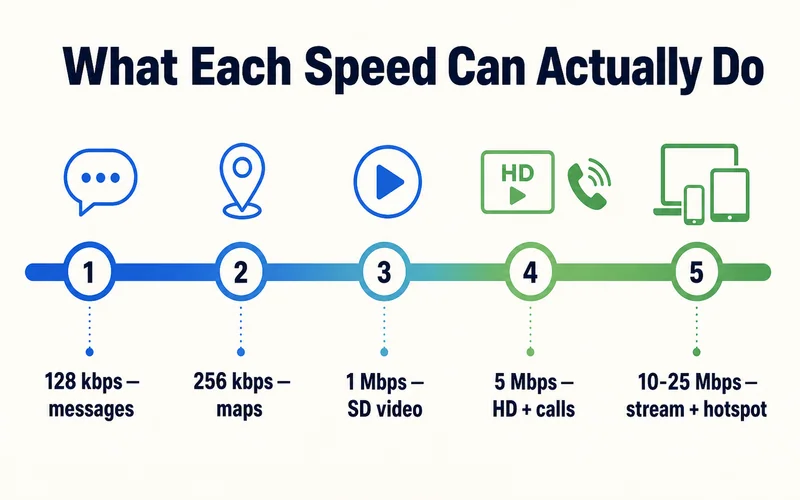
| 128 kbps | Text messaging, email text | Almost everything visual |
| 256 kbps | Maps, ride-hailing, audio | Any video beyond low quality |
| 1 Mbps | Social feeds, SD video, basic browsing | HD video, big uploads |
| 5 Mbps | Comfortable browsing, HD video, video calls | 4K, multiple heavy devices |
| 10–25 Mbps | Smooth streaming, uploads, hotspot for a laptop | Little, for one traveler |
| 25 Mbps and up | 4K, large file transfers, several devices at once | Overkill for solo travel |
Notice how little you need for the essentials. (The kbps rows are kilobits per second — 1,000 kbps make 1 Mbps.) Even 1 Mbps, which is what many unlimited plans throttle to after the daily high-speed allowance, still plays SD video. That is exactly why a fair-usage plan labeled FUP1Mbps stays usable after the threshold.
Download vs upload, and what real apps ask for
Most speed figures quote download (data coming to you). But upload (data going out) is what carries your side of a video call and your photo and Reel uploads, and on mobile it is usually much lower than download. If your calls freeze while everything else loads fine, weak upload is the usual cause. Here is what the apps travelers actually use ask for, split by direction:
| Activity | Download needed | Upload needed |
|---|---|---|
| Maps, messaging, social scroll | Under 1 Mbps | Minimal |
| Music (Spotify, Apple Music) | ~0.3 Mbps | Minimal |
| SD video (Netflix, YouTube) | ~3 Mbps | Minimal |
| HD video (1080p) | ~5 Mbps | Minimal |
| 4K video | 15–25 Mbps | Minimal |
| Video call (Zoom, FaceTime, 1080p) | ~3 Mbps | ~3 Mbps |
| Posting photos / Reels, cloud backup | Minimal | 3–10 Mbps |
| Online gaming | Under 1 Mbps (ping matters most) | Under 1 Mbps |
The pattern most travelers miss: streaming leans on download, but video calls and uploads lean on upload, which mobile networks give you less of. That is why a plan that streams 4K perfectly can still stutter on a work call.
Need data for your trip? Compare eSIM plans by validity and data volume.
View eSIM plansWhat 4G and 5G Really Mean
4G (LTE): the workhorse of mobile data. Theoretical peaks reach 300 Mbps, but real-world speeds land between 15 and 100 Mbps, with latency around 30–70 ms. That range comfortably covers maps, HD video, calls, and remote work.
5G: faster and snappier, real-world 100 Mbps to 1 Gbps with latency as low as 1–10 ms. Genuinely useful for heavy uploads or moving big files, but for everyday travel you will rarely notice it over good 4G.
The takeaway: when choosing a travel plan or destination coverage, reliable 4G beats patchy 5G every time.

How Much You Need, by Travel Style
- Light user / budget traveler (around 5 Mbps): maps, chat, social, the occasional video. Any 4G plan handles this easily
- Active traveler (10–25 Mbps): daily streaming, video calls home, sharing photos and stories in real time
- Digital nomad / business (25 Mbps and up): hotspotting a laptop, cloud backups, video meetings, large uploads. Pair with a higher-data or daily plan
Streaming a lot on the road? Our guide to streaming abroad on an eSIM covers the quality settings that keep data use sane.
Sharing a Connection: Add Up What You Need
Speed is shared, so when several people or devices lean on one line, you add their needs together. The quick method: estimate the heaviest thing each person does at the same time, then sum it.
A worked example, two people hotspotting off one travel eSIM on a train:
- Person A streams HD video: 5 Mbps
- Person B is on a video call: 3 Mbps down and up
- Both have maps and chat ticking over: ~1 Mbps
- Total: about 9 Mbps. Any solid 4G connection (15–100 Mbps) handles this with room to spare.
The math is reassuring: even a small group rarely needs more than 10–15 Mbps, well inside what a good 4G travel eSIM delivers. You only push past that when several people stream HD at once or someone uploads large files, which is where a fixed higher-data plan or a dedicated hotspot line pays off. Note too that hotspotting splits one pipe, so five devices on a 10 Mbps line get roughly 2 Mbps each, not 10 apiece.
Why Your Data Sometimes Crawls
Advertised speeds are best-case. Real speed drops for a few practical reasons:
- Congestion: a packed airport or stadium means thousands sharing one tower, so everyone slows down at peak times
- Distance and obstacles: the farther you are from a tower, or the more walls between you and it, the weaker the signal
- Shared connections: hotspotting several devices splits the same pipe between them
- Fair-usage throttling: on an unlimited plan, speeds ease off after the daily high-speed allowance
When you are stuck on slow data mid-trip, our fix-slow-eSIM-data guide lists the quick wins (toggle airplane mode, switch network mode, move location).
How to Check Your Own Speed
Want to know what your eSIM is actually delivering? Run a free speed test (Speedtest by Ookla or Fast.com) with WiFi turned off, so you are measuring the mobile line. You get three numbers that matter: download (loading pages and video), upload (calls and posting), and ping in milliseconds (responsiveness). As a rough guide, anything above 5 Mbps download with ping under 100 ms is a comfortable travel connection. Test at a couple of different times of day, since a crowded evening in a tourist area reads very differently from a quiet morning.
One more everyday signal: the little letter next to your signal bars. 5G or LTE/4G is what you want; H+/3G is slower but usable; E (EDGE) or G (2G) means barely-there data, usually from weak coverage or heavy congestion.
Four Speed Myths Worth Dropping
Myth 1: "Roaming gives me my home speed." Not usually. Roaming often lands you on a partner network's slower tier, sometimes 3G where your home network runs 5G, at premium prices. A local-rate eSIM connects you like a local. More in what data roaming really is.
Myth 2: "I need 5G to travel." You do not. Solid 4G covers maps, calls, streaming, and work with room to spare.
Myth 3: "Free public WiFi is good enough." Shared by hundreds and often unsecured, hotel and airport WiFi is slow at busy times and risky for banking. A travel eSIM is usually faster, steadier, and safer.
Myth 4: "Full bars means fast internet." Not necessarily. Bars show signal strength, not speed. You can have full bars on a tower so congested — think a packed stadium or airport — that real throughput crawls. Strength gets the signal to your phone; capacity decides how fast it moves.
Conclusion
Speed numbers look intimidating until you match them to real use: 5 Mbps for the essentials, 10–25 for active travel, and 25-plus only if you do heavy work on the road. 4G handles the vast majority of it. So instead of hunting for the biggest headline speed, pick a plan with reliable coverage where you are going, browse options on the Zyesims store, and you will be online at the speed that actually matters.
Frequently Asked Questions
What does Mbps mean for internet speed?
Mbps means megabits per second, a measure of how fast data moves over your connection. Higher Mbps means faster loading and smoother video. For most travel activities, 5-10 Mbps is plenty; you only need 25 Mbps or more for heavy HD streaming or large uploads.
How much internet speed do I actually need while traveling?
Around 5 Mbps covers maps, messaging, social media, and email comfortably. 10-25 Mbps suits active travelers who stream and video call. Only digital nomads doing heavy uploads or 4K streaming really benefit from 25 Mbps and up. Below 1 Mbps you can still message and load basic pages.
Do I need 5G for international travel?
No. 4G typically delivers 15-100 Mbps in real use, which is more than enough for maps, video calls, social media, and remote work. 5G is faster (100 Mbps to 1 Gbps) and lower latency, but for normal travel you will not notice a difference. Solid 4G coverage matters more than chasing 5G.
Why is my mobile data slower than the advertised speed?
Real-world speed depends on network congestion, how many people share the tower, your distance from it, and whether you have hit a fair-usage threshold on an unlimited plan. Crowded airports and city centers at peak times are the usual culprits. Advertised speeds are best-case, not guaranteed.
What is the difference between Mbps and MB/s?
Mbps is megabits per second, the unit internet plans are sold in; MB/s is megabytes per second, the unit you see when a file downloads. There are 8 bits in a byte, so you divide by 8: a 100 Mbps connection downloads at about 12.5 MB/s. They measure the same speed in different units, which is why a fast plan can look slow when you watch a download in MB.
How do I test my eSIM speed?
Turn WiFi off, open Speedtest by Ookla or Fast.com, and run a test. Read the download (loading), upload (calls and posting), and ping (responsiveness) figures. Above 5 Mbps download with ping under 100 ms is comfortable for travel. Test at different times, since congestion at peak hours in busy areas can slow any connection.
Is 5 Mbps fast enough?
For one traveler, yes. 5 Mbps comfortably handles maps, messaging, social media, HD video, and video calls. It is not enough for 4K streaming or for several people sharing one connection at once, but for solo everyday travel it covers almost everything. You would only want more for heavy uploads or hotspotting multiple devices.
What is a good upload speed and ping for video calls?
For a smooth 1080p video call, aim for about 3 Mbps upload (not just download) and a ping under 100 ms, ideally under 50 ms. Upload is the number most people overlook: calls freeze because your outgoing video can't keep up, even when download looks fine. High ping adds lag that makes a call feel out of sync, so both matter alongside raw Mbps.
Is free hotel or airport WiFi fast enough?
Often not. Public WiFi is shared by hundreds of people, so speeds drop at busy times, and open networks carry security risks. A travel eSIM usually gives you faster, more consistent, and safer data than free public WiFi, especially for anything sensitive like banking.
Read More
- Fair Usage Policy on Unlimited eSIMs: What It Really Means
- What Is Data Roaming? Costs and Alternatives
- Slow eSIM Data While Traveling? How to Fix It Fast
Keep reading
- Fair Usage Policy on Unlimited eSIMs: Daily Caps & Throttling
- eSIM Not Working? How to Fix No Service on iPhone and Android
- What Is Data Roaming? 2026 Costs and Cheaper Alternatives
- Best eSIM for Japan in 2026: Plans, Networks and Real Prices Compared
- Can You Hotspot with an eSIM? Limits, Data Use and Fixes for Travelers

A travel and tech enthusiast who loves to wander and discover new places. Mihi writes Zyesims' guides to eSIMs and mobile data abroad, built from carriers' and app makers' own documentation, published plan terms and Zyesims' current plan data — with sources named in each article. Mihi also writes about travel at MihiTravel and Notemeeting.
Ready for your next trip?
Choose the right eSIM, get your QR code by email, and connect when you land — coverage in 200+ countries.