eSIM Disadvantages: Real Limitations, Myths, and Fixes

The honest downsides of eSIM: device support, slow transfers, harder troubleshooting, software dependency. Plus the myths (battery, speed, security) and how to sidestep the real ones.
You have heard eSIMs are the future: no tiny cards to lose, instant activation, perfect for travel. Most of that is true. But the marketing skips the real limitations, and a couple of them can leave you offline at the worst moment. This is the honest version: the genuine downsides of eSIM, which "downsides" are actually myths, and how to sidestep the real ones before you switch.
(For the record, we sell eSIMs, so we are not anti-eSIM. We just think an informed traveler is a happier one.)
The Real Disadvantages
1. Not every phone supports it
eSIM needs the right hardware. It works on iPhone XS and newer, Samsung Galaxy S20 and newer, and Google Pixel 3 and newer, but many budget and pre-2020 phones simply do not have the chip. Region matters too: iPhones sold in mainland China generally lack eSIM, and some models sold in Hong Kong and South Korea are limited too.
Check yours in 10 seconds: dial *#06# and look for an EID number, or on iPhone go to Settings → General → About and look for EID. No EID usually means no eSIM. For a model-by-model rundown, check our eSIM-compatible devices list; if you are unsure what that number is, see what an eSIM actually is.
2. Moving to a new phone is slower, or impossible
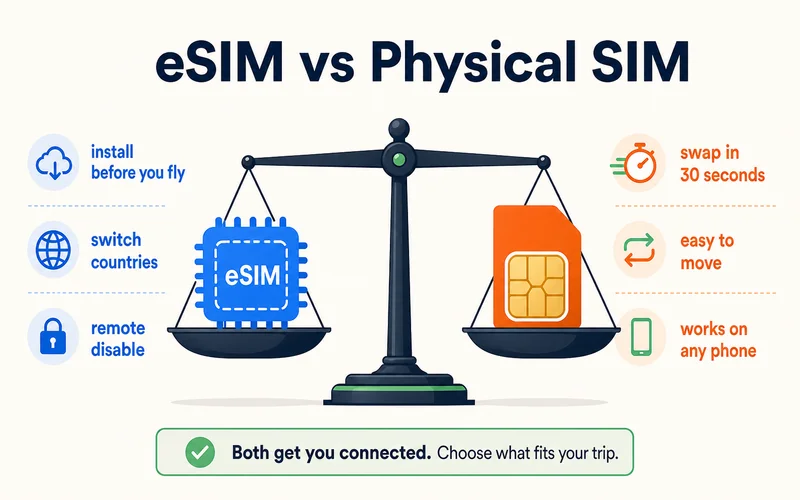
Swapping a physical SIM into a new phone takes 30 seconds. An eSIM ranges from nearly as fast to a real chore: same-carrier iPhone-to-iPhone "Quick Transfer" can finish in under a minute, but Android-to-Android is inconsistent, and switching between iPhone and Android often needs carrier help and a fresh QR code — figure 15 to 60 minutes. One catch specific to travel: many prepaid travel eSIMs are one-time-use and locked to the device they activate on, so once installed they cannot be moved to another phone at all. Check the provider's transfer policy before you buy if switching phones mid-trip is a possibility.
3. You cannot pop it out to troubleshoot
With a physical SIM, you test a problem by moving the card to another phone, two minutes and you know whether it is the phone or the SIM. You cannot do that with an eSIM. Fixes are remote, which creates a catch-22 abroad: your eSIM fails, and the support team that can fix it is reachable only if you find working WiFi or another connection first. If you do hit trouble, our guides on fixing an eSIM that will not connect cover the first steps.
4. It depends on your phone's software
eSIM profiles live in the operating system, so a buggy update can occasionally disrupt or erase them. The practical rule: do not install a major OS update in the two weeks before a trip, and keep a copy of your QR code offline so you can restore quickly.
5. Carrier support is inconsistent
Not every carrier handles eSIM the same way. Some activate instantly; others need manual verification or a store visit. You might even have to reissue an eSIM when changing countries. Choosing a provider with a simple, self-serve activation and clear instructions avoids most of this friction.
6. You can't lend it or drop it in a spare phone
A physical SIM is a loose card: pop it into a friend's handset if yours dies, move it to an old backup phone, or hand a spare data SIM to a travel buddy. An eSIM is bound to one device, so none of that works. If your phone breaks abroad, you can't just move the chip; you have to ask the provider to reissue the profile onto another device, which needs a connection and often account verification. This is the real argument for keeping one physical SIM in your wallet as a backup.
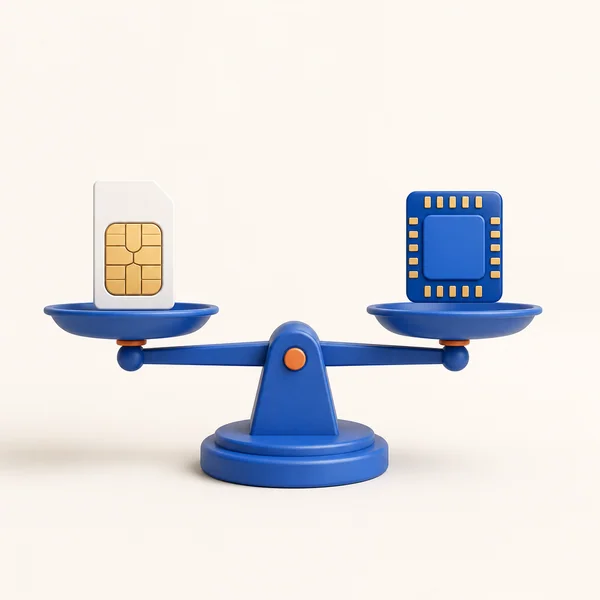
eSIM vs Physical SIM at a Glance
| Situation | Physical SIM | eSIM | Winner |
|---|---|---|---|
| Moving to a new phone | 30 seconds | 15–60 minutes | Physical |
| Troubleshooting | Swap and test in 2 min | Remote support only | Physical |
| Buying data abroad | Find a shop, show ID | Install before you fly | eSIM |
| Lost or stolen phone | Reuse card instantly | Needs reissue, but can be disabled remotely | Mixed |
| Multiple countries | New SIM each country | Switch plans instantly | eSIM |
| Carrying many numbers | Juggle cards | Store many profiles | eSIM |
| Security | Can be pulled and reused | Locked in, remote disable | eSIM |
| Waste | Plastic | None | eSIM |
Neither wins outright. The smartest answer for most travelers is not one or the other, but both, which we get to below.
Need data for your trip? Compare eSIM plans by validity and data volume.
View eSIM plansFour "Disadvantages" That Are Actually Myths
"eSIMs have slower data." False. Speed comes from the network and your plan, not the SIM format. On the same network, an eSIM matches a physical SIM exactly.
"eSIMs drain the battery." False. Both connect to towers the same way and use the same power. The only extra drain comes from running two lines at once, and that is true for any dual-SIM setup, physical or digital.
"eSIMs are less secure." The opposite. A thief can pull a physical SIM and reuse it; an eSIM cannot be removed and can be disabled remotely if your phone is stolen. That is a security win.
"eSIMs use more data." False. Data use depends on what you do — streaming, browsing, uploading — not the SIM type.
One honest caveat the myths skip: anonymity. Because an eSIM can't be bought and swapped as a loose card, the profile is tied to your device, so it is harder to stay anonymous than with a cash-bought physical SIM. And while eSIMs resist the physical SIM-swap that thieves use, the risk simply shifts to your account: anyone who compromises your carrier or provider login could still trigger a transfer. So strong account security (a unique password and two-factor login) matters more with an eSIM, not less.
How to Sidestep the Real Downsides
Every genuine disadvantage above has the same core fix: preparation and a backup line.
- Run dual SIM. This is the big one. Keep a physical SIM for calls and backup, use the eSIM for data. If the eSIM ever fails, you still have a working line. Here is the full dual SIM travel setup
- Test before you fly. Activate and use the eSIM on your home WiFi a day or two ahead, not at the airport
- Save the QR code offline. Store it in a password manager and the cloud, not just your phone's gallery, so a lost phone does not take the code with it
- Hold off on OS updates. Skip major updates in the two weeks before travel
- Check compatibility first. Confirm your phone supports eSIM and is carrier-unlocked before buying any plan. If you are wiping the phone, read how to keep your eSIM when resetting
Should You Switch?
For most travelers, yes — with eyes open. The convenience of installing a data plan before you land and switching plans between countries is real, and the myths about speed, battery, and security do not hold up. The genuine downsides — transfers, troubleshooting, and compatibility — are manageable with a little prep and a physical SIM in your wallet as backup.
If your phone supports it and you travel often, an eSIM earns its place. When you are ready, browse plans from $0.89 across 200+ destinations on the Zyesims store, test on WiFi before you go, and keep that QR code saved somewhere safe.
Frequently Asked Questions
What are the main disadvantages of an eSIM?
The real ones: not every phone supports eSIM, moving a profile to a new phone is slower than swapping a plastic SIM, you cannot pop the chip out to troubleshoot, service depends on your phone's software, and carrier activation processes vary. Battery drain, slower speeds, and weaker security are myths — an eSIM performs the same or better.
Are eSIMs less secure than physical SIMs?
No, they are more secure. A physical SIM can be pulled from a stolen phone and reused; an eSIM cannot be removed and can be disabled remotely. Speed and battery life are identical to a physical SIM on the same network, since both connect to towers the same way.
What happens if my eSIM stops working abroad?
You cannot swap the chip into another phone, so a fix means contacting your provider to reissue the profile, which needs a WiFi or working data connection. That is why you should test the eSIM before you fly, save your QR code offline, and ideally keep a physical SIM as backup in a dual-SIM setup.
Is it hard to move an eSIM to a new phone?
Harder than a physical SIM. iPhone-to-iPhone transfers are fairly smooth, but Android-to-Android is inconsistent and switching between iPhone and Android often needs carrier help. Plan ahead if you change phones often, or keep a physical SIM for the switch.
Can I move a travel eSIM to a new phone?
Usually not. Many prepaid travel eSIMs are one-time-use and lock to the device they were activated on, so they can't be transferred. Carrier eSIMs can often move via a reissued QR code or a same-brand quick transfer, but it is slower than swapping a physical card. If you might change phones mid-trip, check the provider's transfer policy first, or keep a physical SIM as backup.
How many eSIMs can I have on one phone?
Modern phones store several eSIM profiles, typically 8 or more, but only one or two can be active at the same time. So you can keep many travel plans installed and switch between them, but you'll only run one (plus your home line) at once.
How do I avoid eSIM problems while traveling?
Check your phone supports eSIM and is unlocked, activate and test the plan on WiFi before you leave, save the QR code in a password manager and the cloud, avoid major OS updates right before a trip, and consider a dual-SIM setup with a physical SIM as backup.
Read More
- How Does Dual SIM Work? The Travel Setup
- How to Keep Your eSIM When Resetting Your Phone
- What Is an eSIM? A Beginner's Guide
Keep reading
- What Is an eSIM? A Complete Beginner's Guide for Travelers (2026)
- SIM vs Nano SIM vs eSIM: Key Differences and Which One to Choose
- eSIM Not Working? How to Fix No Service on iPhone and Android
- How Does Dual SIM Work? Pairing a Home SIM with a Travel eSIM
- How to Buy an eSIM Online: A Simple Guide for Travelers

A travel and tech enthusiast who loves to wander and discover new places. Mihi writes Zyesims' guides to eSIMs and mobile data abroad, built from carriers' and app makers' own documentation, published plan terms and Zyesims' current plan data — with sources named in each article. Mihi also writes about travel at MihiTravel and Notemeeting.
Ready for your next trip?
Choose the right eSIM, get your QR code by email, and connect when you land — coverage in 200+ countries.