Fair Usage Policy on Unlimited eSIMs: Daily Caps & Throttling

What a Fair Usage Policy really means on unlimited eSIMs: daily high-speed allowances, what throttled speeds still handle, and how to read FUP terms on a plan label before you buy.
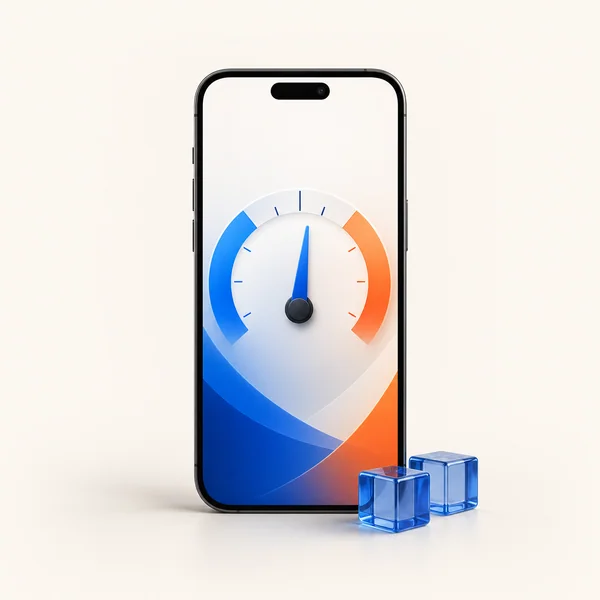
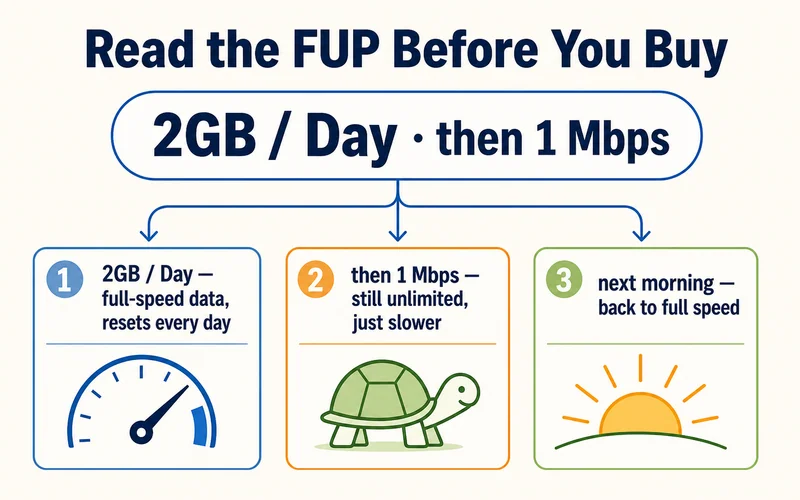
Quick answer: on an unlimited eSIM, a Fair Usage Policy (FUP) means you get a daily allowance of full-speed data, and after heavy use your speed temporarily drops instead of your bill going up. You are never cut off and never charged extra. On Zyesims plans the rule is printed right in the name: US 2GB/Day FUP1Mbps gives you 2GB at full speed every day, then unlimited data at 1 Mbps until the daily reset.
You land after a long flight, turn off airplane mode, and open the map. The connection works but feels slower than expected, and your plan says "unlimited". What is going on? Nine times out of ten the answer is the Fair Usage Policy. This guide explains what FUP is, why speeds slow down, what throttled speeds actually feel like, and how to read FUP terms on a plan label before you pay — no telecom jargon.

What Is a Fair Usage Policy (FUP)?
A Fair Usage Policy is a standard network rule attached to unlimited plans. It lets everyone keep unlimited access while temporarily reducing speeds for accounts that use an unusually large amount of data in a short time. The goal is simple: stop a handful of very heavy users from clogging a shared network in busy places like airports, stadiums, and city centers.
Think of it like rush-hour traffic. Everyone still drives, but the highway slows down so it keeps moving. On unlimited eSIMs that slowdown is called throttling: a temporary speed reduction, not a penalty, and not a disconnection. The local carrier your eSIM connects to manages it automatically.
The key point: FUP never cuts your data off and never creates surprise charges. It only manages speed.
How FUP Works on an Unlimited eSIM
Here is the cycle most travelers experience:
- Daily high-speed allowance. Your plan includes a set amount of full-speed data per day, for example 1GB or 2GB.
- Full speed while you are under it. Maps, messaging, browsing, and streaming all run at normal 4G/5G speeds.
- Threshold reached. After sustained heavy use, the network flags the high consumption.
- Speed drops, data continues. Your connection keeps working at a reduced speed that still handles essentials.
- Automatic reset. Full speed returns the next day, typically at midnight local time or 24 hours after throttling began.
"Unlimited" means continuous access with no overage fees. It does not mean unlimited high speed forever — no provider offers that, anywhere.
Need data for your trip? Compare eSIM plans by validity and data volume.
View eSIM plansFUP vs Hard Data Cap: Not the Same Thing
Travelers often confuse two very different limits:
| Fair Usage Policy (unlimited plans) | Hard data cap (fixed plans) | |
|---|---|---|
| When you hit it | Speed drops, data keeps flowing | Data stops or you buy a top-up |
| Extra charges | Never | Only if you buy more |
| Resets | Automatically, usually daily | No reset, allowance is total |
| Best for | Not wanting to count GB | Predictable full speed |
Neither is a trick. They are two honest ways of pricing the same network, and the right one depends on how you use data.
What Throttled Speeds Actually Feel Like
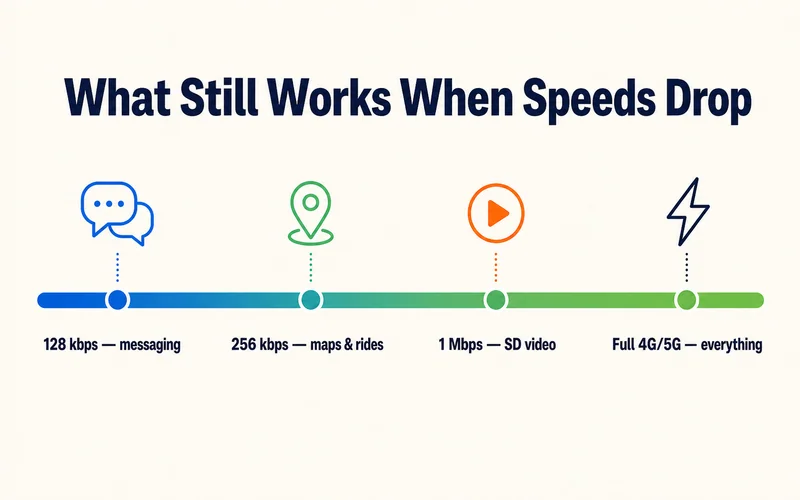
Speed is measured in kilobits or megabits per second (kbps/Mbps), and higher is faster. Here is what common reduced speeds handle in real life:
| Speed | Works well | Sometimes works | Does not work |
|---|---|---|---|
| 128 kbps | Messaging apps, email text | Basic web pages | Video streaming, large downloads |
| 256 kbps | Maps, ride-hailing, audio | Low-quality video | HD video, cloud backups |
| 1 Mbps | Social feeds, SD video | Video calls in stable areas | 4K video, big uploads |
At 256 kbps, Google Maps still loads routes, WhatsApp sends reliably, and your boarding pass refreshes. At 1 Mbps, SD video is watchable and short calls work if the signal is steady. Throttled is slow, not offline. If your data is crawling before you have used any real amount, run through our guide to fixing slow eSIM data while traveling; and if the numbers above feel abstract, see what internet speeds really mean in everyday terms.
How to Read FUP on a Plan Label (the Zyesims Way)
Most providers bury FUP terms in fine print. Zyesims prints them in the product name, so you know the exact rule before checkout. Take US 2GB/Day FUP1Mbps at $2.99 per day:
- 2GB/Day — your full-speed allowance, resetting every day
- FUP1Mbps — after 2GB, data continues unlimited at 1 Mbps (the row in the table above where SD video still plays)
- Next day — allowance resets automatically, no action needed
Lighter users can take the 1GB/Day FUP1Mbps version at $1.89 per day. Prefer no throttling at all? A fixed-data plan like US 20GB / 30 days at $17.99 runs at full speed until the allowance is used. Every destination on the Zyesims store shows these terms the same way, so comparing plans takes seconds, not a search through legal pages.
How Unlimited eSIM FUP Compares Across Providers
The daily allowance and the throttle speed after it are where "unlimited" plans actually differ. The figures below are indicative, drawn from provider terms and traveler reports in mid-2026; providers rarely print them on the product page, so treat this as a starting point and confirm before you buy:
| Provider | Full-speed allowance | Speed after the threshold |
|---|---|---|
| Zyesims | Printed in the plan name (e.g. 2GB/Day) | 1 Mbps (FUP1Mbps), stated up front |
| Airalo (unlimited) | ~3GB/day | ~1 Mbps |
| Saily | ~5GB/day | ~1 Mbps |
| Nomad | ~2GB/day | ~512 kbps |
| Ubigi | Tiered by plan length (~15–60GB) | ~2 Mbps |
| Holafly | ~2–3GB/day (varies by country) | 256 kbps–1 Mbps |
The pattern is clear: nearly every "unlimited" plan is really a daily-allowance plan with throttling after. The honest providers tell you the number before checkout, and Zyesims puts it right in the plan name.
Unlimited Data Does Not Mean Unlimited Hotspot
Tethering — sharing your eSIM's data with a laptop or a second phone — is often capped separately from your main allowance, and it catches remote workers off guard. Some unlimited brands limit hotspot use to a few hundred MB per day (Holafly caps tethered data at around 500MB/day on many plans) or disable it entirely, while others such as Airalo, Saily, and Ubigi set no separate hotspot limit. If you plan to work off a laptop through your phone, check the tethering terms specifically, not just the headline "unlimited". On Zyesims fixed and daily plans, hotspot data draws from the same allowance as everything else, with no separate tethering cap.
How to Tell If You're Being Throttled
If pages crawl even though your signal shows full bars, the likely cause is throttling, not bad coverage. To confirm it: turn WiFi off so you are measuring the eSIM, run a speed test (Speedtest by Ookla or Fast.com), and compare the result against a test from earlier in the day before your allowance ran down. A drop from several Mbps to a steady 1 Mbps or below, right after heavy use, is the FUP kicking in, not a network fault. Screenshot the numbers if you plan to contact support.
Is FUP the Same Everywhere?
No. FUP behavior depends on the local network your eSIM connects to, not just the eSIM brand. Two travelers on identical plans can have different experiences:
- Country differences: network capacity and regulations vary by market
- Urban vs rural: busy city centers throttle sooner during congestion; rural areas are steadier but often slower overall
- Season: peak travel months add congestion around landmarks, stadiums, and airports
Severity varies too. In busy, well-covered markets the throttled speed often stays a usable 1–5 Mbps, but in destinations with weaker networks it can fall closer to 128 kbps, where only text-based apps stay comfortable. That is why a printed throttle speed like FUP1Mbps matters: it tells you exactly what to expect after the daily allowance, instead of leaving it a mystery in the fine print.
What Usually Triggers FUP While Traveling
Throttling comes from sustained patterns, not single actions. The usual culprits: hours of HD streaming, long hotspot sessions feeding a laptop, cloud photo backups running in the background, and big app updates over cellular. A remote worker hotspotting a laptop for three hours in a café will hit a threshold long before a tourist who uses maps and messaging all day.
Four settings that keep you under the limit:
- Download offline maps before heading out
- Set video apps to SD quality on mobile data — more in our guide to streaming Netflix and YouTube abroad on an eSIM
- Pause cloud photo backups while abroad (Settings → Photos/iCloud)
- Keep hotspot sessions short — under 30 minutes at a stretch
Unlimited-Style vs Fixed-Data: Which Fits Your Trip?
| Factor | Daily FUP plan | Fixed-data plan |
|---|---|---|
| Speed pattern | Full speed daily allowance, then 1 Mbps | Full speed until total allowance ends |
| Data tracking | None needed, resets daily | Watch your total over the trip |
| Worst case | Slow evening after a heavy day | Buying a top-up early |
| Zyesims example | 2GB/Day FUP1Mbps, $2.99/day | 20GB / 30 days, $17.99 |
| Best for | Maps + chat + social, no counting | Uploads, hotspot work, video calls |
If your days are navigation, messaging, and social feeds, a daily FUP plan removes all data anxiety. If you upload work files or hotspot a laptop regularly, fixed data gives you predictable full speed, and our eSIM vs roaming cost breakdown shows both still beat carrier roaming by a wide margin.
Three Myths About Fair Usage
Myth: "Unlimited is a scam." Reality: unlimited means no caps and no overage bills. The trade-off is temporary speed management during very heavy use. That is how shared mobile networks work globally, from local SIMs to home broadband.
Myth: "Throttled data is unusable." Reality: maps, messaging, email, and ride-hailing all keep working. At 1 Mbps you can still watch SD video. Only heavy tasks feel the slowdown.
Myth: "Only cheap plans have FUP." Reality: FUP is standard across the industry at every price point. The difference between providers is not whether it exists, but whether they tell you the numbers before you pay.
Conclusion: FUP Is Normal, Opacity Is Not
Fair Usage Policy is a normal part of keeping mobile networks usable for everyone. For most travelers — checking maps, messaging home, posting photos — the threshold never even comes into view. What separates providers is transparency: you should know the daily allowance and the throttle speed before checkout, not after landing.
That is why Zyesims puts the rule in the plan name. Compare the numbers on the store, match them to how you actually use data, flip video to SD, pause backups, and unlimited-style plans stay one of the easiest ways to be online the minute you land.
Frequently Asked Questions
What is a Fair Usage Policy (FUP) on an unlimited eSIM?
A Fair Usage Policy is a standard network rule on unlimited plans: you get a daily allowance of full-speed data, and after heavy use the network temporarily reduces your speed instead of charging extra or cutting you off. Speeds reset automatically, usually the next day.
Does my data stop when I hit the fair usage limit?
No. FUP slows your connection; it never disconnects you and never adds surprise charges. Maps, messaging, email, and ride-hailing keep working at reduced speeds; only heavy tasks like HD streaming and large uploads feel slow.
What can I still do at throttled speeds?
At 256 kbps, Google Maps loads routes, WhatsApp sends reliably, and boarding passes refresh. At 1 Mbps, which is what Zyesims FUP plans throttle to, you can even watch SD video and hold short calls if the signal is steady. Only HD video and big file transfers really suffer.
What triggers a Fair Usage Policy while traveling?
Sustained heavy use: hours of HD streaming, long hotspot sessions feeding a laptop, cloud photo backups, and large app updates over cellular. Everyday travel use like maps, messaging, and social browsing rarely comes close to the threshold.
Is FUP the same on every plan and in every country?
No. Thresholds and throttle speeds depend on the plan and the local network your eSIM connects to. That is why transparent labeling matters: Zyesims prints the rule in the plan name, for example 2GB/Day FUP1Mbps means 2GB at full speed daily, then unlimited data at 1 Mbps until the next day.
Does unlimited data mean unlimited hotspot?
Not necessarily. Tethering is often capped separately from your main data. Some unlimited brands limit hotspot to a few hundred MB a day or turn it off; others place no separate limit. On Zyesims fixed and daily plans, hotspot data comes out of the same allowance as everything else, with no separate tethering cap, so always check the tethering terms rather than trusting the word "unlimited" alone.
How do I know if my eSIM is being throttled?
Run a speed test (Speedtest by Ookla or Fast.com) with WiFi off, and compare it against a test from earlier in the day. If the speed drops to a steady 1 Mbps or below right after heavy use while your signal bars stay full, that is the Fair Usage Policy, not a coverage problem. It resets automatically at the next daily cycle.
Can I remove the speed limit once I've been throttled?
No, there is no way to un-throttle mid-cycle, and most providers give no warning when it starts. You simply wait for the automatic reset, usually the next day or 24 hours after throttling began, when full speed returns. If you regularly need full speed all day, a fixed-data plan is the better fit than an unlimited one.
Read More
- What Do Internet Speeds Really Mean?
- eSIM vs Roaming Cost: Which One Actually Saves You Money?
- Slow eSIM Data While Traveling? How to Fix It Fast
Keep reading
- What Do Internet Speeds Really Mean? Mbps, 4G & 5G for Travelers
- Can You Hotspot with an eSIM? Limits, Data Use and Fixes for Travelers
- Best eSIM for Vietnam in 2026: Plans, Networks and Real Prices Compared
- Best eSIM for USA Travel in 2026: Plans, Networks and Real Prices Compared
- Do eSIMs Expire? What Runs Out, When, and How to Check (2026)

A travel and tech enthusiast who loves to wander and discover new places. Mihi writes Zyesims' guides to eSIMs and mobile data abroad, built from carriers' and app makers' own documentation, published plan terms and Zyesims' current plan data — with sources named in each article. Mihi also writes about travel at MihiTravel and Notemeeting.
Ready for your next trip?
Choose the right eSIM, get your QR code by email, and connect when you land — coverage in 200+ countries.